

Post-Processing

How I Changed My View of Lightroom Presets with a New Workflow

Lightroom presets are all around us. You might love them as a 1-click solution to your batch editing needs or you might think that they are useless and that all the photos for which one was used look the same. Still, the truth is they are here to stay and maybe we should start thinking of how to integrate them into our professional workflows as more than crutches for your next Instagram post.

Match Your Favorite Style Instantly With Imagen Talent AI Profiles

Imagen has come a long way in the months since PetaPixel initially reviewed the service with the improved workflows and further enhancement of Talent AI Profiles. These AI profiles have been created by industry-leading photographers with unique editing styles so that any user can instantly edit their own images to match them instantly.

14 Best Free Online Photo Editors in 2026

Looking to make basic adjustments to photos without having to shell out a lot of money for image editing software? There are a large number of online photo editors these days that can be used completely for free within your web browser.

How to Resize an Image in Photoshop

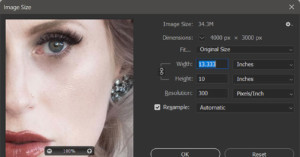
Resizing images in Adobe Photoshop sounds like it should be a trivial and simple operation, and for many uses and users, it is. It’s when one starts looking closely at the details in a resized image that it becomes apparent you should be looking into the options of the resize image dialogue box.

best lightroom and photoshop plugins

The Best Plugins for Photoshop and Lightroom in 2026

Photoshop and Lightroom are mainstays in most photographers’ workflows for a reason. While other options abound, no other set of programs matches the popularity and widespread adoption of Adobe’s signature photography software. But while Photoshop’s manipulation capabilities and Lightroom’s processing and editing power are certainly robust, both offer even more power beyond the software itself in the form of plugins.

How to Remove a Background in Photoshop

Using Photoshop to remove the background in an image so that you can replace it is one of the most frequent things for which it was used, and might still be. The actual placing of a new image for a background is relatively easy. The heavy lifting comes from making a good selection of your subject as this will be used to remove the unwanted background for replacement.

Cleanup.pictures: How to Easily to Remove Objects From Your Photos

Removing unwanted objects and text out of an image to clean up your photo used to require special software and skills, but these days AI has led to features like Content-Aware Fill in Photoshop that lets anyone do it in just a few clicks. If you do not have a Photoshop subscription, there is a free Web and mobile app called Cleanup.pictures you can use.

Optimize Your Lightroom Photo Editing with These Tips and Tools

With the advance in computer technology, you would think editing photos is faster than ever before. It's simply not the case - far from it. Software such as Adobe Photoshop Lightroom Classic has become far more sophisticated, and with the increasing file sizes improving your workflow speed and productivity becomes a necessity.

How to Use Curves in Photoshop

When thinking about the Curves tool in Adobe Photoshop, the phrase “With great power, comes great responsibility” is a thought that comes to mind. Curves is the most powerful tool in Photoshop for adjusting brightness, contrast, tonality, and color.

Huion Kamvas Pro 24 Review: A Flagship 4K Pen Display for a Lot Less

The Kamvas Pro 24 (4K) is Huion's flagship pen display: a high-resolution graphics display that delivers most of the benefits of a Wacom Cintiq Pro 24 at about half the price. In the two months I've spent using it on-and-off in preparation for this review, I've come to three important conclusions: (1) this is an excellent product, (2) a large 4K pen display is the best way to edit your photos, and (3) I can't realistically use this display as my daily driver.

How to Use Curves Effectively in Capture One 22

The Tone Curve in Capture One 22 is by far my favorite tool to edit images, but it's usually one of the most difficult commands to get to grips with. It can definitely be one of your most valuable assets if you want to improve your editing skills.