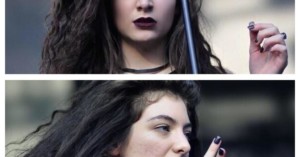
Pop Star Lorde Shows Off Her Blemishes on Twitter After Finding ‘Shopped Image
i find this curious - two photos from today, one edited so my skin is perfect and one real. remember flaws are ok :-) pic.twitter.com/PuRhxt2u2O …
i find this curious - two photos from today, one edited so my skin is perfect and one real. remember flaws are ok :-) pic.twitter.com/PuRhxt2u2O …
When it comes to nailing the white-balance in a photo, it's rarely an easy task, especially with portraits. It becomes even more arduous when you're trying to stylize the image a certain way, since you might not want the same tones and color balance in your skin tones as you do in the rest of your image.
When Nick Fancher created his series of 80's Cyber images, he made use of some textures to add that extra bit of character to the photos. The textures turned out so well that, upon publishing the series, he received multiple inquiries about where he got those textures.
There are a few different ways to address bags under the eyes when you're editing a portrait in Photoshop, but the video above shows one that is both simple and extremely effective.
When it comes to sharpening an image, more than likely, your technique involves using a certain method over the entire image all at once. However, that's rarely the best way to do it, because how much and where to sharpen varies quite a bit depending on what you're shooting.
Let's play a little game of "I Spy." This time, it's going to involve a suspicious-looking photo of the #worldsmosttalkedaboutcouple, Kanye West and Kim Kardashian.
Target has officially come out to apologize after an embarrassing and very public post-processing mistake has left the company dealing with a PR nightmare. But for many, the apology isn't enough. What the general public is asking is "why?"
It's happened to all of us: we're browsing through someone's portfolio or even just through Flickr or 500px and we come across a photograph or series of photographs with a 'look' we absolutely love.
This might be the worst Photoshopping we've ever seen... maybe even worse than the floating inspectors from China. Because while usually the Photoshop goof-ups pointed out by websites like Jezebel aren't all that horrific (as the Lena Dunham debacle pointed out), in this case, they hit the mother load.
No matter who it is you're photographing or where you're taking their picture, it's almost inevitable that in at least a few shots there will be some stray hairs flying across the photo. Usually, the result is an extra hour or so in post-production trying to get the hairs out one-by-one. Cue infomercial guy saying: "There has to be a better way!"
No matter how long you've been shooting or what level you're at in your photography endeavors, there will always be those moments where you walk away from a shoot unsatisfied with how some of the images turned out. It happens to the best of us.
Update on 12/16/21: This video has been removed by its creator.
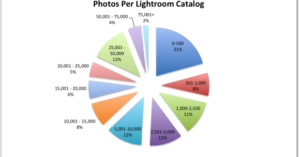
Here at PetaPixel we enjoy the crunching of numbers. So, naturally, when Mosaic told us about a blog post they had done recently that broke down some Lightroom catalog statistics, we were intrigued.
According to Lifehacker, Adobe is currently sending out emails to notify users that they are resetting everybody's Creative Cloud 30-day free trial. If you've not given the newest versions of the software a chance and you're not one of the people who is dead set against it, now is a great time to see if what you're missing is worth jumping into the subscription model.
Continuing to uphold the "gold standard" of film emulation, Visual Supply Co. has released its fifth series of film emulation presets. Called VSCO Film 05: The Archetype Films Collection, this emulation palette is based on some of the film stocks that defined the consumer analogue photography market of the past two decades.
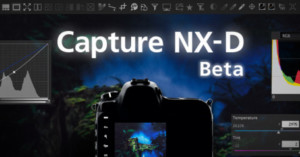
In a rather interesting development that was somewhat overshadowed by the announcement of the Nikon D4s, Nikon has unveiled a new piece of photo editing software made specifically for processing images from Nikon cameras.
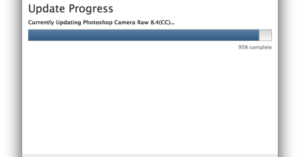
Yesterday, Adobe released the Adobe Camera Raw 8.4 release candidate for both Photoshop CS6 and Photoshop CC. Full of the usual updates in terms of new camera systems and lens support, as well as a few other notable features, it's another step in the right direction for Adobe as they strive to remain on top.
Actual 3D footage can be a pain, both to capture and to watch, which is why we fell in love with this super simple technique when we ran across it. It turns out, all you have to do to turn a normal photo or animated GIF into a 3D experience is add a couple of white bars...
John Stanmeyer of VII won the World Press Photo of the Year on Thursday with this magnificent image of migrants in Djibouti trying to get a cheaper cell phone signal from neighboring Somalia.
It's common knowledge that Photoshop is used, in varying degrees, to help models and celebrities look their best in magazines. But is 'their best' really all that great? Does removing imperfections, smoothing skin and trimming waistlines really something desirable? …
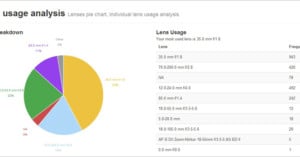
You may be stuck in a photographic rut and not even know it. To the rescue comes Lightroom Analytics, a free plugin for Adobe's Lightroom management/editing package that analyses the metadata in your library to spot trends.
It's likely one of the reasons Adobe decided to shift to a subscription model was so that they could bring in more beginners and amateurs that had never had affordable access to the software.
Where Photoshop and other advanced image editing software is concerned, the standard keyboard is woefully outmatched. To get around this, Adobe and other developers use shortcuts (that aren't always all that short), but one designer decided that instead of going down to the keyboard's level, he would bring the keyboard up to his.
Don't lie, you saw this one coming. Adobe has already beaten the proverbial horse bloody when it comes to their Photoshop Photography Program being extended again and again and again... and again.
According to a recent report by Fuji Rumors, Fujifilm users with X-Trans sensor cameras will have some additional incentive to use Adobe Lightroom and Camera RAW. Apparently, there's a soon-to-be-released update in the works that will improve Adobe's support of Fuji's X-Trans RAF files.
Adobe has released a new version of the free Photoshop Express for Android, taking advantage of the new KitKat version of the operating system to make numerous speed and performance boosts.
A couple of months ago, The Creators Project and post-processing guru Joe Fellows teamed up to show you how to turn stills into '2.5D' animated sequences. The tutorial was very popular on PetaPixel, but it left some with as many questions as answers, and so the duo are at it again, creating a part 2 that addresses the most common concerns.
Back in May, Adobe Lightroom product manager Tom Hogarty appeared on the online show The Grid and gave the photo community a sneak peek at the powerful RAW editing capabilities of the tablet version of Lightroom the company is working on.
The introduction of the new Perspective Warp tool (among other things) for Photoshop CC was met with a good deal of excitement by photographers. But if you haven't had a chance to play with it yourself, or you're still unsure exactly how it works from the intro video, the demo above should give you a much better idea of how to put the tool to use.
Okay, we know you've asked for less time-lapses and we're doing our best to kick the habit, but this one couldn't be helped, and we're pretty sure you'll forgive us. It's not your standard stunning landscape time-lapse, this one shows the remarkable attention to detail and skill that goes into taking a great photograph of a Rolex watch, and making it phenomenal.
One of the advantages to the Creative Cloud model is that those onboard don’t have to pay any extra when major upgrades come. No more updating to the newest creative suite because Adobe has added a tantalizing feature like Content Aware Move, the update will come your way and all you have to do is continue to make your monthly payment.
There are a few of big deals worth mentioning today that should make a lot of people happy, whether they're looking to purchase a new camera, new lens or new software. And, since we listed them in that order, that's the order we'll share them in.
From no Photoshop straight to excessive yet awesome image manipulation, we're all over the spectrum today. Although general belief (at least among purists) is that it is always better to create something in-camera than in post, there are certain things that just can't be done in-camera... and architecture photographer Víctor Enrich did ALL OF THEM to this one hotel in Munich.
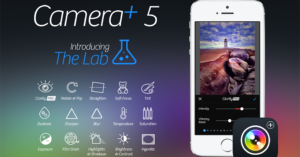
One of the most popular camera apps on iOS is Camera+. In fact, it's so popular it currently ranks at #33 on Apple's top paid apps chart. But that number is likely to jump after today, because version 5.0 has just been released, and this update is a big one.
Last year, a time-lapse called 'Body Evolution - Model Before and After' went viral as people the world over had their eyes opened to just how much a model can be altered with the help of hair, makeup and, most of all, Photoshop. That video has accrued almost 8 million views, and is still shared today in hopes of convincing magazines to begin putting disclaimers on images that are significantly altered in post.
If you've followed PetaPixel even just the last month, you might have noticed that Adobe extended its Photoshop Photography Program (also referred to as the Photography Bundle) to people regardless of whether or not they own a previous version of Photoshop not once, not twice, but three times.
Here's something that both photographers and the typical millennial have to look forward to in old age: Your memory is going to suck because of all the photos you took when you should have been paying attention to what was happening around you.
The ability to pull photos out of your camera and onto your computer wirelessly is an incredibly useful tool that many photographers use, but what if you could pull those photos instantly into Lightroom right there on-location? Well, it turns out you can, and it's not all that complicated either.
Here's a new way to be violated in the social media era: Post a photo of yourself on Instagram, then wait for somebody you don't know and didn't authorize to repost an edited version that looks vaguely like you, except shinier and with a lot more makeup.
After experiencing one too many embarrassing, high-profile Photoshop disasters, China is turning its research focus on image-editing software, although not in the way you might think.
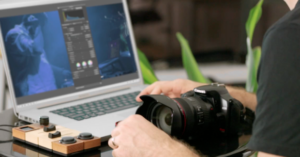
When engineers Calvin and Ashish got in touch with us to tell us about their upcoming Palette interface, we immediately got excited. That's because a lot of people have thought up ways to speed up your post-processing workflow with everything from video game controllers to MIDI controllers, but none of them hold a candle to Palette's potential.
When Adobe officially announced its special Creative Cloud plan/bundle for photographers, there was a catch: you had to own Photoshop CS3 or above in order to qualify for the special $10/month pricing. Well, no more. For a limited time, Adobe is lifting that restriction and making the special bundle available for everyone.
UK motion graphics artist and Make Productions founder Joe Fellows specializes in bringing stills to life. Using a series of steps in Photoshop and then After Effects, Fellows is able to transform photos into '2.5D' animated sequences that look like slow motion footage shot with a video camera.
Victoria's Secret model, mother, and wife to Hollywood star Orlando Bloom (for now... I'm still hopeful) Miranda Kerr landed in some seriously hot water with the Internet-at-large recently after posting a clearly Photoshopped photograph of herself to her Instagram account.
When Nokia announced that the new Lumia 1520 and the current Lumia 1020 would both soon have DNG Raw capabilities, the response was polarized -- half of the smartphone photo community was excited, the other half skeptical. Would these files really give you the latitude that RAW is known for? Or would they just be a massive waste of hard drive space.
Android 4.4 KitKat was officially announced a few days ago, but one of the coolest features (especially for us camera folk) wasn't mentioned in the announcement at all: an impressive new non-destructive photo editor is built right in.
If you're looking to make an argument for the inherent superiority of Western-style capitalism, consider how difficult it apparently is to find a competent Photoshop jockey in the Communist world.
No doubt feeling pressure from certain other social media sites raking in the dough, Google announced Wednesday a slew of new features for Google+ intended to enhance the way users share, organize and tweak photos.
Without a makeup artist at your disposal, even a great portrait can be ruined by shiny skin. So if you're looking through the results of your most recent portrait shoot and there's a lot of shine there, here's a fantastic tutorial that shows you how to get rid of it without making the photo look like it's been doctored.
The image above, which was published by Pyongyang's official news agency KCNA, seems to show Kim Jung-un and some of his underlings touring the site of a children's hospital. However, like so many of the photos released by KCNA in the past, its authenticity is being called into question.