Canva Now Lets Users Turn Off Generative AI Features

Canva has introduced new settings that allow users to disable its generative AI features and reduce the amount of AI-generated material shown in its content library.
The Verge reports that the controls are available to both free and paid subscribers, giving users greater choice over how AI is incorporated into their design experience.
The generative AI setting disables a range of tools, including Magic Expand, Magic Write, Magic Design, Magic Layers, Magic Edit, Dream Lab, Canva Code, and AI Shapes. It also prevents users from generating images through Canva’s AI chatbot.
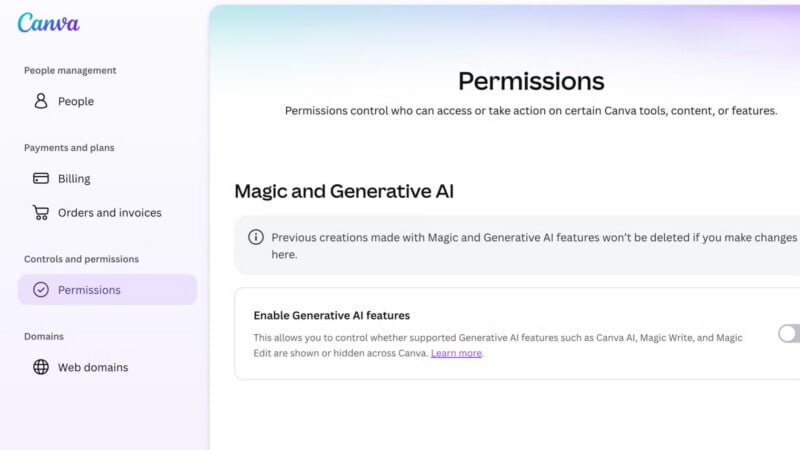
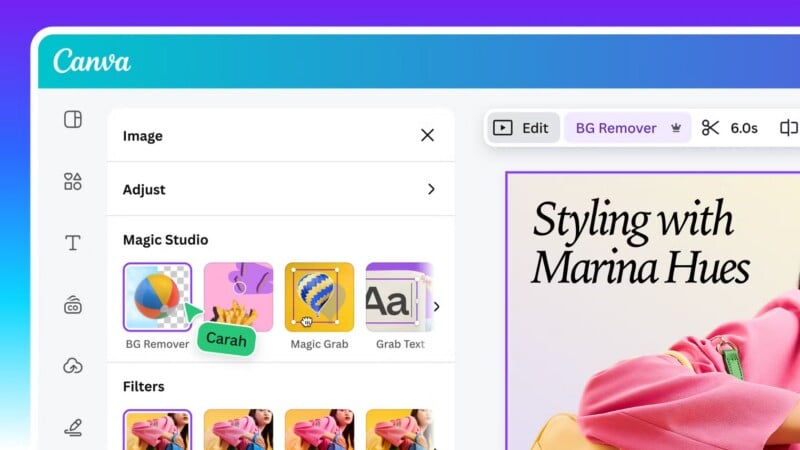
However, the change does not disable every AI-powered feature on the platform. Tools such as Background Remover and Magic Grab will remain available, even when generative AI is switched off. Canva says these tools will stay enabled because they “make everyday tasks faster without generating anything new.”
The distinction is based on how the tools operate. While generative AI features create new content, Background Remover and Magic Grab work with existing images. The latter allows users to select an object within an image and reposition it elsewhere in the design.
A second setting allows users to reduce the amount of AI-generated material displayed in Canva’s content library. When enabled, the platform will prioritise human-created templates, graphics, and other design elements in search results.
However, the setting does not guarantee that AI-generated content will be excluded entirely. Canva says that a “small portion” of its library consists of AI-generated material, and designs containing these elements will carry an AI label in their metadata.
Both settings can be accessed through the profile menu. To disable generative AI tools, users should go to Profile, select Settings, open Permissions, and switch off Enable generative AI features. To reduce AI-generated content in search results, they can navigate to Profile, Your Account, and AI Personalization, then enable the option to show less AI content.
It’s no secret that AI has a popularity problem, and Canva appears to be listening to that sentiment. Last month, PetaPixel reported that the company released an image generation model that wasn’t trained on photographs.
Image creditsHeader photo licensed via Depositphotos.
Affiliate Disclosure PetaPixel articles may include affiliate links; we may earn a commission if you buy through one.