Mac mini With M6 Review: Powerful Enough for Some Photographers
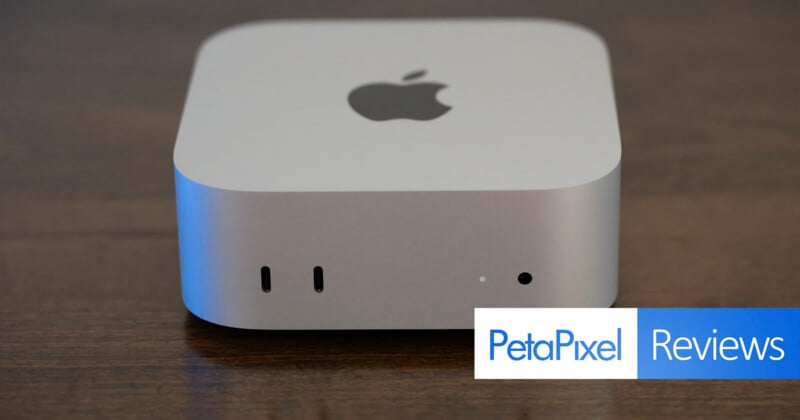
The novelty of the M4-generation Mac mini’s redesign has worn off. But on the plus side, there’s something else all-new to enjoy, the first Mac with M6 is here.
It's good, not great.
Pros
- Small but mighty
- Front headphone jack
- Quiet
- Good value if you don't need a lot of memory
Cons
- No Thunderbolt 5 ports
- Can easily run out of ports in general
- Power button location is still annoying
- Built-in speakers aren't great
Update 10/5: Now that the Mac mini with M6 has been out for a bit, I ran the Lightroom benchmarks again. Results were slightly improved, but there is still some sort of issue.
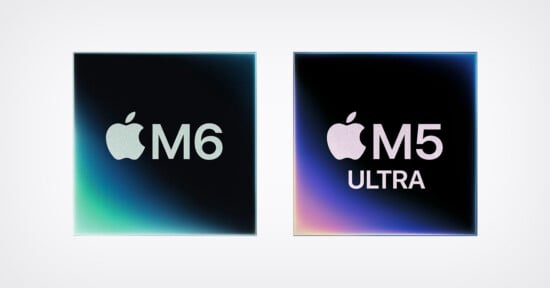
The M6 is Apple’s first 2nm chip. Although “2nm” doesn’t refer to a specific measurement and is more a general term for a new generation of chip design, one of the M6’s biggest differences is that it fits more into the same amount of space. The more powerful 12-core CPU is larger and features Apple’s most powerful CPU core to date. In fact, Apple says it is the fastest CPU core in the world, period.
As a bit of a spoiler alert, though, that doesn’t mean the M6 Mac mini is the most powerful Mac we’ve tested. CPU speed alone doesn’t make a machine. However, the M6 is very good at AI-related tasks, very good at CPU-intensive ones, and plenty powerful for a wide range of users.
You get the expected CPU and GPU performance bumps with each generation. Beyond “the world’s fastest single-threaded performance,” multithreaded performance is said to be up to 1.2 times faster than M5 and up to 2.4 times faster than M1.
The M1 comparison is interesting. With the Mac mini, Apple’s most affordable desktop, I expect the upgrade cycle to be relatively long. Having used many Macs over the years, often for a long time per machine, I know that Macs generally age very well.
However, the original Apple Silicon-powered Mac mini, which was much less “mini” than the redesigned version we have today, came out nearly six years ago now. While I’m sure some M1 owners are still happy with their machines, I suspect many more have noticed that their favorite photo and video editing apps don’t feel quite as snappy as they used to.
More and more AI-powered features have become integral to creative apps over that period, and these benefit greatly from Apple’s more advanced Neural Accelerators. Then there’s the dual 16-core Neural Engine introduced in M6, which promises up to twice the peak compute for AI workflows than even M5, which is a very competent chip.
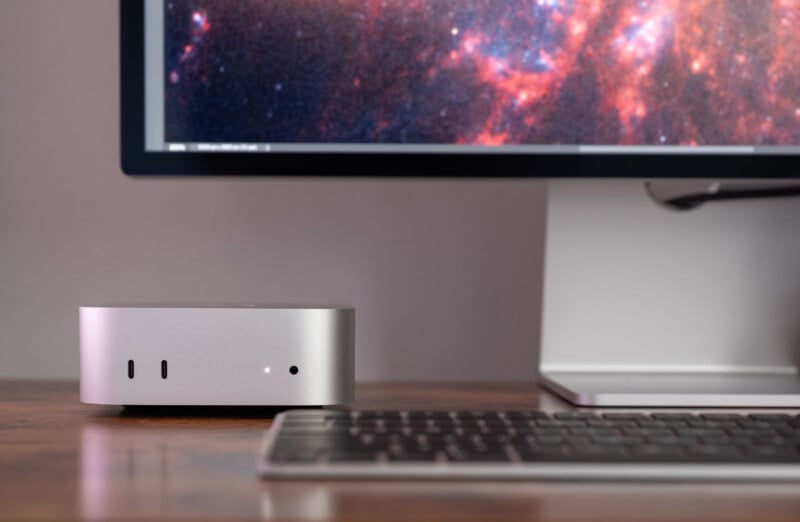
Generally, the Mac mini is a good option for a photographer. As we’ll see, it does have some limitations, but I genuinely believe it can work really well for many users, even advanced ones.
The review unit I’ve got here is a Mac mini with M6 (12-core CPU, 12-core GPU), 16GB of unified memory, and a 256GB SSD. The SSD is a very real limitation, honestly, and I would strongly recommend that users pay Apple’s premium to get at least 512GB of storage. That’ll go fast, too, but you can certainly use external storage effectively with the Mac mini. All in, the Mac mini I have is the cheapest one available now, starting at $899. You can upgrade it to 32GB of unified memory and a 512GB SSD for $1,499, which is still a strong value.
The Mac mini also comes with an M5 Pro chip, starting at $1,699. While we aren’t testing that machine, it’s surely very good overall.
Mac mini With M6: Design and Build
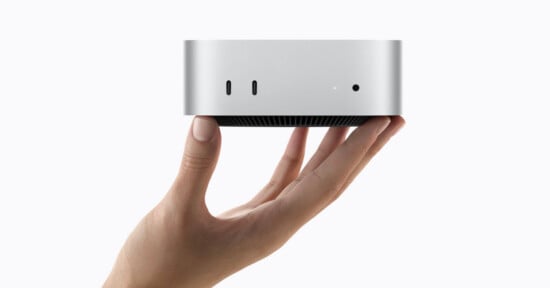
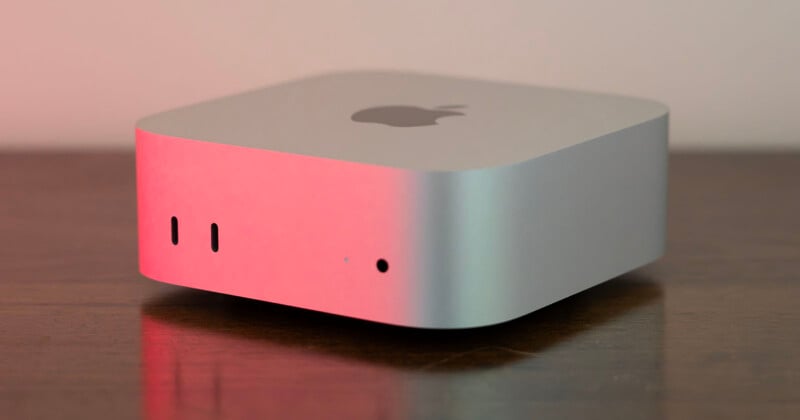
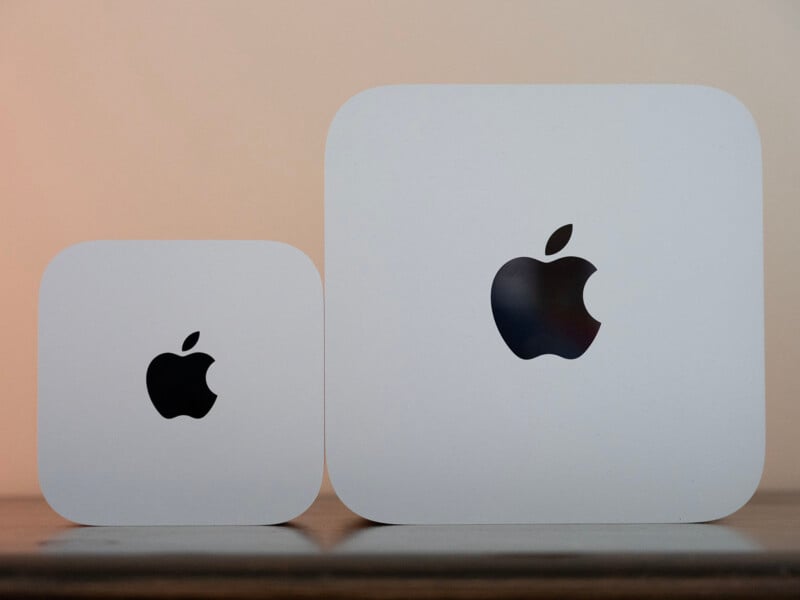
The Mac mini’s redesigned look is still pretty fresh, and it is still pretty great. The computer is practically palm-sized, not that you’ll be holding it very often. It is just five inches wide, five inches deep, and two inches tall (12.7 x 12.7 x 5 centimeters). In case you’re wondering, it weighs about 1.5 pounds (0.7 kilograms), whatever that matters.
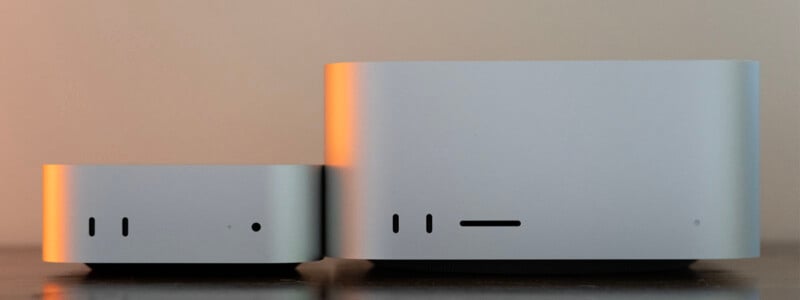
In many ways, the Mac mini looks like a shrunken-down Mac Studio. It has the same general shape and aesthetic, and both computers have front ports. However, unlike the Mac Studio, which has a built-in UHS-II SD card slot, the Mac mini has no card slot at all. On a more positive note, unlike the Mac Studio, the Mac mini does have a 3.5mm headphone jack on the front, which I like.
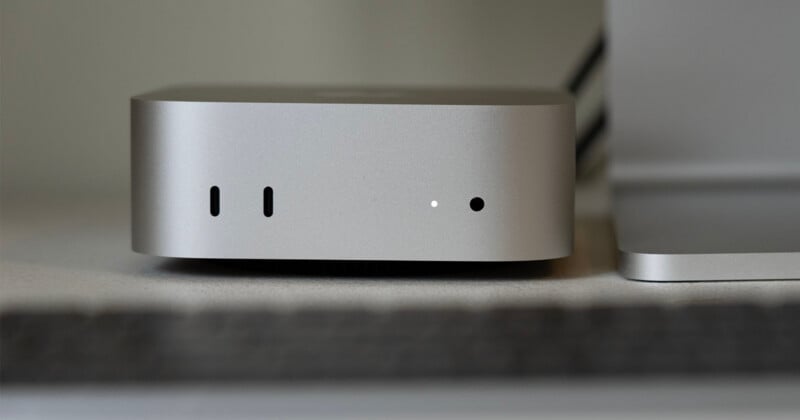
On the back of the Mac mini with M6 are three Thunderbolt 4 ports, an HDMI 2.1 port, 2.5Gb Ethernet, and the power cord port. The Thunderbolt 4 ports are a little surprising, honestly, and that alone may make some users want to pay more for an M5 Pro Mac mini, which has three Thunderbolt 5 ports on the back. Both Mac mini models have the same USB-C ports on the front, with speeds up to 10 Gb/s.
The Mac mini with M6 supports up to three external displays using Thunderbolt and HDMI. It supports two displays at native 6K resolution at 60Hz or 4K at 165Hz, plus a third display at up to 5K at 60Hz over Thunderbolt or 4K at 60Hz over HDMI.
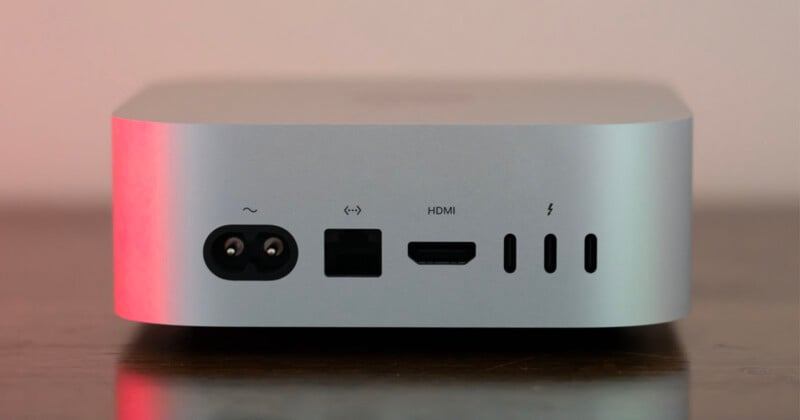
Alternatively, the machine can power two displays: one up to native 8K at 60Hz, 5K at 120Hz, or 4K at 240Hz, and the second at 5K at 60Hz over Thunderbolt or 4K at 60Hz over HDMI.
To me, that seems sufficient. But for those who have stricter display demands, the M5 Pro-equipped Mac mini can support three displays at 6K at 60Hz or 4K at 165Hz. Both machines can drive only one 8K panel at a time, capped at 60Hz.
I complained a bit about the redesigned Mac mini’s power button location with the M4 Mac mini, and it hasn’t changed. It’s still tucked beneath the machine, which is a bit annoying. It’s not a big deal, I just don’t know why it’s not located on the back of the computer.
My biggest complaint about the design and I/O of the Mac mini with M6 is that it doesn’t have Thunderbolt 5 ports. Ultimately, Thunderbolt 4 is still very fast, and most people are likely still using Thunderbolt 4-equipped accessories and external storage, but at some point, the default port will have to become Thunderbolt 5, right?
The Mac mini’s speakers are also not very good, but that isn’t unexpected. You will definitely want external speakers or headphones if you want to listen to music or edit audio.
Overall, the Mac mini is a very well-designed computer. It looks good, works well, and has plenty of ports. However, the ports do fill up pretty quickly.
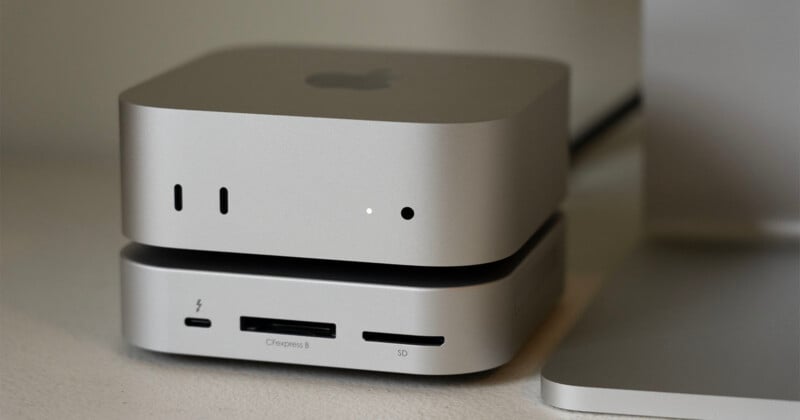
If you need more ports, there are a wealth of third-party dock and hub options for the Mac mini, including the Blackjet MiniRaiden Thunderbolt 5 Studio Dock for Mac mini I have here. It adds a CFexpress Type B card slot (which can support CFexpress Type A cards with an adapter) and a UHS-II card slot to the front of the machine. It also has an M.2 NVMe SSD slot and three Thunderbolt 5 ports. Granted, the Mac mini with M6 doesn’t have a Thunderbolt 5 port for it to plug into.
Mac mini With M6: Performance
Benchmark Testing: Adobe Lightroom Classic
Before diving into this, we must caveat one specific test result. Sometimes when testing brand-new machines with new chips, you experience strange results. In many cases, a bug is the culprit. I believe that’s what’s going on with a very odd Lightroom Classic result.
The Mac mini with M6 generally performed well in Lightroom Classic, but it struggled mightily to export Sony a1 II JPEG files. We have run into a similar issue before, back when we did these tests manually, and it was addressed relatively quickly after the computer launched to the public. I have every reason to believe that will be true this time, too.
The Puget Systems Lightroom Classic benchmark test we use now is much like our old hand-timed test. It ingests 250 RAW files each from the Canon EOS R5 II, Panasonic Lumix S1R II, Sony a1 II, and Nikon Z8.
The software automatically creates 100 Smart Previews for a repeatable set of 100 images per camera and then exports 100 JPEG and 100 DNG files.
Given that JPEG files from other cameras in the test worked fine and the DNG results are great, I don’t see any real cause for concern. However, you must note that one of the bar charts below looks ugly. This outlier affects the overall score, though not much. I am also including the same chart without this outlier so that it’s easier to read overall.
The Lightroom test we use now also includes AI features inside Lightroom Classic, which the Mac mini with M6 handled with aplomb.
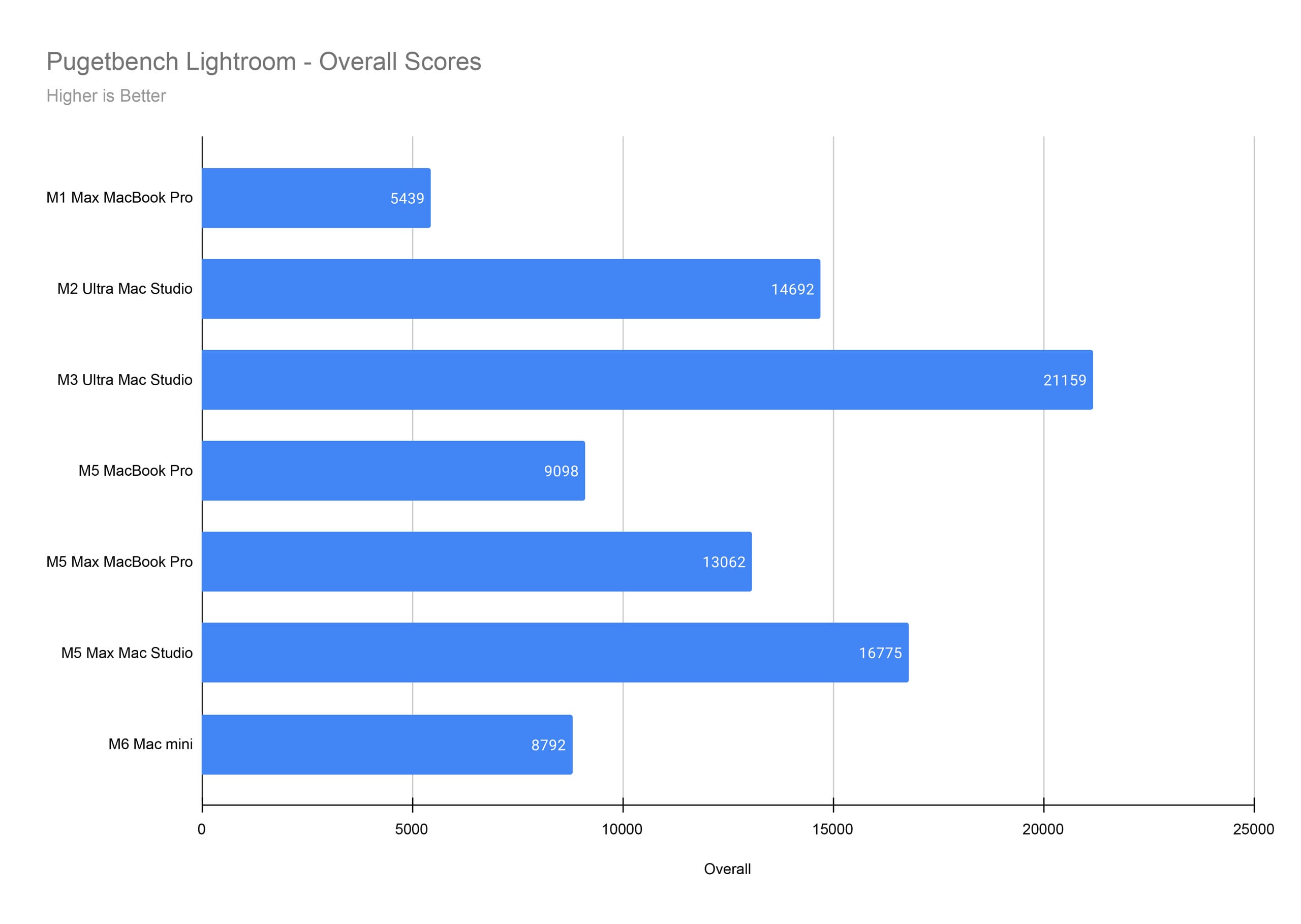
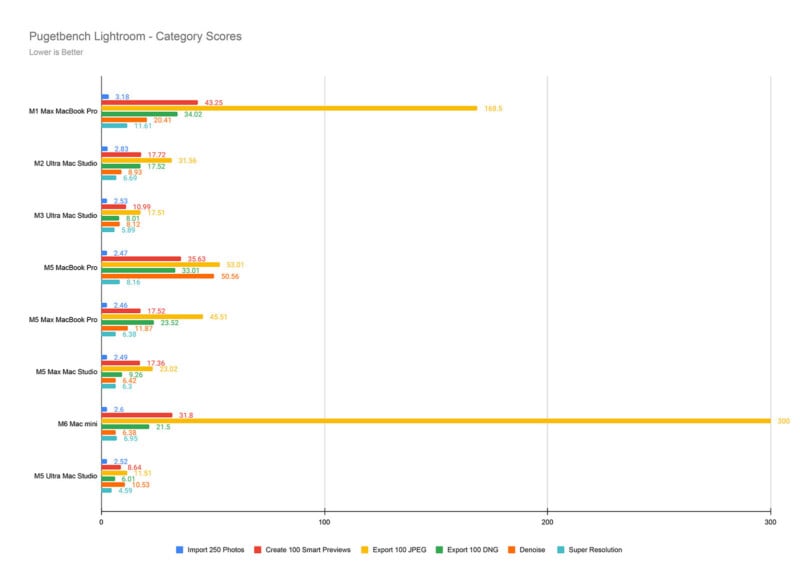
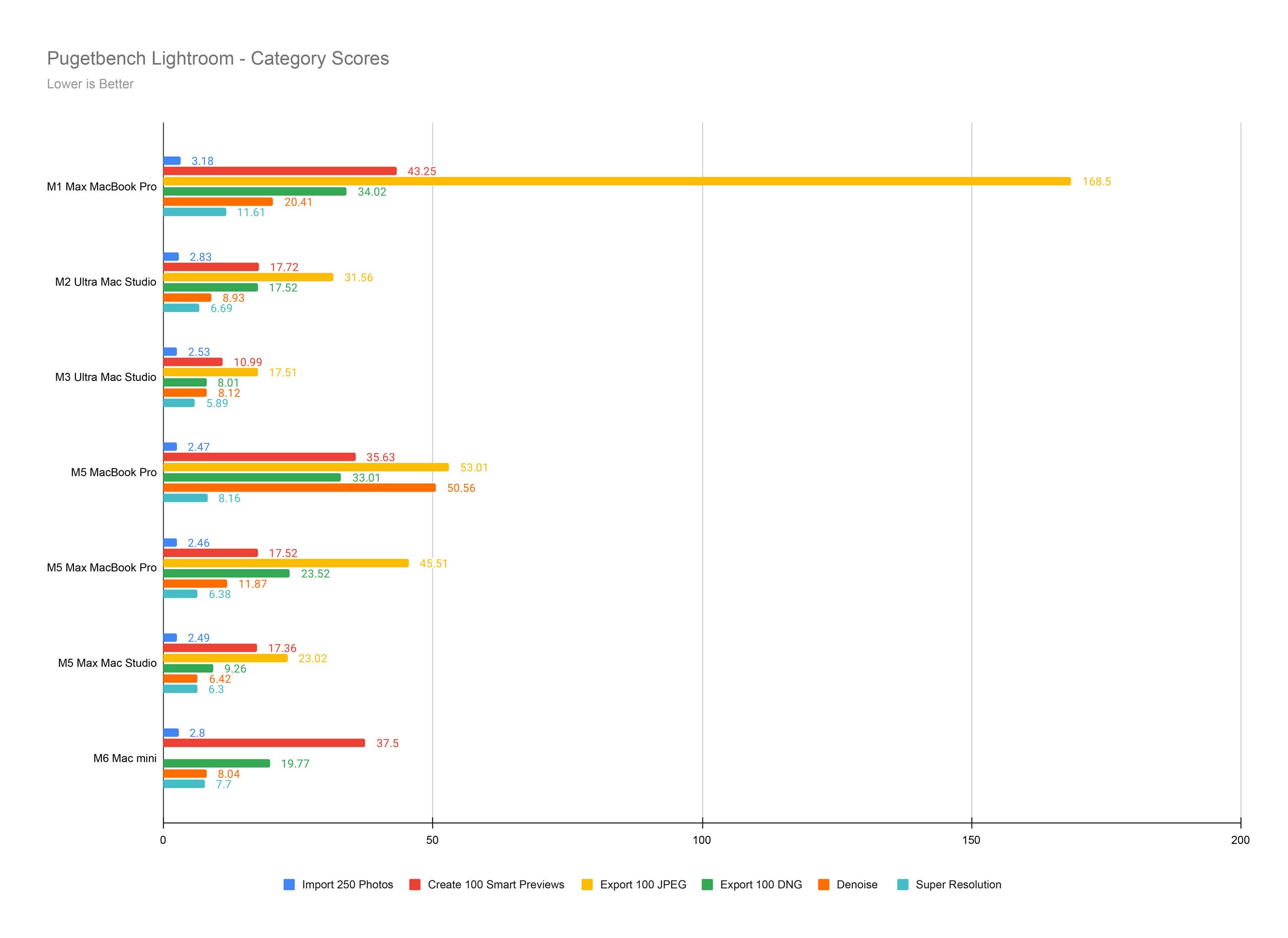
With that weird outlier result in mind, the Mac mini with M6 is still a good option. It’s very similar to the M5 MacBook Pro in many ways, albeit with significantly improved AI-related performance. AI Denoise is excellent on the M6. It’s just generally a strong Lightroom machine. I may re-run these tests when what I suspect is a bug with JPEG exporting gets fixed.
Benchmark Testing: Adobe Photoshop
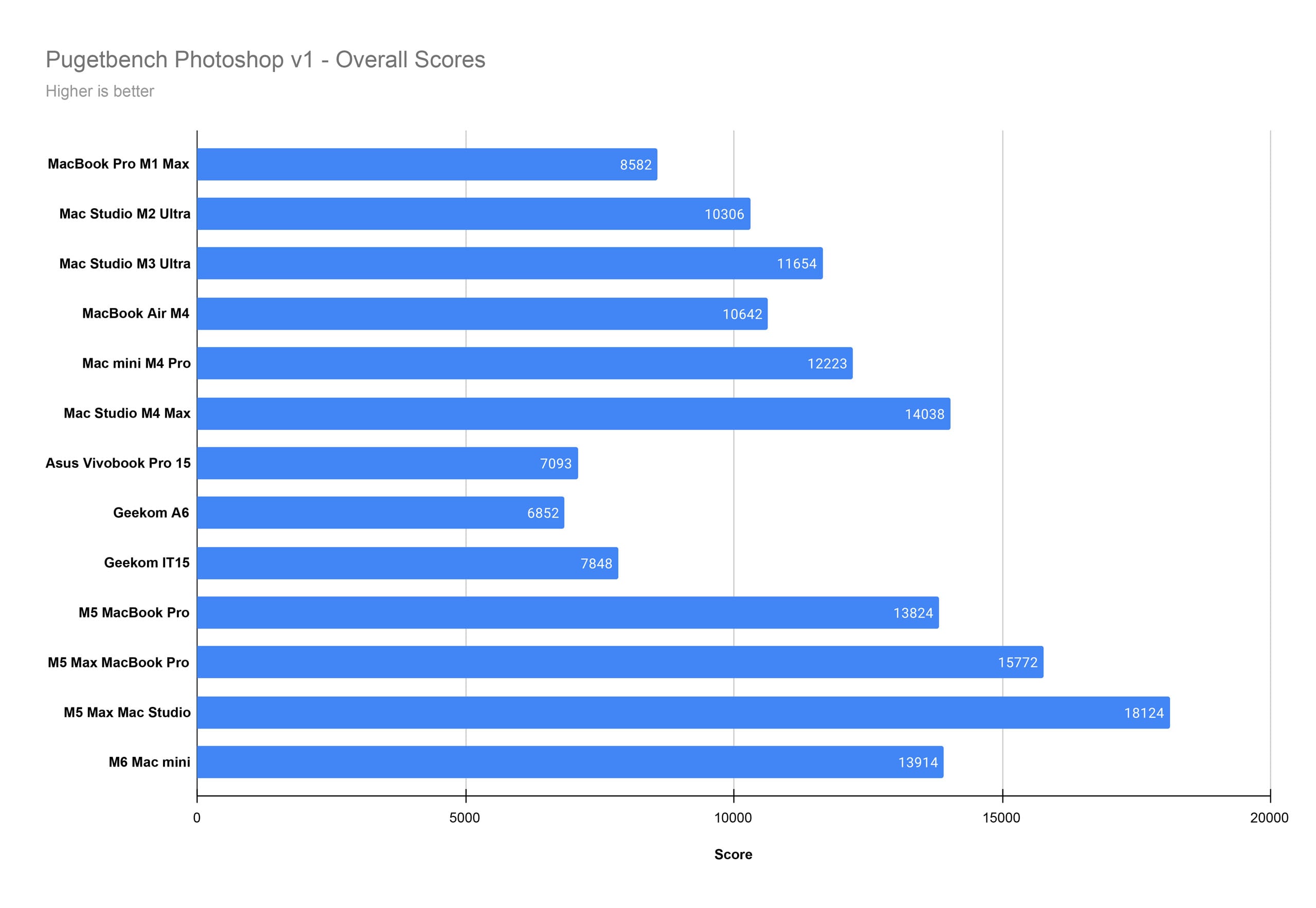
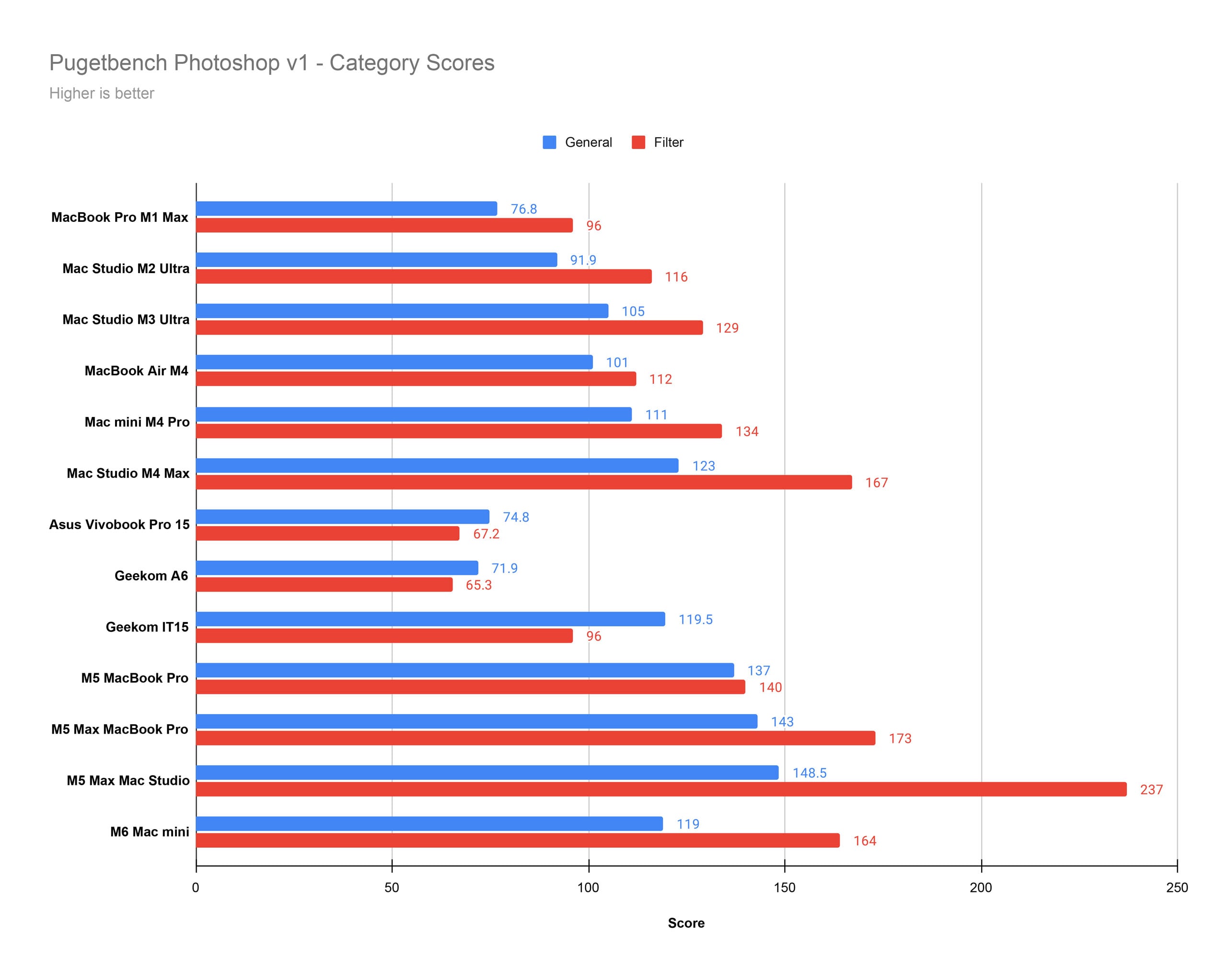
Inside Photoshop, the M6 Mac mini is very good. It’s a little worse than the M5 MacBook Pro in our charts for “General” performance, but it’s worth noting that the M5 MacBook Pro in our testbed has 32GB of unified memory, twice as much as the M6 Mac mini.
Benchmark Testing: Adobe Premiere Pro
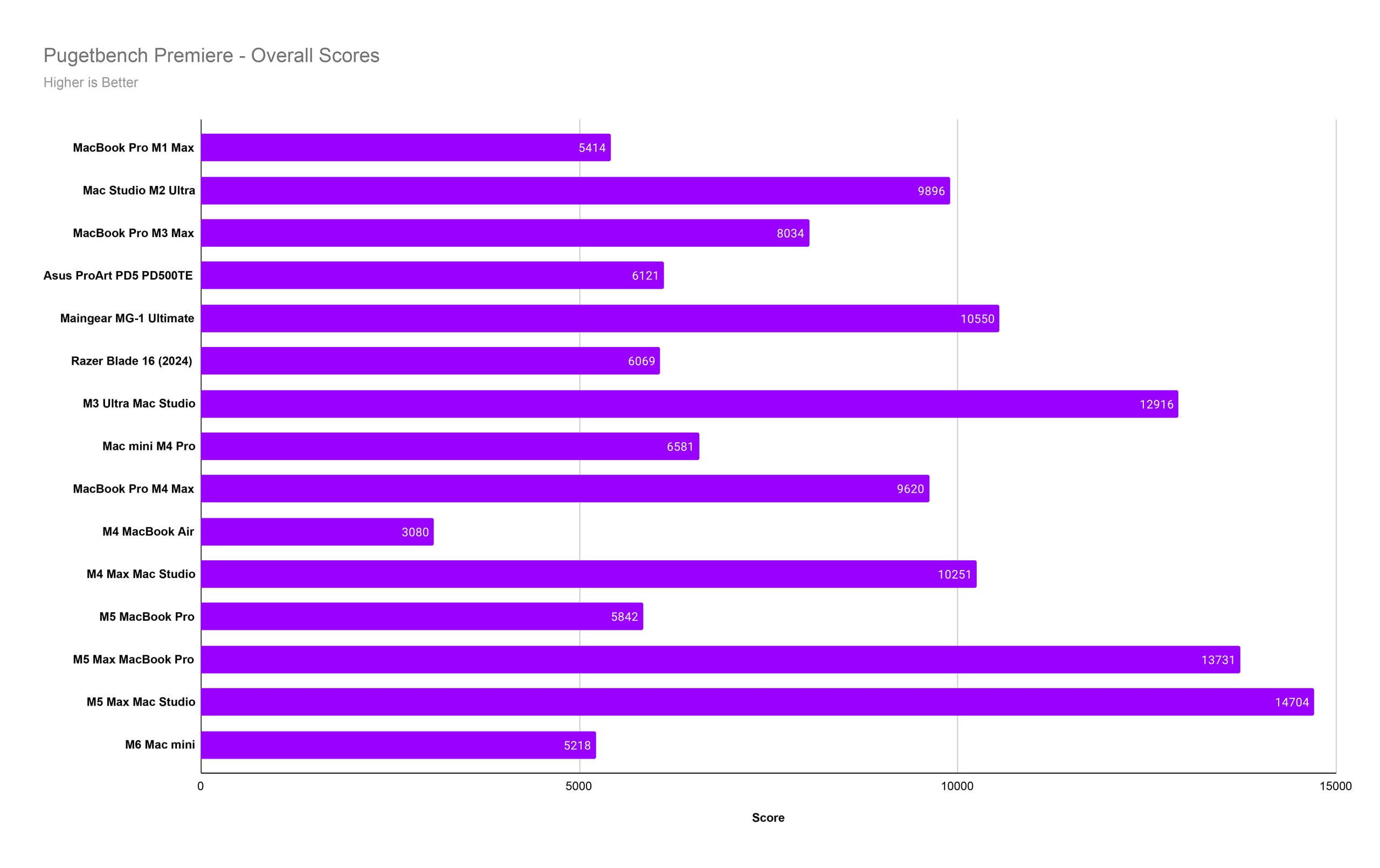
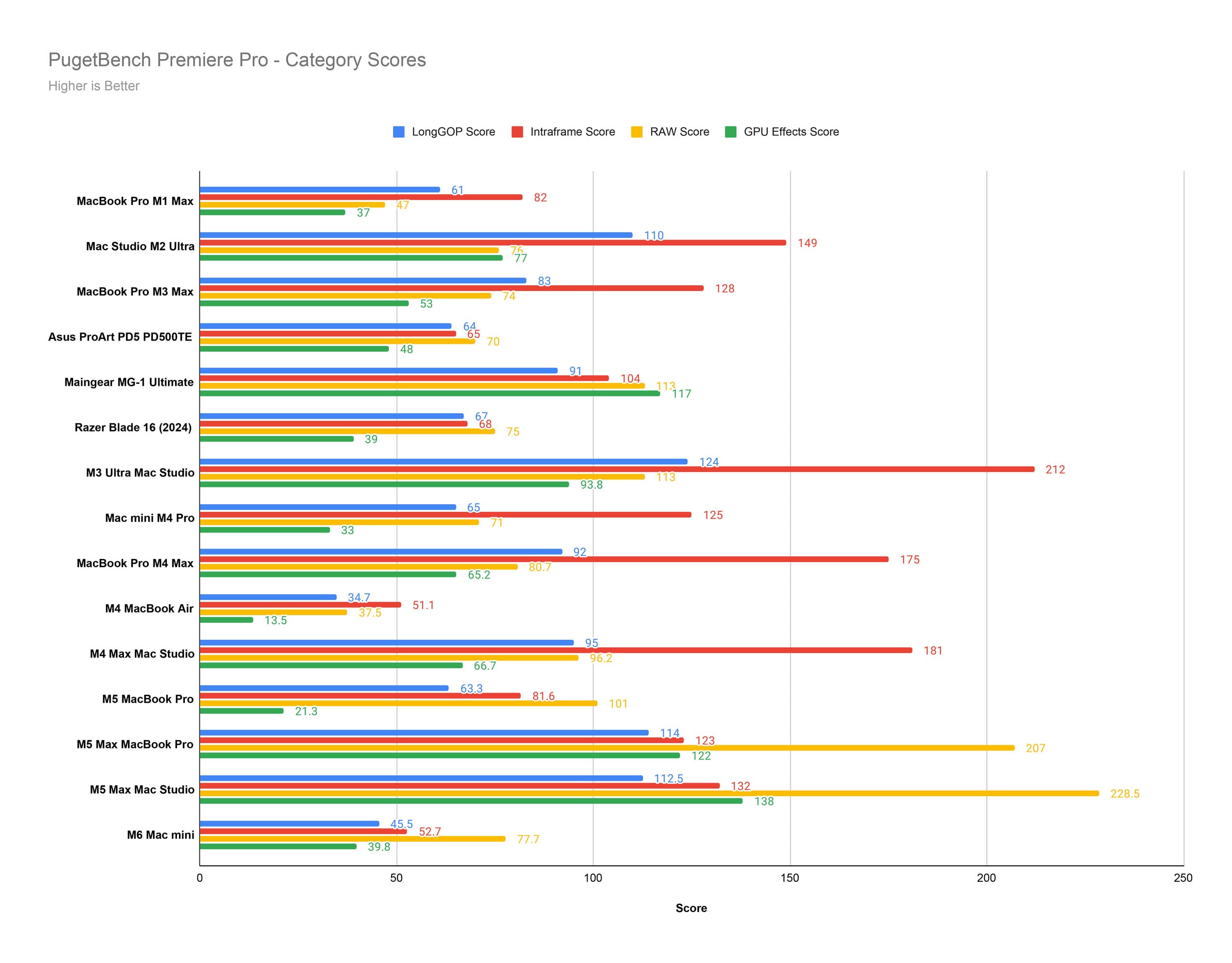
In Premiere Pro, the M6 Mac mini is, yet again, a strong performer. We see the limitation of the 16GB of unified memory in multiple categories, but check out that GPU Effects score. That’s nearly twice as good as the M5 MacBook Pro.
Benchmark Testing: DaVinci Resolve
Puget recently changed its DaVinci Resolve benchmark test, so we don’t have as many machines to compare right now. We’ll keep adding new machines to these charts as we can, but for now, it’s slim pickings.
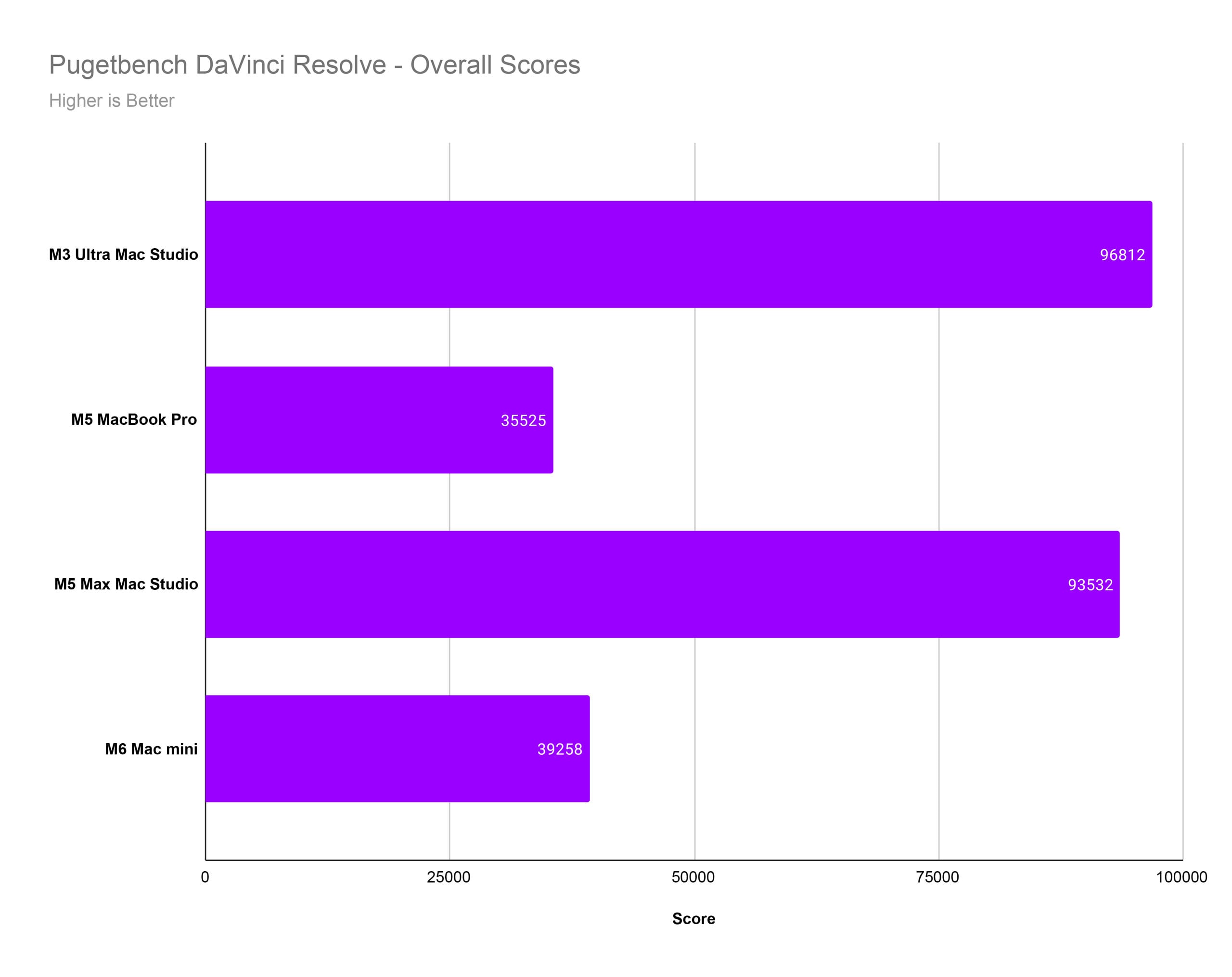
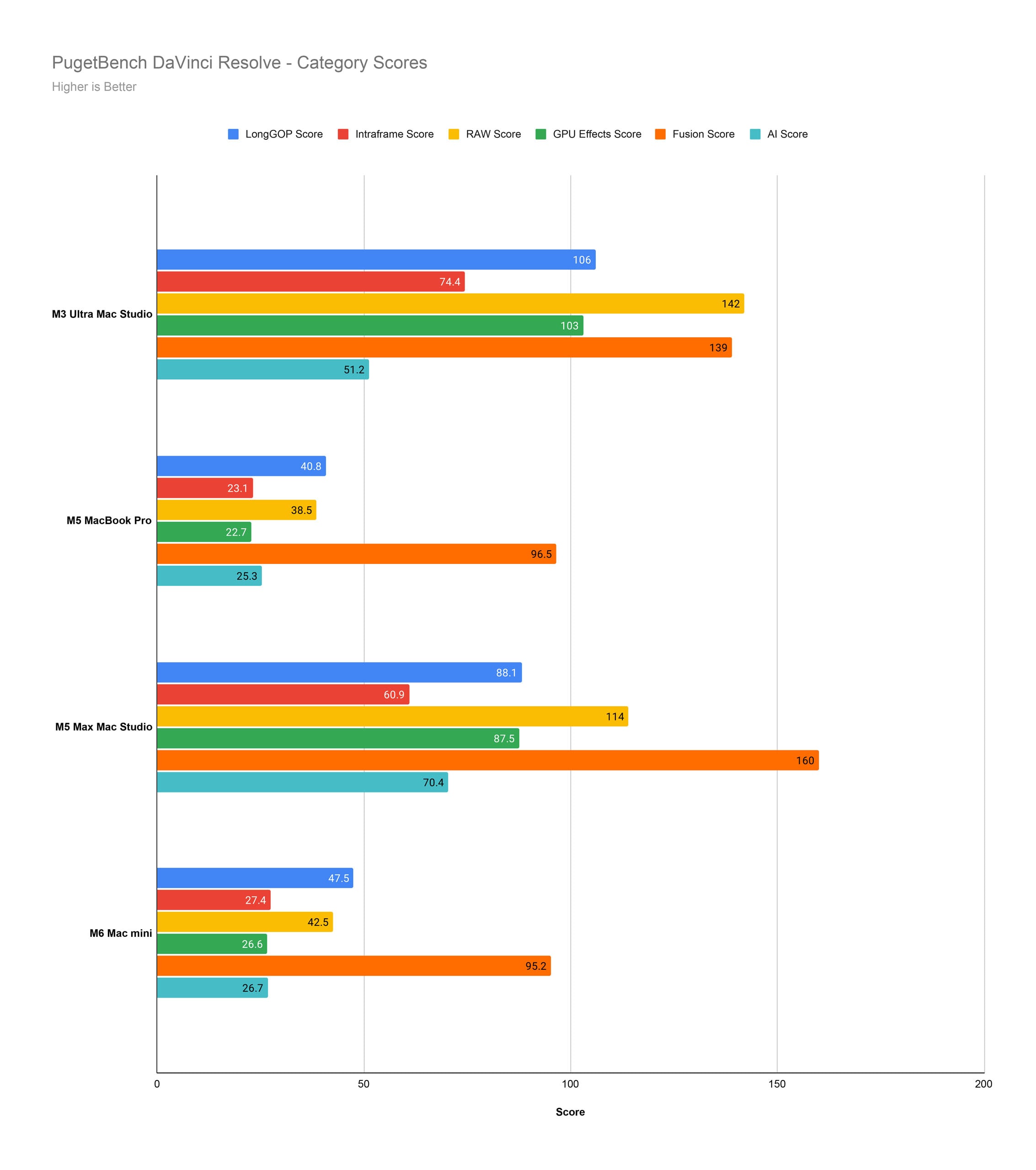
DaVinci Resolve really benefits from the extra cores in a chip like the M5 Max, as the charts show. Importantly, the M6 Mac mini outperforms the M5 MacBook Pro in nearly every category.
Mac mini With M6 Performance Takeaways
The Mac mini with M6 is a good computer. Even in its base configuration with 16GB of unified memory, it’s a strong option, especially for photo-related workflows. Consider that the Mac mini with M6 outperforms the Mac Studio with M3 Ultra in Photoshop. That’s pretty wild, really.
In intensive video editing workflows, the lack of multithreaded performance is notable. However, the M6 is still much more powerful than the M4 and M5 in these situations.
Many photographers won’t want for power with the Mac mini with M6. Video editing is a different story. Even if the M6 is better in these situations, high-resolution editing and RAW video editing workflows would still benefit from a Pro or Max-series chip.
In the Mac mini form factor, an M5 Pro will really perform well. As we saw with the M4 Pro Mac mini, which is still better than the M6 Mac mini in video editing tasks, you can get a lot of performance at a reasonable price.
This Isn’t Quite a Revolution for Creatives
The Mac mini with M6 is a good computer. Many photographers are likely to be very content with the machine, especially if they’re upgrading from an M1- or M2-powered Mac, or especially an Intel-based one.
However, if you’re doing video editing, the base M6 doesn’t really offer anything particularly special. It’s good, not great.
Many photographers and video editors who want a Mac mini will find themselves deciding between the M6 Mac mini and the M5 Pro Mac mini. The price jump is certainly significant, although for the extra $800, you get a better and more powerful processor for multithreaded workflows, 24GB of unified memory instead of 16GB, and a 512GB SSD rather than the woefully small 256GB SSD in the base M6 model. You also get three Thunderbolt 5 ports on the back, rather than the three Thunderbolt 4 ones on the M6 Mac mini.
All that taken together, I would highly recommend that for photographers and especially video editors who can afford a higher-end Mac mini, do it. Go for the M5 Pro one. Those who cannot afford it or simply don’t want to spend the money will likely be happy with the M6 Mac mini, though. It’s not a letdown or a bad computer.
Are There Alternatives?
The Mac Studio is a reasonable alternative, especially if you’re considering the M5 Pro Mac mini. Starting at $2,499 with 36GB of unified memory and a 512GB SSD, the Mac Studio with M5 Max is $800 more than the Mac mini with M5 Pro. The Mac Studio has a lot more power and much better I/O. Is that worth $800 to you?
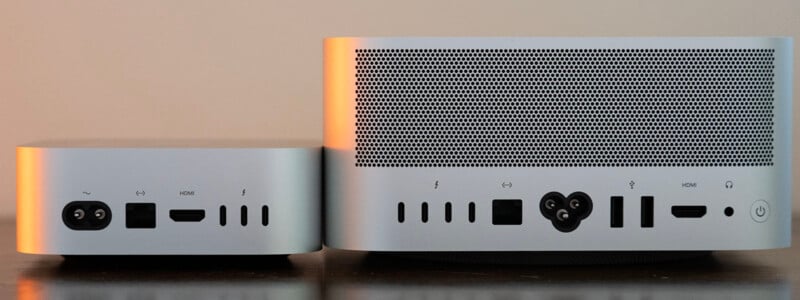
Speaking of the Mac mini with M5 Pro, that’s the most obvious alternative to the M6 Mac mini. I recommend the Mac mini with M5 Pro if you can afford it.
On the PC side, there really isn’t anything quite like the Mac mini. It is the best of its kind. However, there are mini PCs from Geekom, Asus, and HP you may want to consider. We have tested Geekom machines before and were left wanting, but that was a couple of years ago.
Should You Buy It?
A Mac mini in general? Yes. The base Mac mini with M6? No. If you want the M6 Mac mini, you should double its unified memory and SSD, at which point you’re at $1,499 anyway. At that point, you should get the Mac mini with M5 Pro instead.
Affiliate Disclosure PetaPixel articles may include affiliate links; we may earn a commission if you buy through one.