
Mac Studio With M5 Max Review: The Best Mac for Photo and Video We’ve Tested
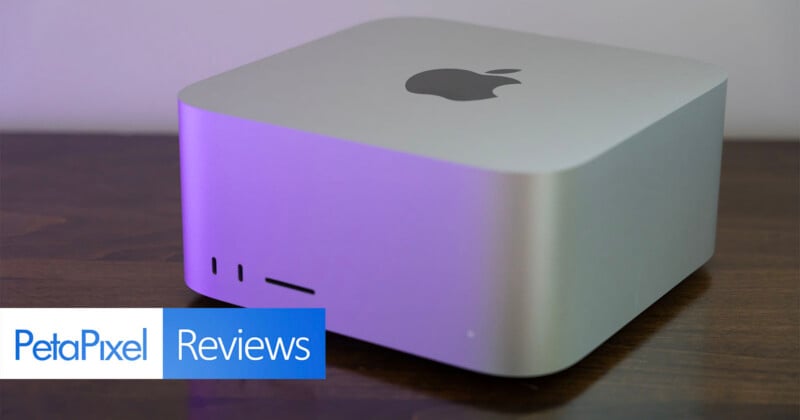
I’ve been a big fan of the Mac Studio ever since Apple released the first one. It has a great design and form factor and delivers enough power for pros and then some. With the Mac Pro gone, the Mac Studio carries a heavy burden. The new Mac Studio with M5 Max is more than up to the task.

The Mac Studio with M5 Max is an outstanding desktop computer with extreme capabilities.
Pros
- Extremely powerful
- Practical and versatile design with great I/O
- Easy to find a place for on the desk
- Silent
Cons
- Unified memory and storage upgrades are pricey
- Built-in speakers are middling
The Mac Studio with M5 Max is not technically Apple’s most powerful new Mac Studio. That honor falls to the pricier Mac Studio with M5 Ultra, which PetaPixel will be reviewing shortly. However, based on our benchmarks for the M5 Max desktop machine, it’s challenging to imagine the Mac Studio with M5 Max not being Apple’s best overall choice for desktop-seeking photographers. I anticipate the returns for photographers to be marginal with the M5 Ultra.
The story will almost certainly be more complicated for extremely high-end video users, although, as we will see, the Mac Studio with M5 Max tears it up in Premiere, too.
As is often the case with new Mac reviews, I must tread over ground that will feel well-trodden for those who stay up to date with Apple. Some of you are here for the first time and may not know the Mac Studio’s familiar design or what different generations of Apple silicon mean.
This is the M5 Max’s first foray into a desktop machine after it debuted earlier this year in the MacBook Pro. Make no mistake, the MacBook Pro is great. If you want a laptop and you need power, that is your best option, not just in Apple’s lineup but in the entire computer landscape.
The move to a desktop form factor benefits a chip like the M5 Max, though. A MacBook Pro simply can’t match a desktop’s thermal efficiency. The Mac Studio has inlets, outlets, and bigger fans than the MacBook Pro can accommodate. Since the MacBook Pro with M5 Max we reviewed in March also has 128GB of unified memory, like the Mac Studio we’ve got in for testing, we can put them toe-to-toe and measure that desktop difference. Both M5 Max-equipped computers also have an 18-core CPU and 40-core GPU: a real Apple-to-Apple comparison.
Now you do pay for the power, which is a very important consideration to make when evaluating any computer and certainly for prospective customers weighing their options. This particular configuration, not aided by “RAM-ageddon,” is $6,899. Obviously that’s a lot, but it’s worth noting that $1,800 of that price is upgrading from the default 512GB SSD to a 4TB one. Further, while the 128GB of unified memory does benefit performance, a Mac Studio with M5 Max, the CPU/GPU upgrade, 512GB of storage, and 64GB of unified memory is $3,499, a much easier pill to swallow.
The Mac Studio with M5 Max (18-core CPU and 36-core GPU), 36GB of unified memory, and a 512GB SSD is $2,499.
Okay, with that out of the way, let’s dig in.
Mac Studio With M5 Max: Design and Build
You would be forgiven for thinking, “I’ve seen this computer before.” Yes, you probably have. If you have even a surface-level familiarity with Apple’s Mac lineup in recent years, you have seen this exact design before.
Don’t mistake boring for bad, though. The Mac Studio is a very practical computer with textbook Apple design language.
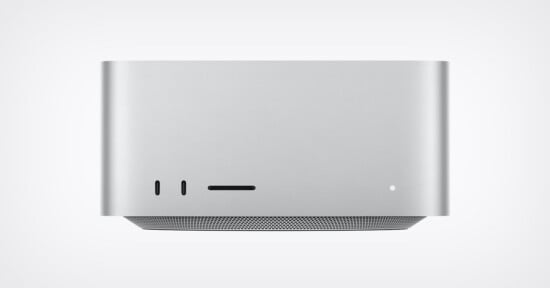
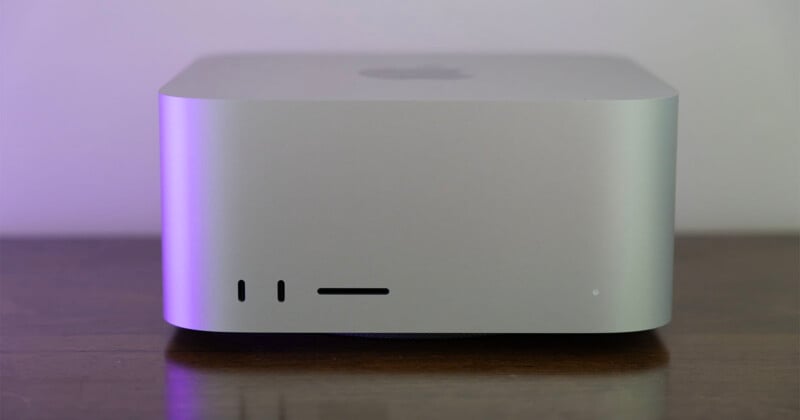
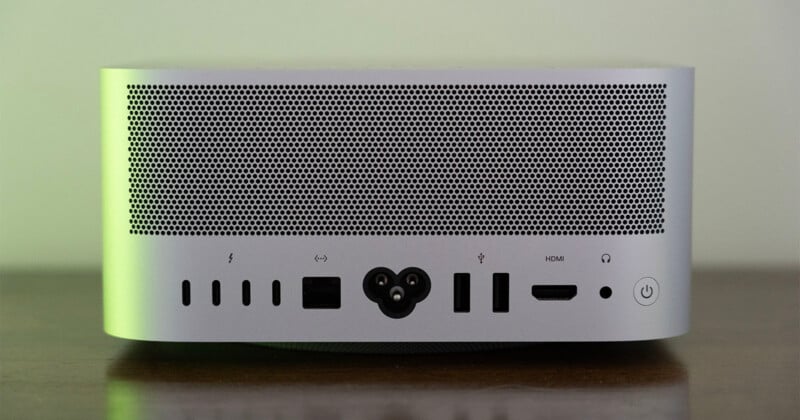
It has a front UHS-II SD card slot flanked by two USB-C ports. By the way, on the M5 Ultra Mac Studio, these front ports are both Thunderbolt 5 (120Gb/s).
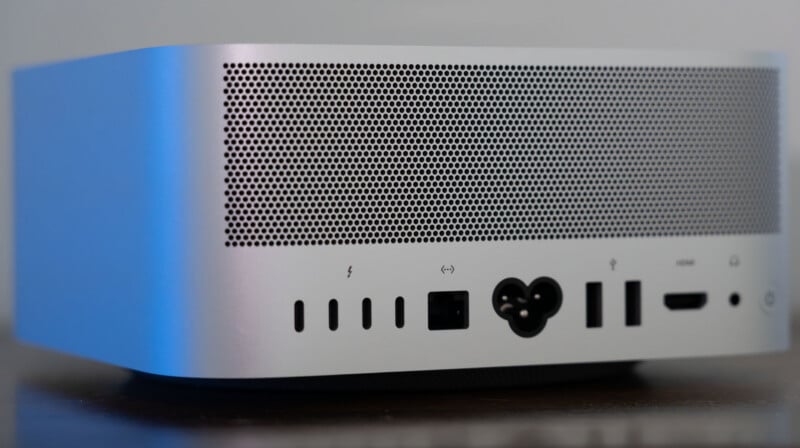
But fret not, the M5 Max Mac Studio has Thunderbolt 5 ports, too. Both versions have four on the back. The back also has a 10Gb Ethernet port, a central power port, two USB-A ports, an HDMI 2.1 port, and a 3.5mm headphone jack.
Thunderbolt 5 isn’t extremely widely supported yet, but these ports are very powerful and useful. They are backward compatible with Thunderbolt 3 and 4, too, of course.
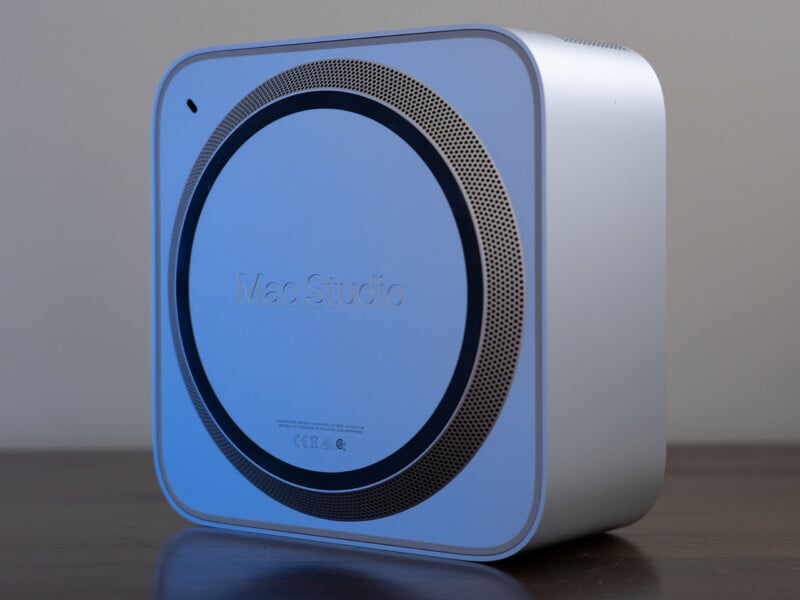
The Mac Studio has embraced the same look for a while now. That would certainly bother me more if I had any notion at all about how to meaningfully improve the computer’s design. It’s clean, with a relatively well-hidden fan system, an easy-to-reach power button (unlike the Mac mini), and plenty of ports.

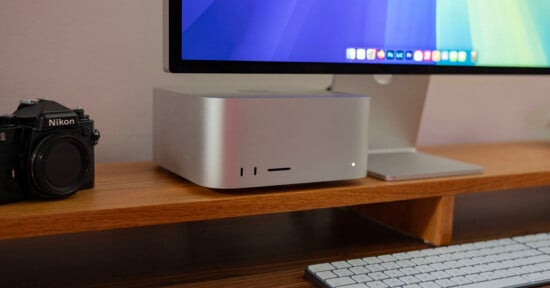
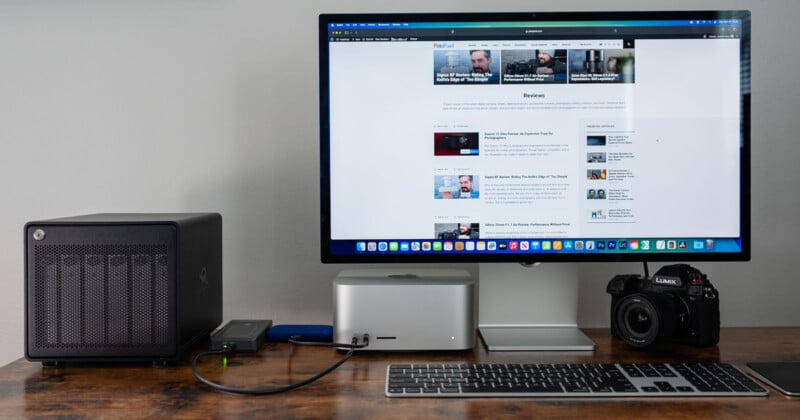
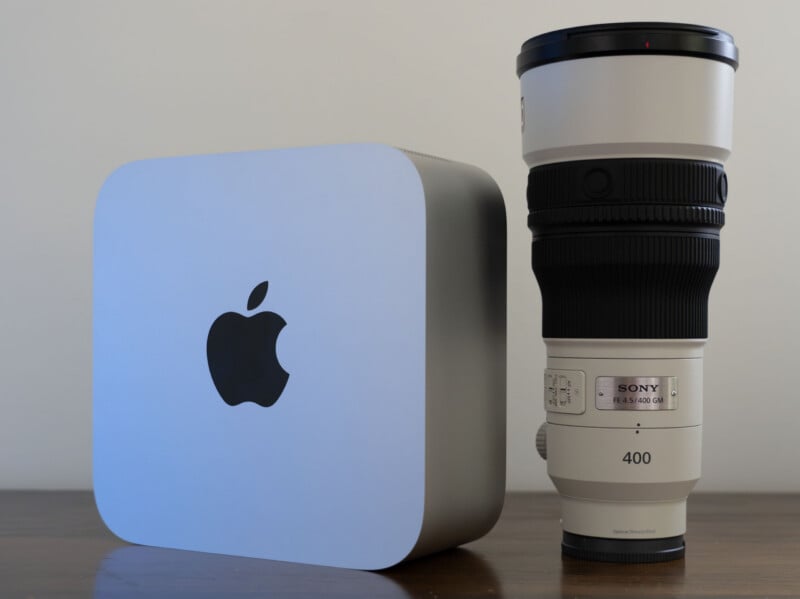
I’m not even sure I wish it were smaller, because then its thermal management could suffer. In fairness, the Mac Studio isn’t a large desktop computer. It’s just 3.7 inches tall, 7.7 inches wide, and 7.7 inches deep (9.5 x 19.7 x 19.7 centimeters). It weighs about eight pounds (3.6 kilograms). It isn’t designed to be moved around, but it’s still easy to maneuver around a desk as you see fit. It fits beneath most monitors, and certainly all of the ones I have ever used.
The Mac Studio’s strength is its capability, and its I/O is excellent for professional workflows. Better still, it looks modern without being ostentatious. No bold graphics or flashing lights here. No shade if you’re into that sort of thing, but I’m not, and I’m grateful Apple isn’t either.
If I had to knock the Mac Studio for something, it’s that its built-in speakers are not very good and that I’d prefer a front-facing headphone jack. These are minor dings, but on the other hand, this thing is quiet. Like silent quiet.

Mac Studio With M5 Max: Performance
Oh yeah, here we go, the star of the show: performance. Speed! Power! Benchmarks!
The M5 Max chip inside the Mac Studio is a relatively known quantity, but what can it do when it throws heat to the wind, or more literally, out of the bottom of the chassis? What happens when you unleash the beast? Like all of the best beasts, it goes nuts.
Benchmark Testing: Adobe Lightroom Classic
Our old hand-timed Lightroom Classic test is gone. We recently switched to Puget Systems’ Lightroom Classic benchmark, and it’s still fresh enough that we should break it down a bit here.
The Extended version of this test is similar to what we used to do manually but even more extensive. It imports 250 RAW image files from the following four full-frame mirrorless cameras: Canon EOS R5 Mark II, Panasonic Lumix S1R II, Sony a1 II, and Nikon Z8.
The test then creates 100 Smart Previews of a repeatable selection of these RAW files, and exports 100 JPEG and 100 DNG images.
The benchmark provides an overall performance score in Lightroom Classic for each batch of files. However, the full test log also includes timing for each task. PetaPixel includes timing results only for the Sony a1 II files in its charts, since the a1 II has the highest megapixel count of the four cameras included.
The benchmark also tests some of Lightroom Classic’s AI features, including Select Sky, Select Subject, Reflection Removal, Denoise, Enhanced Details, and Super Resolution. Many of these tests take just a fraction of a second on modern Macs, so few scores differ, and most results fall within a margin of error. However, Denoise and Super Resolution tests require enough time for meaningful variations between machines to exist. Further, a single AI score captures all AI performance, as shown in the charts below.
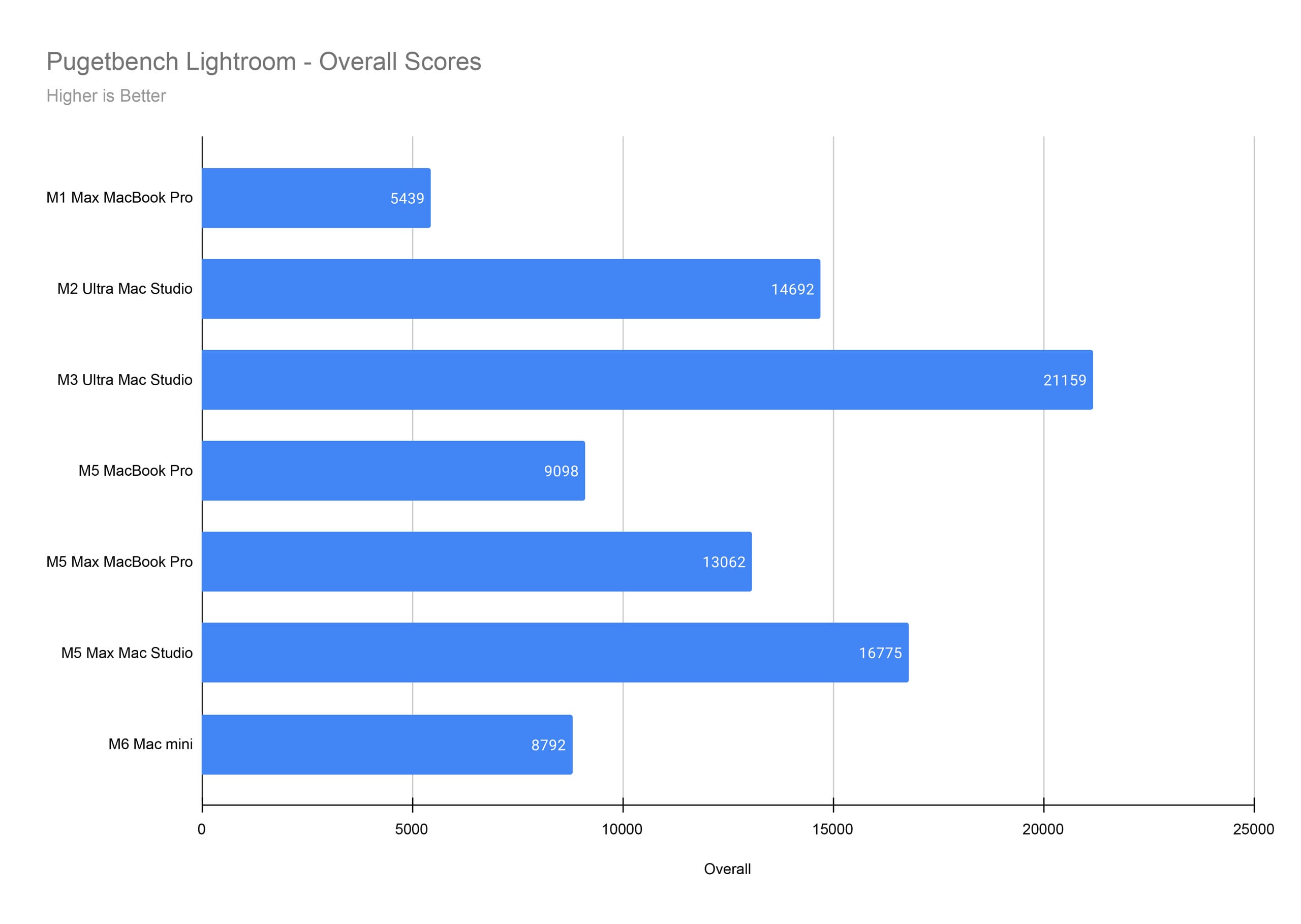
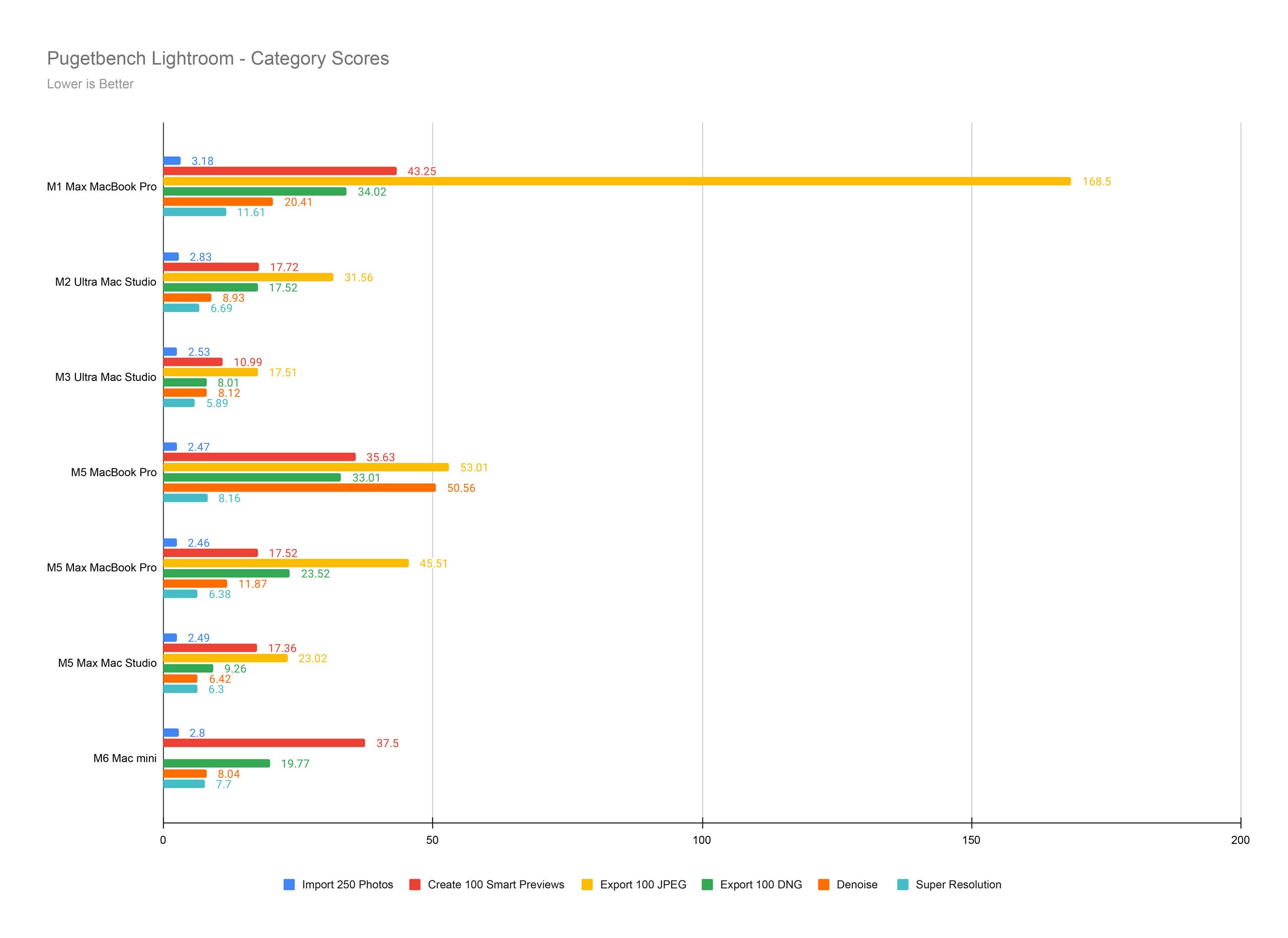
The Mac Studio with M5 Max is nearly as good as the Mac Studio with M3 Ultra inside Adobe Lightroom Classic. The Mac Studio with M3 Ultra has twice the unified memory, though, which definitely helps inside Lightroom. The Mac Studio with M5 Max is outstanding here.
Benchmark Testing: Adobe Photoshop
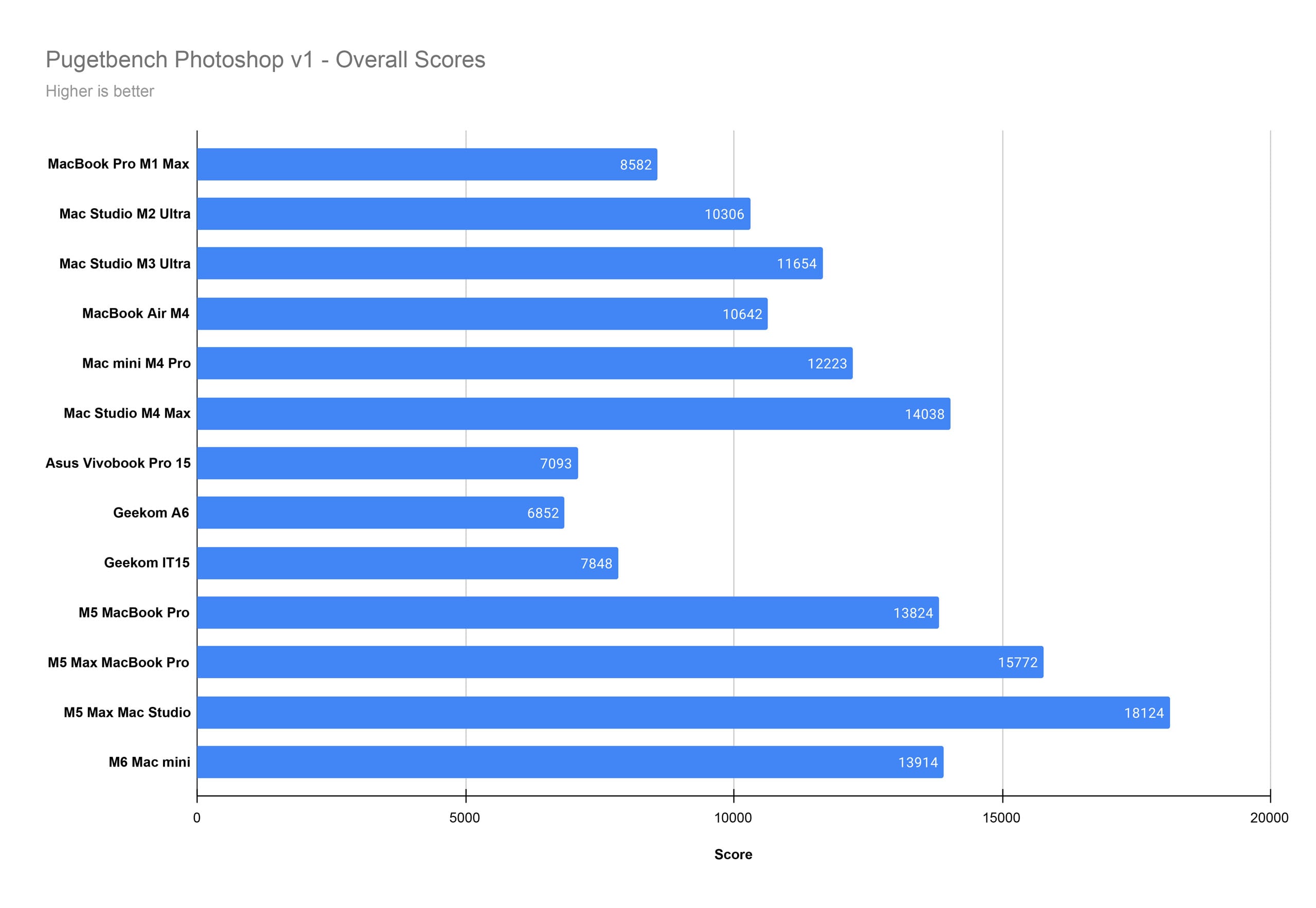
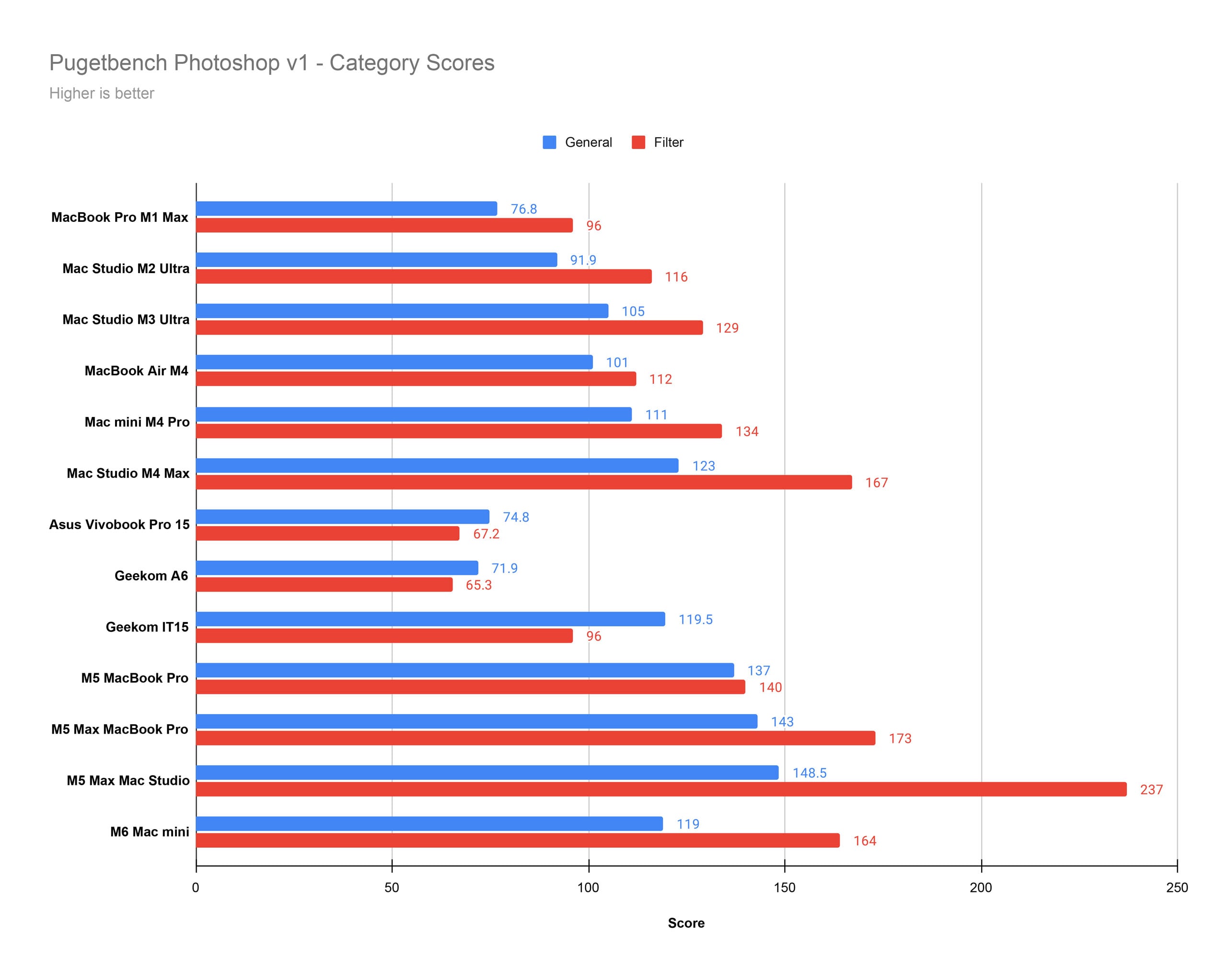
The Mac Studio with M5 Max is an absolute beast in Adobe Photoshop. It is the best machine we have ever tested. As mentioned earlier, it has the same specs as the MacBook Pro with M5 Max we tested earlier this year, which shows what larger built-in fans and more space for cooling can do for performance.
Benchmark Testing: Adobe Premiere Pro
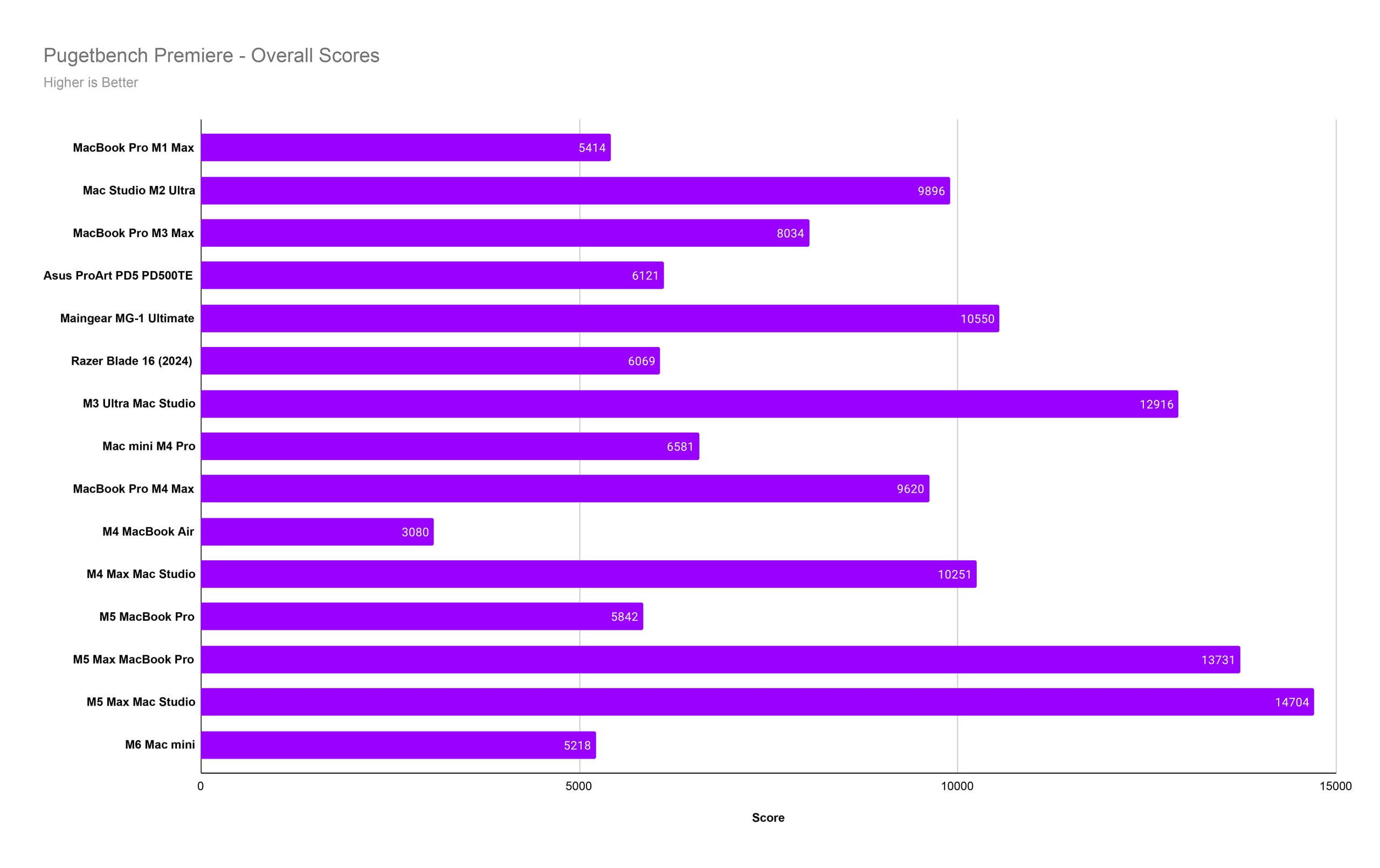
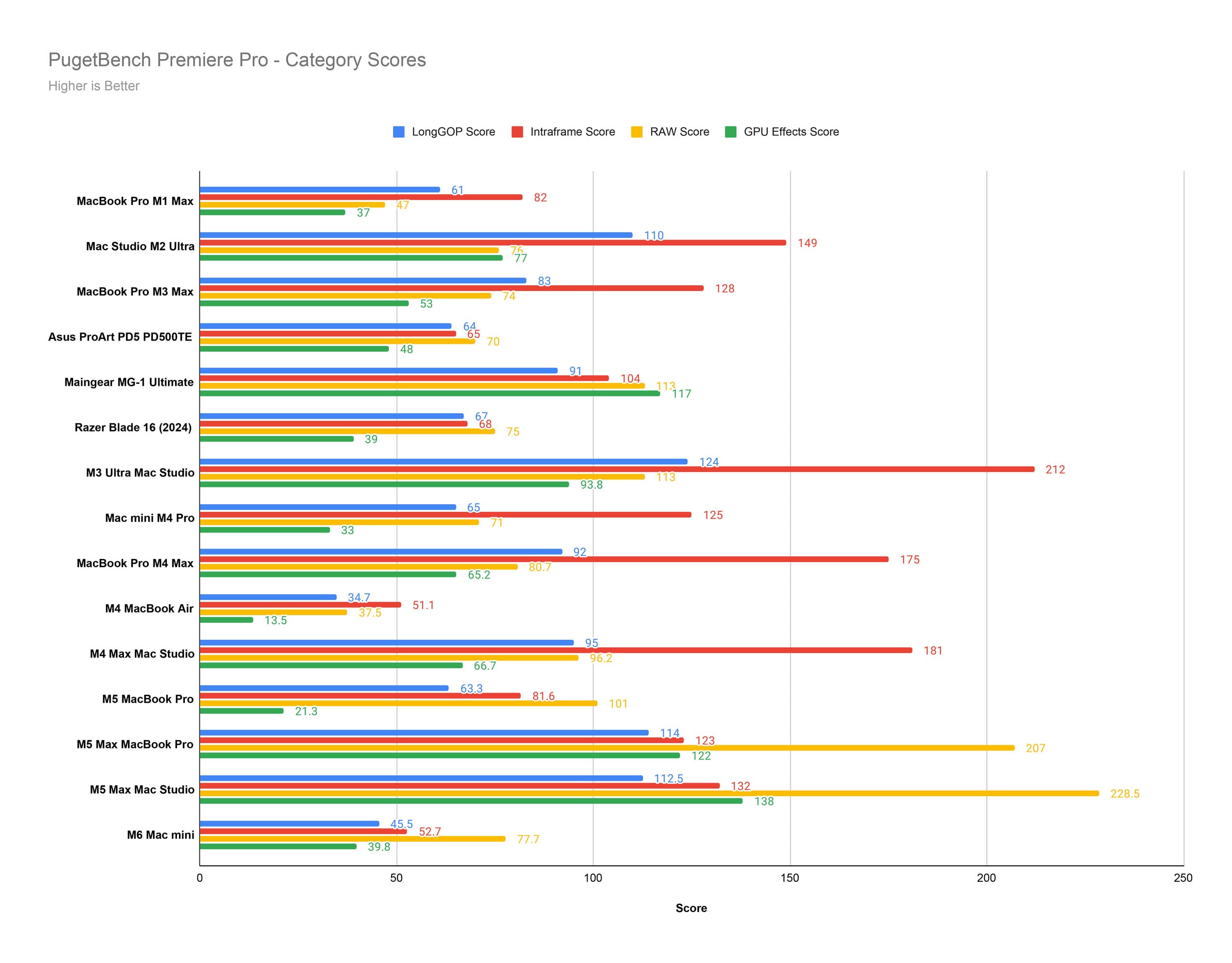
We have another new winner in our Premiere Pro tests. Yeesh! The Mac Studio with M5 Max sets a new record score, thanks largely to its Filter performance.
Benchmark Testing: DaVinci Resolve
Unfortunately, Puget recently changed its DaVinci Resolve benchmark test, rendering it pointless to compare machines. We haven’t been able to restock our benchmark test with older Macs yet, but we hope to fill the coffers by the time of our Mac Studio with M5 Ultra review. For now, this is what we’ve got. For now, you’ll need to rely more on Premiere Pro and Photoshop benchmark tests.
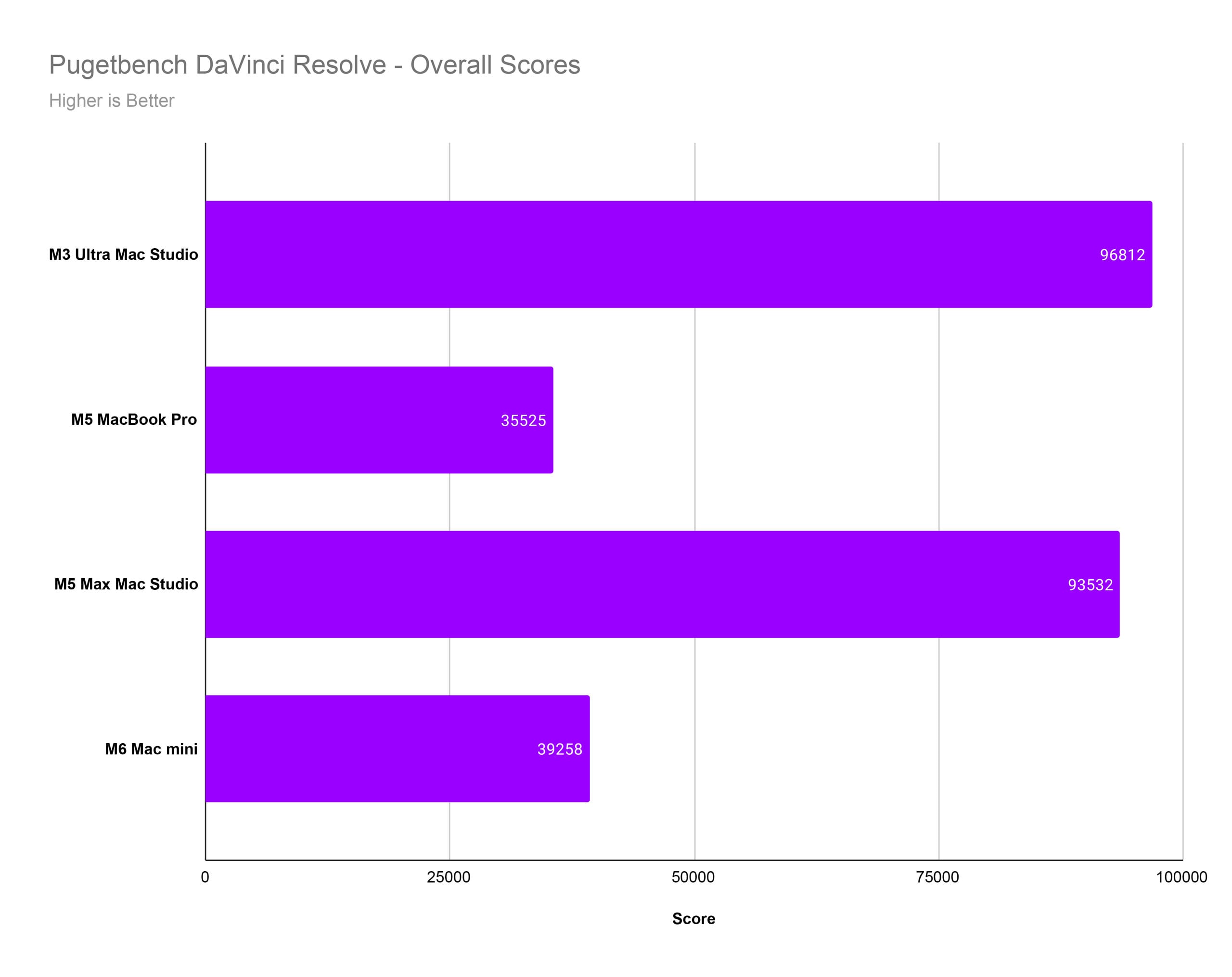
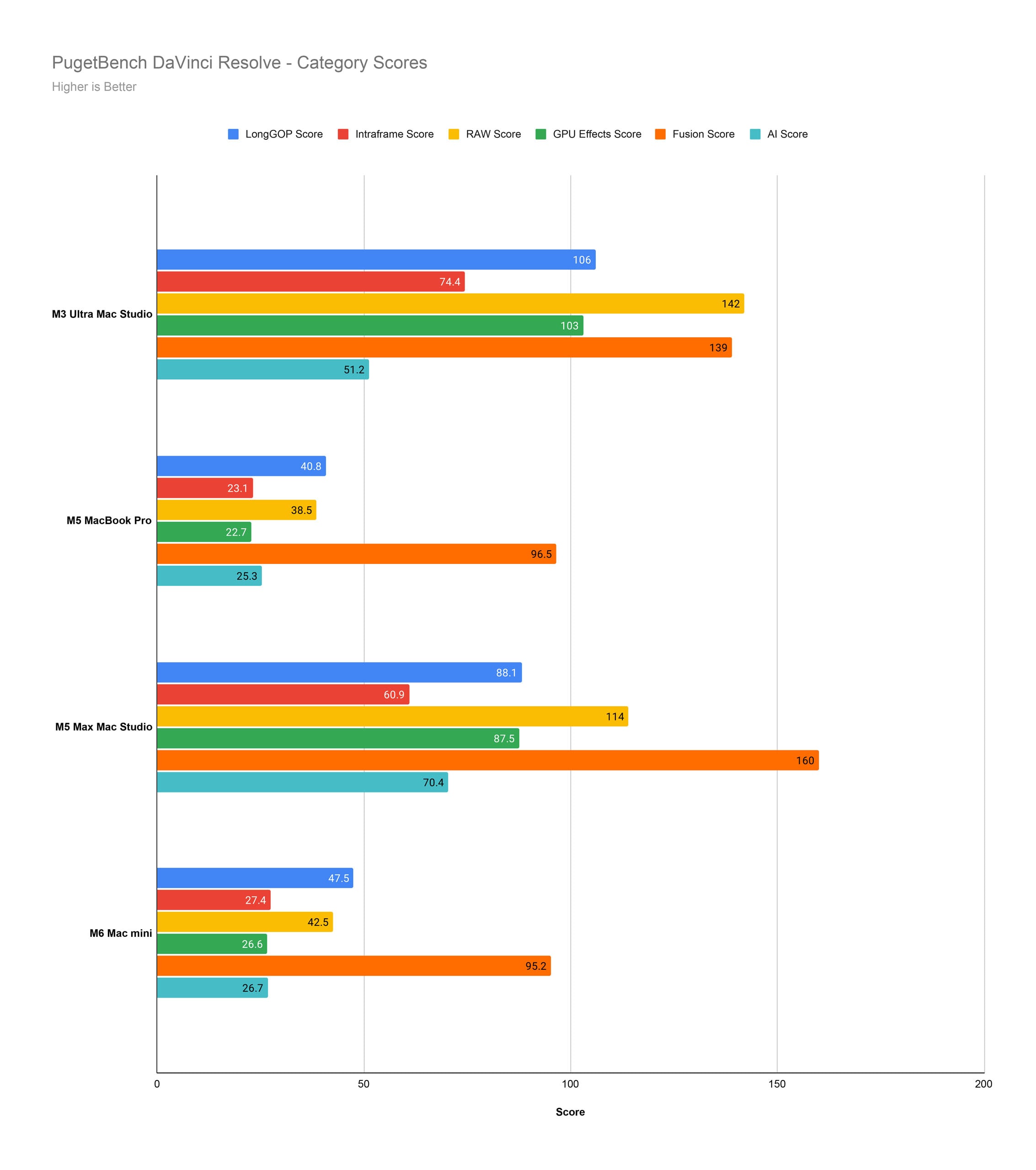
We can still at least see how the Mac Studio with M5 Max compares to the Mac Studio with M3 Ultra, which is a very powerful computer. The M3 Ultra Mac Studio we tested has 256GB of unified memory, too, for what it’s worth. The Mac Studio with M5 Max almost matches it. Bravo, Apple.
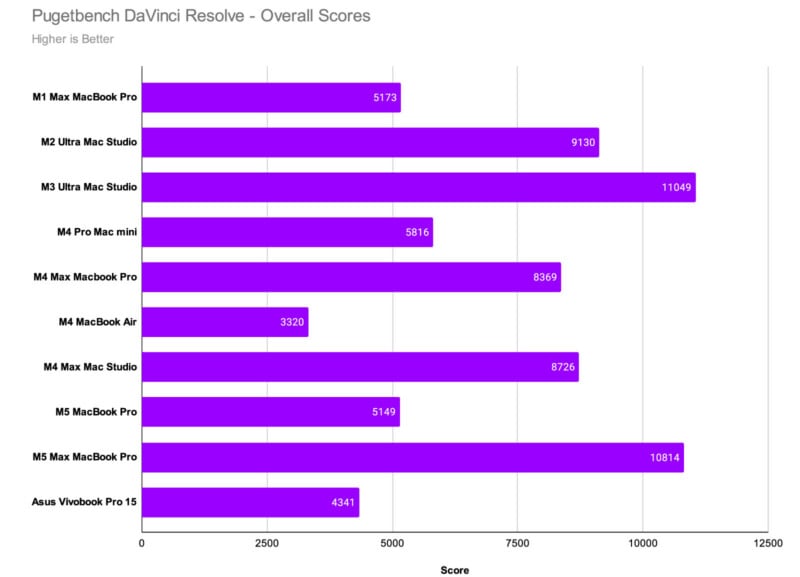
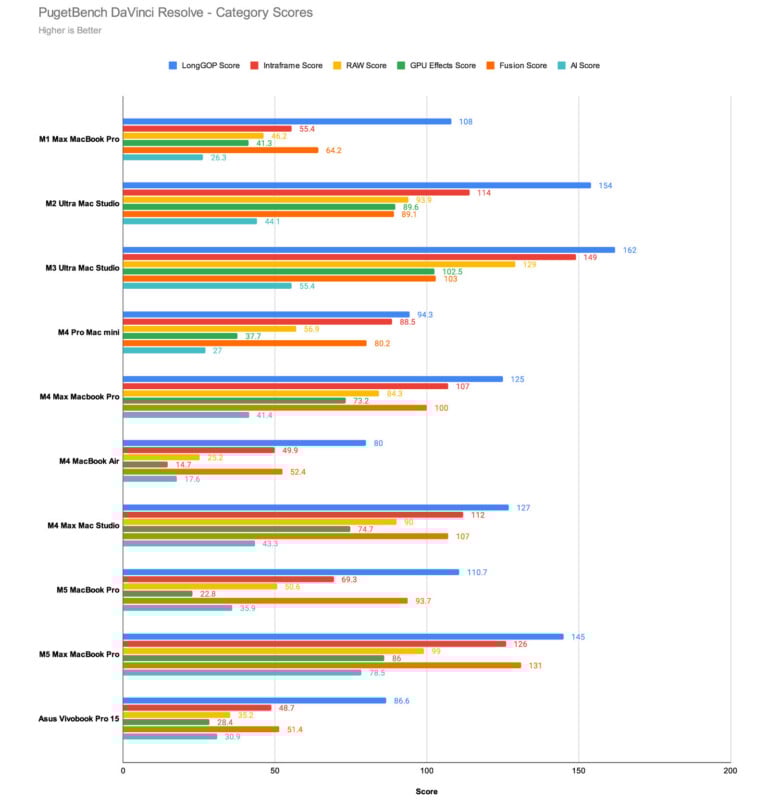
For the sake of it, I’m including the now-outdated chart that shows the M5 Max MacBook Pro. It is not perfect data because the MacBook Pro exists in a different thermal reality than the Mac Studio, but it still shows you the floor relative to a bunch of other Macs. The floor is very high, as you can see.
Mac Studio With M5 Max Performance Takeaways
The Mac Studio with M5 Max is an exceptionally powerful computer. It tears through photo and video editing workflows with no hiccups.
Naturally, the 128GB of unified memory, which is a fairly pricey upgrade option, carries some of the responsibility for the great results, but the M5 Max in general is just very good. I do wish I could tell you how the base model Mac Studio with M5 Max performs, since it’s a very reasonable $2,499, but you can very safely put it somewhere below the M5 Max Mac Studio in our benchmarks but above the base M5 and the M4 Pro. That still leaves a lot of room for great performance.
While we don’t have a Mac Studio with M4 Max in all of our latest benchmarks, we can see it in the Photoshop and Premiere Pro tests. We described the Mac Studio with M4 Max as “all photographers really need” in March 2025. Now it’s the Mac Studio with M5 Max that makes that same promise.
This Is One Heck of a Computer for Photographers and Video Editors
While I remain extremely curious to see what obscene numbers the Mac Studio with M5 Ultra puts up in our benchmark tests, they will do little to take away from what a great machine the Mac Studio with M5 Max is.
The Mac Studio with M5 Max is an outstanding desktop computer with extreme capabilities. No, it’s not technically Apple’s “best” computer in the lineup, but it is undoubtedly the best choice for photographers and video editors seeking a desktop Mac that doesn’t start at $5,499.
“Seeking a desktop Mac” does a lot of heavy lifting for some people. I know that Apple’s very closed-off ecosystem rubs some people the wrong way, and I get it. I don’t agree with most of these complaints because I value computers that just work all the time without any fuss, a utopia made possible in part by Apple’s walled garden. But I do understand the complaints.
You might want to have a desktop computer you can crack open and upgrade whenever you want. Apple doesn’t want you to live in that world, and that’s the reality of the company’s philosophy.
If you can live without being able to install extra RAM or upgrade a GPU whenever you fancy, then the Mac Studio with M5 Max is an outstanding desktop that is not just exceptionally powerful right now, but will remain so for many years to come.
Are There Alternatives?
For photographers, a Mac mini may be all you need. It costs less, still has Thunderbolt 5 ports (just fewer in some configurations), and works very well in Lightroom Classic and Photoshop.
If you’re using an older Mac, like an Intel-powered one or a M1- or M2-series device, you will get a huge upgrade with even an M4-generation Mac. If you can find a Mac Studio with M4 Max at a great price, that’s a completely reasonable choice to save some money.
If you somehow look at the benchmarks above and think they are lacking, then the Mac Studio with M5 Ultra is really your only Apple-branded choice. Enjoy living on the cutting edge.
On the PC side, you are awash in options. You can definitely build your own tower that will shred, but note that inflation in the memory and chip market has hit the PC components landscape especially hard. You can also go the pre-built route, and again, it is choices galore for powerful PCs. I personally really like Maingear’s towers.
Should You Buy It?
Yes, unless you hate getting work done faster, for some reason.
Affiliate Disclosure PetaPixel articles may include affiliate links; we may earn a commission if you buy through one.