Apple’s Photos App is Getting Three New AI-Powered Editing Tools
Apple is enhancing the photo editing tools available in the Photos App with the next version of iOS. Three new features are coming: enhanced Cleanup, Extend, and Reframe.
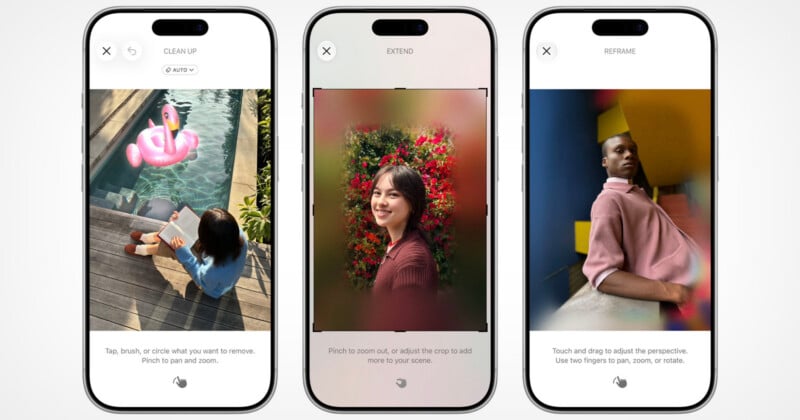
In its WWDC (Worldwide Developer Conference) keynote, Apple showcased enhanced editing tools that are coming to the Photos app. Firstly, Cleanup — the only one of the three highlighted tools that has a form available in the Photos app today — is getting more powerful, with the ability to remove more objects from a scene more naturally. Apple showcased one example where multiple people are removed from an image without the background looking fake.

While that is only new in the sense that it is more powerful, the next two features are truly new to the app.
Firstly, Extend is a feature coming to Photos that is best described as Apple’s take on Adobe’s Generative Expand feature, which allows users to digitally “pull back” from a photo and fill in that missing information using generative AI. Apple showcased an example where a portrait might be too tightly framed, so an editor can create a wider field of view using the new feature. While preparing the tool, the app will show a blurred area that shows how much is being made by AI before using it.

The second feature combines both generative AI and Apple’s spatial maps cleverly into one feature. Spatial Reframing, or Reframe as it is called in the app, takes a photo’s spatial data and allows a user to isolate and move subjects around in that spatially generated digital space. Once a new frame is chosen, the same blurred area shown in the Extend feature will show what parts of the new frame need to be generated with AI. Once done, the final image is a new perspective of an existing scene that is only made possible by using those two technologies.
“The next generation of Apple Intelligence powers tremendous new features in apps across the system. In Photos, Spatial Reframing enables users to improve the composition of a photo after it’s been taken,” Apple says.
These features will all arrive later this year with iOS 27.
Image creditsApple