
Sharge Disk Pro 2 Review: Now That’s How You Take Customer Feedback
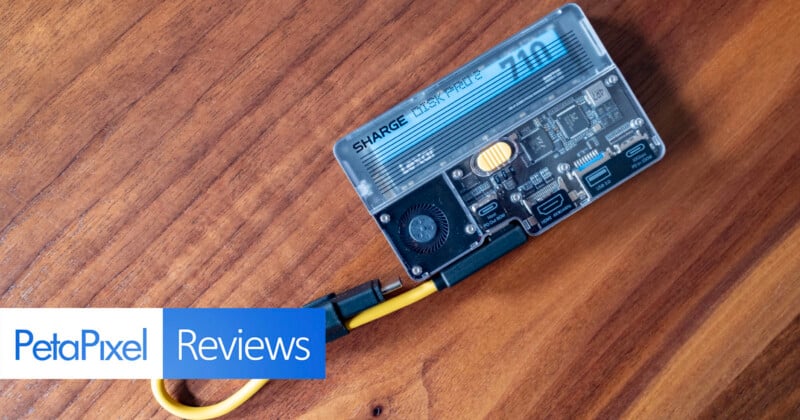
In April, I reviewed the Sharge Disk Pro, the industry’s first actively cooled hub with a built-in SSD. I liked it, but found that big selling point to be the worst feature: the fan was just the right level of pitch to be noticeably annoying. Just a few months later, Sharge released the follow-up, and it might just be the most impressive example I’ve ever seen of a company taking user complaints to heart.


The Sharge Disk Pro 2 might just be the most impressive example I’ve ever seen of a company taking user complaints to heart and addressing every single one of them.
Pros
- User-replaceable SSD
- Significantly quieter and more intelligent fan
- Fan can be toggled off completely
- Improved port selection including SD and microSD
Cons
- USB 3.2 Gen 2 connection is older, slower tech
- Removable cable design is less compact than the original
The updated Disk Pro 2 specifically addresses multiple pain points found in the original: the integrated cable, a fixed SSD, a crammed USB-C port (which made it difficult to use with some larger cables), and a loud fan that could never be fully toggled off (and wasn’t particularly smart). I’m happy to report that all of these updates successfully mitigate everything I didn’t like about the first version.
Sharge Disk Pro 2 Review: Design and Build Quality
One of the things I liked the most about the original Disk Pro was the design: I’m a sucker for transparent plastics so I can see the electronics on the inside. Maybe that’s just due to my 1990s upbringing when that aesthetic reigned supreme, but it feels pretty timeless, and the Disk Pro 2 looks sleek and high-tech.
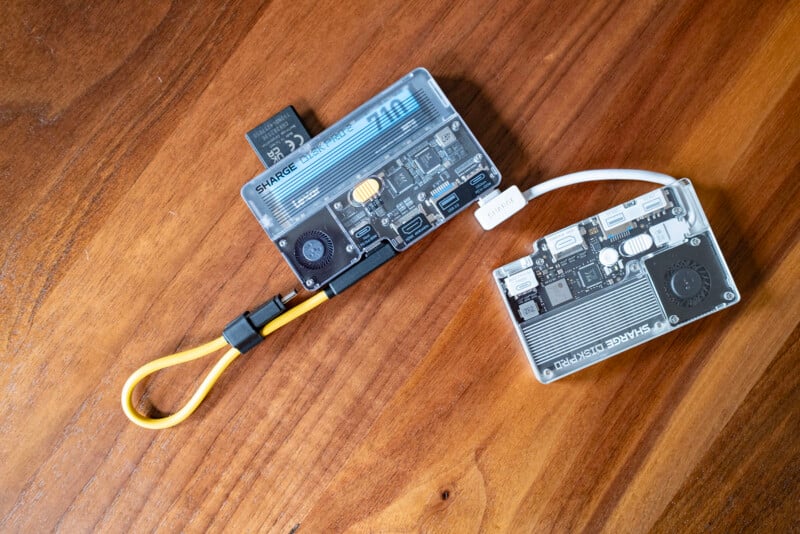
The Disk Pro 2 retained that aesthetic but made some really good changes. Firstly, the integrated cable in the original Disk Pro is no more, replaced instead with a USB-C cable that you probably will rarely remove, but you can in case it gets damaged. That’s really the only reason I’m a proponent of removable cables: while I might not actually remove them, if something happens to that cable, I’m not stuck with a chunk of silicon e-waste.
The included cable, which is a hot yellow instead of the demure white of the original, is specifically designed to sit flush with the body of the Disk Pro at the USB-C connection point. That said, it’s not as well-designed as when Sharge used the integrated cable.
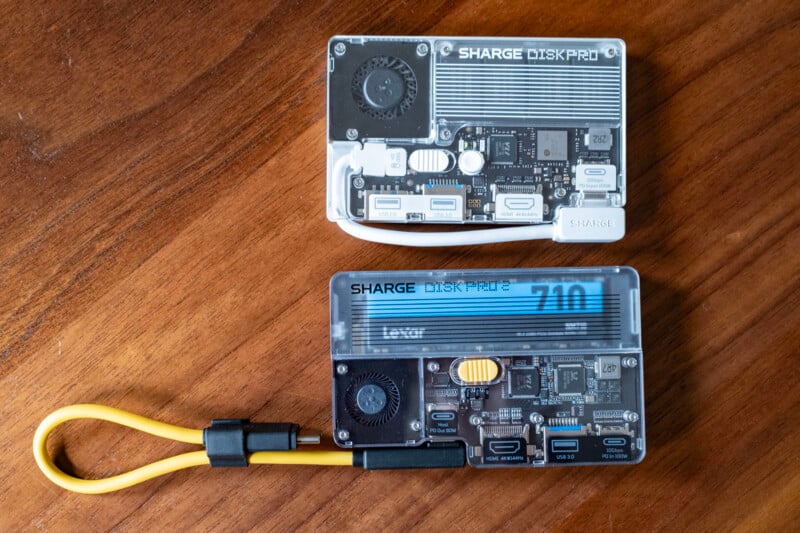
If I could levy one complaint, I think something was lost in translating the integrated cable into a removable one: this new design doesn’t neatly fit together into a compact rectangle. The previous version would clip into one of the USB-C ports so that the cable wasn’t just dangling free. On the Disk Pro 2, the cable does have a little notch to tuck it in so it’s less dangly, but unless you remove the cable entirely, you’re always going to have that length of cable flopping around on the outside. Sure, I could just uncork that cable and store it separately, but I like the neatness of the design when it was one flush unit, personally.
Sharge positions this design as a “lanyard” you can hang the hub from, but I’m not a psychopath: I am not trusting a data cable to keep an SSD attached to my bag, and you shouldn’t either.
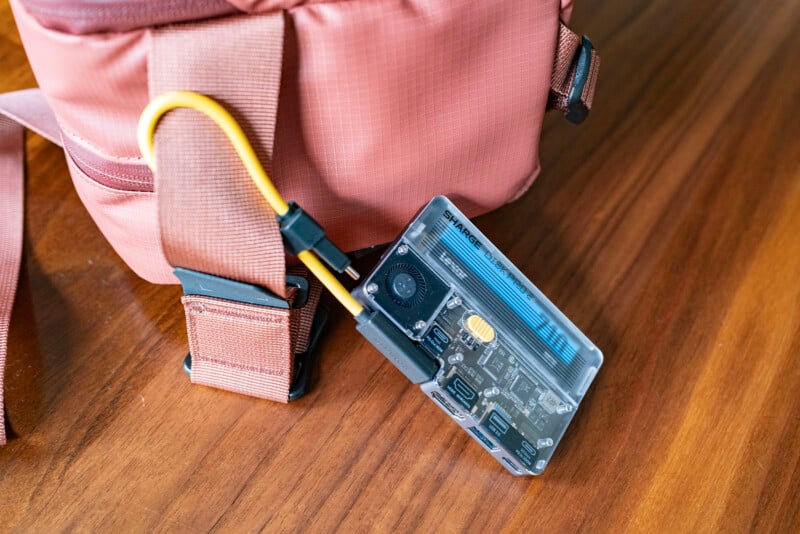
That’s really the only complaint I have from a design perspective, and it’s pretty minor. Beyond that, everything else on the design front is an improvement.
The Disk Pro 2 increases the number of available ports on this hub from five to six: it has both SD and microSD card slots, two USB-C ports (one that supports 80W power delivery and one that supports 10 Gbps and 100W power delivery), a full-size HDMI port, and a USB-A 3.0 port. All of these ports fit in a form factor that’s the diameter of a credit card and the thickness of a Ridge wallet—that’s impressive.
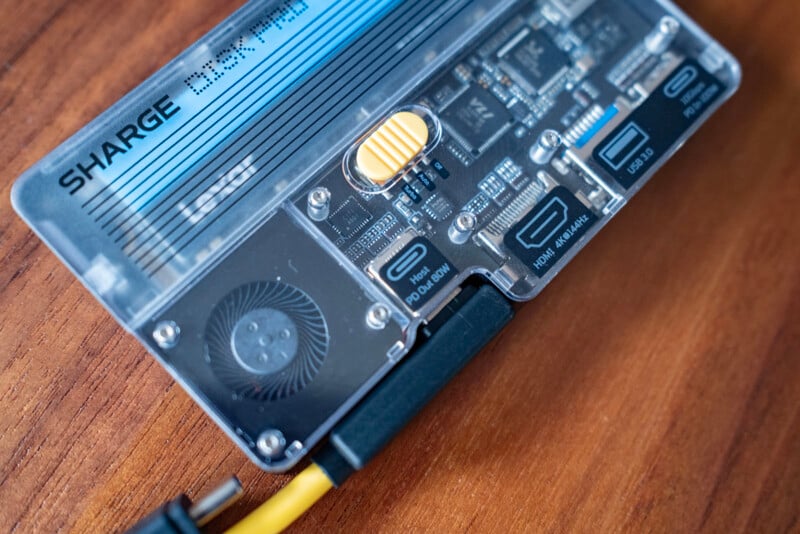
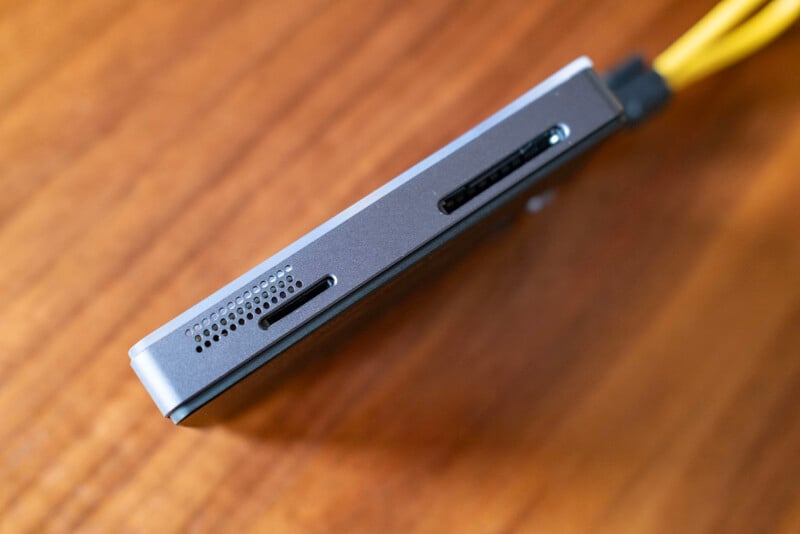
The magnetic back returns and lets this drive snap directly to the back of the iPhone. If your smartphone doesn’t have a magnet, Sharge includes a thin magnet that you can adhere to anything you like, including the back of your computer or handheld gaming console, if you like doing that.
Perhaps most impressive was Sharge’s complete overhaul of the fan. The Sharge Disk Pro only had two settings: Auto and Turbo. In both cases, the fan made the worst, high-pitched whine that I could imagine. It was so bad I was willing to accept thermal throttling if it meant I didn’t have to hear it. Thankfully, this new fan is not only quieter, but you can also toggle it off if you don’t want to hear it at all.
Sharge successfully got rid of the irritating high pitch of the last fan, and this one is actually more powerful: it now has up to 12,000 RPM (up from 10,000). Sharge also increased the size of the air intake and made it react to the hub’s temperature more intelligently according to the SSD’s real-time temperature.
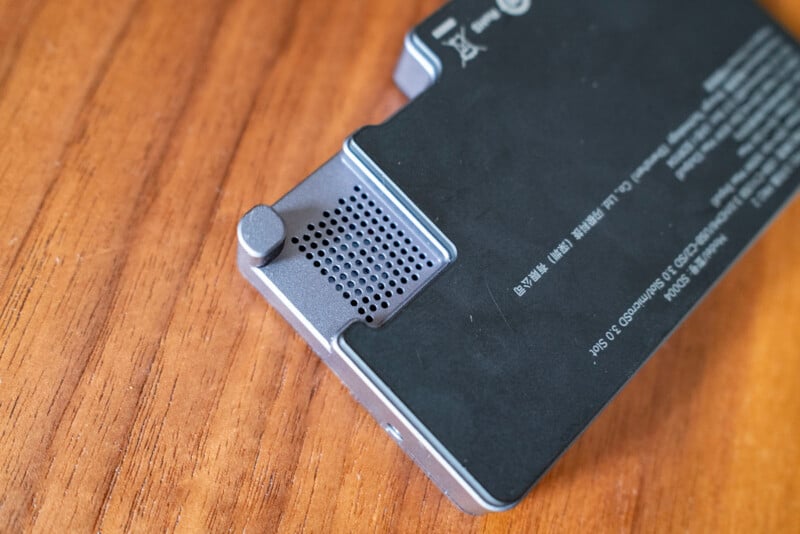
Sharge also listened to feedback that users didn’t like the idea of being hamstrung to a single included SSD and wanted the option to select their own. So, for the Disk Pro 2, Sharge doesn’t include an SSD at all and instead allows users to easily put their own in. The benefit of switching to this method not only gives buyers more choice, but it also allowed Sharge to dramatically cut the cost of the device since it no longer was responsible for covering the cost of memory. The base $269 option has fallen to $110 (and that’s often discounted to $90). The value proposition feels higher, although if you want to use an SSD, you will have to source your own, and that’s not cheap in 2026. The Disk Pro 2 can accept an M.2 or B&M NVMe SSD at up to 8TB capacity.
Sharge Disk Pro 2 Review: Performance
Because the SSD you might put in the Sharge Disk Pro 2 is almost assuredly not the same one that I have in it, doing a full range of speed performance tests isn’t particularly useful information: your mileage is going to vary.
That said, I did stress test the hub to see if and how I could get the fan to toggle on and if I noticed any heat throttling. So, for the record, my Disk Pro 2 is equipped with a 2TB Lexar 710 M.2 2280 PCIe Gen4x4 NVMe SSD. This SSD is capable of up to 5,000 MB/s transfer speeds, but because of the USB-C technology Sharge employs, I am capped at significantly less than that.
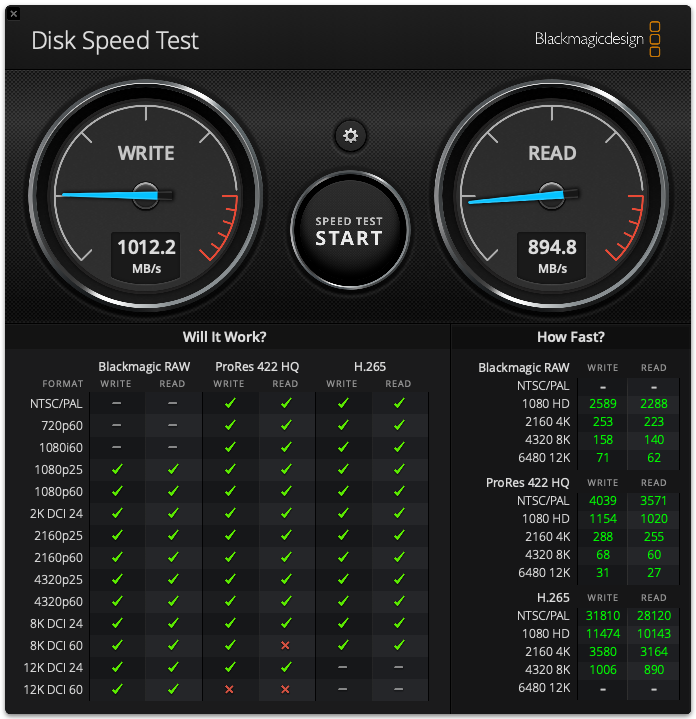
As you can see, you should expect around 1,000 MB/s transfer speeds with the Disk Pro 2, which is plenty for working with photos and most HD and 4K video, but it is not ideal for large swaths of high-resolution video editing (think multiple streams of 6K, 8K, or 12K video clips or most RAW video codecs). It is by no means bad, but it’s not what I’ve come to expect out of USB 4.0 or Thunderbolt 5 hubs and drives.
When under load, the Sharge Disk Pro 2 rarely activated its fan when on Auto mode, and I did not see any evidence of thermal throttling. If you’ve got it attached to a gaming console or an iPhone that’s really pumping out heat, or if you’ve got a bunch of things plugged into it, then you’ll hear that fan come on occasionally. Sometimes, you might even need Turbo mode. Either way, you’ll likely not be bothered by the frequency of the fan’s sound: it’s very quiet—I registered it at around 42 dB, which isn’t much louder than my ambient office sound. It’s not quite as silent as Apple’s Mac Studio fan, but I’m way more tolerant of it than I was the first time around.
The microSD and SD card slots both function as expected. They work with UHS-II cards (which I effectively expect these days given how most cameras have made that jump), and the performance is as you would expect with SD cards: as fast as the cards are capable of going. SD cards aren’t very good when it comes to sustained speed, so don’t expect to get anywhere near the transfer speeds the SSD is capable of hitting, but the fact you can run a single cable into your computer and manage an SD, microSD, and even another SSD all at the same time is pretty awesome.
Remember, this is not just an SSD, but a tiny hub that you can run a lot off of when traveling. Just bear in mind, all memory you plug into this hub will be capped at the maximum throughput of the Disk Pro 2’s USB, which is the only real downside of using this system as a hub.
I would have really liked to have seen Sharge give us a bit more future-proofing with the USB technology employed here: the Disk Pro 2 only has USB 3.2 Gen 2, which caps at 10 Gbps. Standard USB 4 quadruples that to 40 Gbps, and the newer Gen 2 version doubles that to 80 Gbps. Yes, the components for those connections are more expensive, but given the cost of the hub fell significantly versus the first-generation Sharge Disk Pro, I would have been happy to pay a bit more to get more speed.
Sharge Disk Pro 2 Review: The Poster Child for Taking User Feedback
I can’t remember the last time a company not only listened to user feedback so acutely but also made changes and released a second iteration within so short a time. It felt like I had just reviewed the original Disk Pro when Sharge told me it had already taken feedback to develop a version 2. I’ve had this one for the past couple of months and traveled with it and used it extensively and found it to be a far more pleasant, vastly improved experience versus the first-generation hub.
This is legitimately an excellent, well-priced, compact system for both professionals and gamers. If you want an all-in-one SSD and hub travel solution, this is my best recommendation right now.
Are There Alternatives?
You can find all manner of compact hubs and docks on Amazon, but none of them have the excellent design and proven history of customer support that Sharge does here. Anker has hubs, but none of them include the ability to add an SSD. CableTime also offers a 7-in-1 magnetic hub that looks like a direct design copy of the Disk Pro, right down to the USB components used. I’d rather have Sharge’s.
Should You Buy It?
Yes. Sharge has shown that it is listening to customer feedback and making adjustments lightning-fast in order to address concerns. The Sharge Disk Pro 2 corrects every major pain point of the original without sacrificing anything about what made that product pretty great in its own right.
Affiliate Disclosure PetaPixel articles may include affiliate links; we may earn a commission if you buy through one.