ZoneLab Helps Analog Photographers Determine the True ISO of Their Film
A new analog photography app allows film shooters to determine the precise ISO of any given roll, as the number on the box can sometimes be inaccurate.
Built as a passion project, Evan Mathis announced ZoneLab on Reddit and explains that he wanted to chart and catalog the effective ISO of various combinations of film, developer, camera, and lens in the Mamiya RB system that he uses.
“As I shared early screenshots and testing results with some of my other photo nerd friends, I was asked quite often if I would ever consider making this into a desktop app that others could use,” Mathis explains on the ZoneLab website.
“I set out to make this an app to help film photographers log and chart the effective ISO of their specific film and development processes through Zone System testing methodology.”
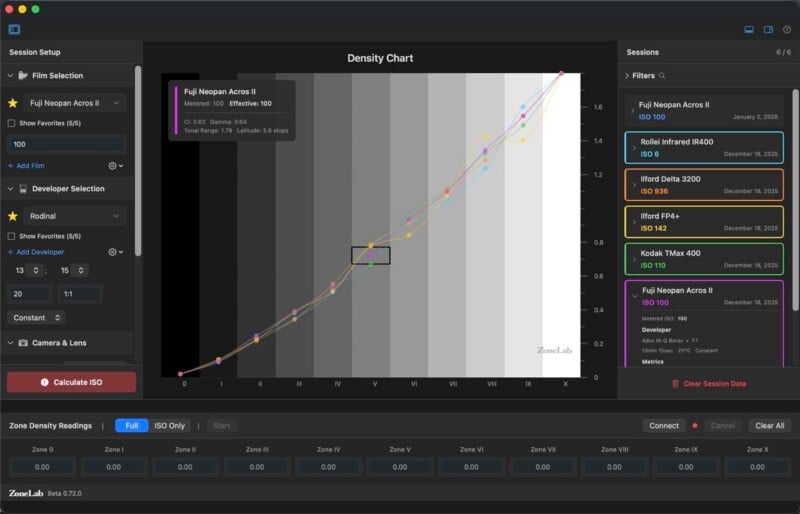
Mathis acknowledges that while ZoneLab won’t make the user a better photographer, it does enable them to “establish a consistent, repeatable process” that eliminates as many variables as possible. ZoneLab can also calculate the setup’s contrast index, gamma, tonal range, and exposure latitude.
How Does it Work?
After registering the film stock, the processing method, the camera and lens, and the gray card they’re using in ZoneLab, the photographer must then shoot 10 photos of the gray card with consistent lighting.
“Meter the grey card at the film’s box speed ISO to determine your base exposure,” Mathis explains. “Then shoot 10 frames with one-stop increments”.
The photographer starts at Zone I, which is -4 stops, and shoots all the way through to Zone X, which is +5 stops. It’s important to keep the lighting the same all the way through.
Then it’s time to develop the film. Mathis urges the photographer to maintain “consistent temperature, time, and agitation”, as these are all critical variables.
Once the film is dry, each zone is measured with a densitometer. Mathis says that if the photographer doesn’t have a calibrated device that can measure degrees of darkness, then any “quality photo lab” will have one.
Once the photographer has those densitometer values, they can be entered into ZoneLab, where there is a “Calculate ISO” button.
ZoneLab is not for the casual photographer. It’s aimed at film shooters who deeply care about how all the variables of the analog process can affect their overall picture aesthetic.
The Phoblographer notes that ZoneLab also allows photographers to compare different photo sessions and track developer changes.
ZoneLab is in beta and is available via TestFlight on macOS (requires Sonoma). To install it, head to the website.
Yesterday, PetaPixel featured FilmMeter, an app that combines multiple useful tools for analog shooters.
Image credits: ZoneLab