61% OFF VideoProc Converter AI: Annual Upgrades for AI Image/Video Enhancement for Photographers
In recent years, photography and videography have evolved rapidly — sensors are stronger, and even phones can shoot impressive footage. Yet we still run into familiar challenges: low light makes photos grainy, fast action blurs faces, old family films look soft, and audio often picks up background hum.
Full Disclosure: This story is brought to you by VideoProc
As an AI-powered image & video enhancer and a complete media toolbox, VideoProc Converter AI introduces multiple feature upgrades throughout the year to fix these problems with the next-level outputs. It helps correct noise, boost sharpness, upscale low-resolution photos, and recover fine textures that cameras couldn’t capture.
What’s new in the latest version:
- Better Face Restoration for more natural, detailed facial repairs.
- DPI control for more precise adjustments in Image AI.
- 40-80% faster AI video upscaling with updated V3 models, modern codecs (AV1/HEVC/H.264), and MKV output that preserves all subtitle tracks.
- AI Noise Suppression to reduce background noise and AI Vocal Remover to separate vocals and instrumentals.
Existing users can always upgrade to the latest version for free. New users can take advantage of the Year‑End Sale to enjoy a Lifetime License discount of up to 61%.
61% OFF Year‑End Sale: One‑Time Purchase, Lifetime Updates
To celebrate the new upgrades, VideoProc Converter AI is rolling out its biggest promotion of the year. You can get a lifetime license at up to 61% OFF, with no recurring fees.
- $34.95 Lifetime License for 1 device, instead of $89.95
- $54.95 Lifetime License for 5 devices, instead of $159.95
- Free upgrades forever
- 30-day money-back guarantee
- 4 Premium Software Gifts at $0 with any purchase
This promotion is limited. The price will rise as the sale sells out. Buying now locks in the best price.
Learn more about the Year-End Sale >

Upscale and Enhance Low‑Quality Photos
Low-light photos often suffer from grainy noise, especially when shooting at higher ISO. Everyday shots can easily turn blurry due to movement or slower shutter speeds. Even beyond these common issues, images such as old family photos, AI-generated artworks, or quick phone snapshots may appear pixelated or full of compression artifacts.
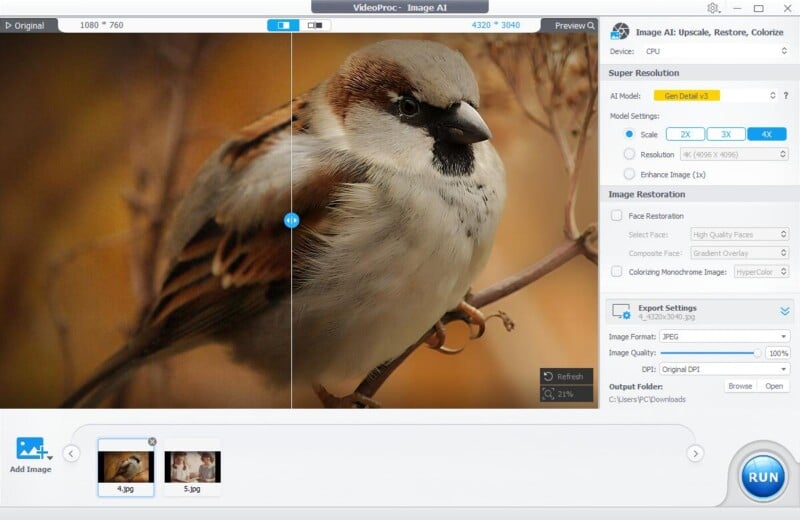
With the Image AI module of VideoProc, the Super Resolution engine can automatically denoise, deblur, add more details, and upscale images without artifacts or loss of detail. Choose 1x, 2x, 3x, 4x upscaling to enlarge the image to an output resolution of up to 10K.
Ideal for:
- Post-editing: fixing image quality loss after cropping or enlarging.
- Printing or framing: supports 1000 DPI high‑resolution output.
- Enhance and restore old photos or family albums without losing details.
The latest V3 models enhance detail and work with both real photos and anime‑style images.
- Gen Detail V3: Add fine details, clarity, and sharpness — especially in skin, hair, and subtle textures.
- Real Smooth V3: Remove noise, restore flaws, and upscale images. Deliver a brighter and smoother appearance.
In practice, this means crisp prints, sharper digital images, and artwork that holds up even when zoomed in. Batch processing lets you run a whole folder overnight, saving time.
Sharpen Portraits and Restore Memories
Portraits can be ruined by soft focus, shallow depth‑of‑field, or subject movement. The improved Face Restoration in VideoProc Converter AI detects faces and improves clarity, with precise details for hair, skin, or lips. There are three AI models you can choose from, depending on the type of photo:
- High Quality Faces: Best for restoring faces that are already relatively clear in the photo.
- Center Face: Focuses enhancement on the main subject positioned in the center of the frame.
- All Faces: Restores every face in the image, ideal for group portraits or crowd shots.

In addition, the program also offers an AI Coloring Monochrome Image feature to breathe new life into black-and-white photos. It adds vibrant colors, transforms old and faded heritage images into true-to-life modern pictures with restored and sharpened details.
Polish Your Videos in Every Way
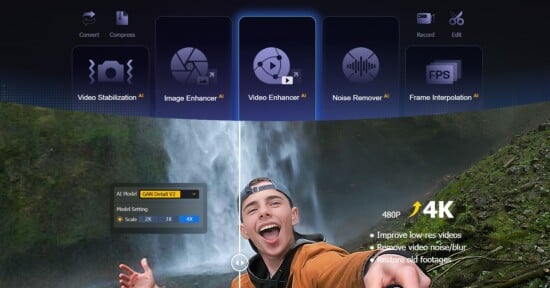
VideoProc Converter AI’s Video Super Resolution enhances low-resolution footage, such as 360p or 720p, and upscales it to crisp, detailed 4K. Whether it’s older material like VHS tapes, DV recordings, or blurry phone clips, the AI engine restores clarity and delivers a noticeably sharper look.
For those shooting action scenes or cinematic footage, there is Al Frame Interpolation, which increases the frame rate from 24/30fps up to 60/120/240fps, allowing slow-motion up to 20x slower without annoying stutter.
At the same time, Al Stabilization is excellent for stabilizing handheld recordings, reducing the micro-vibrations typical of vlogs or videos recorded with smartphones while maintaining natural movement.

Clean Up Audio Like a Pro
On the audio side, VideoProc Converter AI includes an Audio AI module designed to clean up interviews, podcasts, and recordings in noisy environments. The newly added AI Vocal Remover can separate vocals from instrumentals, creating karaoke tracks or getting vocal tracks. Some use cases include ambient noise removal for early equipment videos and audios, as well as music composition and editing.
A True Multimedia Swiss Army Knife
Beyond AI enhancement, VideoProc Converter AI works as a complete multimedia suite. Everyday users can convert hundreds of video and audio formats, back up DVDs, download content from over 1000 sites, and record screen in up to 4K. For professional creators, it allows you to compress large files, perform quick edits in batch, and adjust advanced parameter settings. Hardware acceleration ensures fast processing even with high‑resolution footage.
Year-End Sale 2025: An Offer Not to Be Missed
VideoProc Converter AI is more than a converter. It’s an AI‑powered toolkit for photographers, videographers, and creatives who want professional results without complexity. The latest release brings faster Super Resolution, better Face Restoration, and modern codec support.
Buying the lifetime license during the current promotion gives you all future upgrades, free bonus software, and huge discounts of up to 61% OFF. Now is an excellent time to invest.
Click to seize the Year-End Sales while it’s live >

Full Disclosure: This story is brought to you by VideoProc