LensNode V1 Brings Realistic Lens Simulations to DaVinci Resolve

LensNode brings advanced, data-driven lens simulations to DaVinci Resolve. Using real-world optical data and GPU-powered performance, the plugin delivers authentic distortions, aberrations, and bokeh effects for filmmakers and post-production professionals.
Update 9/30: Initially, LensNode planned to provide permanent/lifetime accounts with updates for the first 12 months and updates would only be available after that for an optional, additional $49 annual “maintenance fee.” The company has removed the maintenance fee due to feedback.
What LensNode Does
PetaPixel initially covered a beta version of LensNode this summer, but now LensNode is fully available as a version 1.0 release, ready for showtime.
The plugin is designed to replicate the character of physical glass by translating precise optical measurements into digital profiles. From distortion to chromatic aberration and coma, these characteristics are modeled to interact organically, producing results that feel both authentic and cinematic, giving users results closer to what an experienced VFX artist might achieve through manual lens simulation.
The plugin is GPU-powered, which makes it suitable for high-resolution workflows while maintaining real-time usability. It is designed to integrate into professional grading pipelines, supporting ACES linear internal processing to preserve color fidelity and achieve high bit-depth output.
Key Features
LensNode includes eight primary effects, each modeled after the natural quirks of physical glass. Distortion serves as the foundation, providing accurate geometric warping to match real lenses. Coma is recreated with particular attention to detail, simulating the light streaking that often defines the character of vintage optics. Chromatic aberration is faithfully reproduced, splitting light wavelengths in hue-accurate ways with smooth falloff across the frame.
The plugin also introduces fringing, capturing the subtle color shifts that occur around high-contrast edges, and a bokeh blur engine that mimics lens-specific blur shapes, including swirly bokeh. Bloom brings glowing highlights with an exponential falloff, delivering a softness comparable to diffusion filters. Finally, vignette and color cast simulations round out the toolkit, adding realistic edge darkening, subtle hue shifts, and lens-specific tinting. All of these effects are animatable and can be combined or masked for maximum creative control.
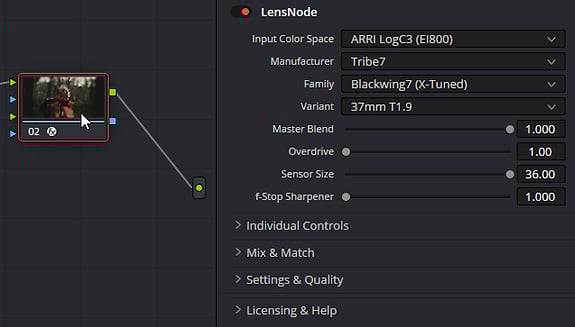
Beyond recreating lenses, LensNode introduces features that push beyond traditional optics. The Mix and Match tool lets users combine traits from different lenses, such as applying the coma of a Helios 44-2 to a Canon FD, creating “impossible lenses” that do not exist in the real world.
An Overdrive mode exaggerates lens characteristics with a single slider, while Sensor Size emulation adjusts how the same lens might behave on different formats. Every parameter is animatable, offering flexibility for stylized effects.
LensNode Lite
Alongside the full version release, the company unveiled LensNode Lite, a streamlined edition designed for users who prefer fewer options but faster workflows.
Lite runs on the same core lens modeling technology but is limited to eight curated presets, excluding certain advanced tools such as sharpening, sensor size simulation, and the full lens profile library. This makes Lite a more affordable entry point for creators who want to enhance footage with stylized looks without diving into detailed adjustments.
Use Cases for Filmmakers and Video Editors
LensNode is designed for a broad range of post-production applications. Cinematographers can use it to replicate the look of specific vintage lenses, while VFX artists may find it valuable for ensuring lens-matched compositing. Editors and colorists can also use LensNode creatively, pushing the plugin’s exaggeration tools to achieve stylized visuals for music videos, commercials, or experimental projects.
The developers plan to expand LensNode beyond Resolve, with potential ports to platforms such as Baselight and Adobe Premiere Pro, depending on the success of the initial launch. The library of profiled lenses is also expected to grow, giving users access to an expanding toolkit of classic and modern glass.
Pricing and Availability
LensNode is available in three options with early-bird pricing: Lite with seven curated presets for $49 (regular $59), Annual with full features and 35+ lens profiles for $99 per year (regular $129), and Permanent for lifetime access to all tools and profiles for $249 (regular $299). All licenses include two floating seats.
Image credits: LensNode