Posts Tagged ‘cs5’

Adobe Backtracks, To Offer Special CS6 Price For CS3/CS4 Till End of 2012

Adobe Backtracks, To Offer Special CS6 Price For CS3/CS4 Till End of 2012 cs5 mini

Adobe caused a stir last November after changing its upgrade policy to only cover one version back instead of three. This meant that only Photoshop CS5 owners would qualify for the upgrade price on CS6 when it’s launched, leaving CS3 and CS4 owners the not-so-nice option of buying the CS5 upgrade before buying the CS6 one. Perhaps in response to the angry customer response, Adobe announced a “special offer” for CS3 and CS4 owners today:

[...] we want to make sure our customers have plenty of time to determine which offering is best for them. Therefore, we’re pleased to announce that we will offer special introductory upgrade pricing on Creative Suite 6 to customers who own CS3 or CS4. This offer will be available from the time CS6 is released until December 31, 2012.

We’ll find out just how much of a discount those users will receive once CS6 is released. It also appears that Adobe isn’t planning to restore the old upgrade policy — today’s announcement is more of a one-time fix for angry customers.

(via Adobe via John Nack)


Image credit: Adobe Creative Sweet CS5 by pcfishhk

The New and Improved Sharpen Tool in Photoshop CS5

The Sharpen Tool in Photoshop has always been useful in that it allows you to quickly sharpen specific areas in a photograph, but a major problem was that it had the tendency to introduce nasty artifacts into the image. Alternative methods that avoid this issue (e.g. using a new sharpened layer) became popular, leaving the Sharpen Tool to gather dust on many users’ tool pallets.

Well, if you’ve recently upgraded to Photoshop CS5, you might want to take another look at the tool. They’ve quietly introduced a new feature (on by default) called “Protect Detail”, which allows for brush-based pressure-sensitive sharpening without the annoying artifact problem.

(via John Nack via Photography Bay)

Use Small Selections to Improve Results with Content Aware Fill

Photoshop product manager Bryan O’Neil Hughes offers this quick tip for getting better results with Content Aware Fill: use smaller selections for more accurate results.

(via John Nack)

Plugin for Saving Large Files 20x Faster in Photoshop CS5

Plugin for Saving Large Files 20x Faster in Photoshop CS5 3315178386 e119a5992d

If you’ve ever tried saving a layered file in Photoshop CS5 that’s more than a 1GB in size, you’ve probably experienced pretty sluggish performance. This is because the program always does image compression on the file that shrinks the file size at the expense of your workflow. If you’re rich in hard drive space but short on time, Adobe has released a plugin called that lets you disable image compression, speeding up the saving of large layered files by 20x!

Save PSD, PSB images without compression (via Mac Performance Guide via Rob Galbraith)


Image credit: Speedometer by RevTimMedia

Adobe Nav Lets You Control Photoshop from Your iPad

Adobe announced new tools today that lets developers create tablet apps — called Photoshop Touch Apps — that interact directly with Photoshop CS5. They also created a few apps to showcase some of the possibilities of using a tablet while working in Photoshop, including one called Adobe Nav. Basically it turns your iPad into a separate interface for controlling Photoshop, allowing you to select tools, customize the toolbar, or manage your open files by conveniently showing them as thumbnails. It’ll be available for $2 starting in early May, but we can’t wait to see what other apps developers will unveil before then!
Adobe Nav (via Photojojo)

Putting Faces to the Names Found on Photoshop’s Splash Screen

Every time you launch Photoshop, you’re greeted momentarily with a splash screen showing a cloud of names that give credit to the people who have worked on the program. This “Behind the Splash Screen” video introduces you to some of the people whose names are found there, and provides some background on how Photoshop CS5 was developed (as well as the huge challenges they faced).

Read more…

Adobe Looking for the Next Photoshop Evangelist

Adobe Looking for the Next Photoshop Evangelist photoevan

Adobe is running a unique contest right now in search of the “next Photoshop evangelist”. Sadly, the winner isn’t given a special “evangelist” position in Adobe’s marketing department, but rather the prize package is pretty typical: a copy of CS5 Design Standard and a trip to Photoshop World in 2011 (which includes airfare, lodging, meals, and a chance to demo the winning tutorial).

Read more…

Photoshop CS5 Free Trial Now Available

Photoshop CS5 Free Trial Now Available photoshopcs51

For those of you who have been itching to try the new Content Aware Fill and Puppet Warp features in Adobe Photoshop CS5, today’s your lucky day. CS5 became available for purchase through the Adobe website, and you can now download a 30-day free trial of the software just to play around with the amazing new features if you’re not sure yet you want to upgrade.

If you’ve tried it out already, do you think the new features live up to the hype?

Adobe Unleashes Photoshop CS5

Adobe Unleashes Photoshop CS5 photoshopcs5After building up anticipation by releasing sneak peeks at upcoming features such as Content-Aware Fill and Puppet Warp, Adobe has unveiled Photoshop CS5, the latest version of its popular image editing program.

Photoshop CS5 and Photoshop CS5 Extended are expected to start shipping next month at the price of $699 and $999, respectively. If you already own Photoshop and only need the upgrade, it’ll set you back $149 or $349.

Here’s a quick overview of some of the new features:

Better HDR

Companies like HDRSoft (makers of Photomatix) can’t be too pleased about this one. Adobe claims to have greatly improved the HDR capabilities in this new version. In addition to greater speed and accuracy, they now have ghost artifact removal (to combat camera shake) and the ability to emulate the look of HDR using single photographs.

New Painting Module

Adobe Unleashes Photoshop CS5 paintingcs5thomashawk
CS5 now features a painting module through which you can “paint” over a photograph. This feature flips photorealism around and allows you to turn your images into rather convincing paintings.
Instead of using an artistic filter, which can produce unreliable results, the painting tools allow for a more organic feel: the program shows a live view of the virtual brush tip as you paint.

Lens Correction Feature

Adobe Unleashes Photoshop CS5 distortioncorrection

Another major feature is almost a subtle addition compared to the other features, but it makes a huge difference in the way we can edit. Adobe is including a lens correction feature which corrects for distortion, chromatic aberration and vignetting based on what lens you used according to the EXIF data. The folks over at dpreview predict that CS5 will come with preset lens profiles – much like color profiles – for Nikon and Canon lenses. Photoshop also enables the ability to customize your own profiles with the possibility of sharing profiles with a larger community of users.

Adobe has also taken several pointers from community feedback with regards to the lens correction filter options.

Adobe Camera Raw 6: Non-Destructive Editing, Add and Remove Grain

Adobe Unleashes Photoshop CS5 adobecameraraw6
Adobe Camera Raw 6 alone is plenty to get excited about. It uses the same processing engine as the Lightroom 3 beta and supports more than 275 camera models. It also allows nondestructive editing not only for raw files, but also for JPEG and TIFF.
There’s a new Grain feature which mimics the look of film grain, which provides an alternative to the film grain artistic filter, but is also nondestructive and can add an evenly dispersed grain to the entire image.
On the opposite spectrum, ACR also has improved noise removal controls that can prove quite handy when shooting at a high ISO.

Improved Edge Detection

In each iteration of Photoshop, Adobe has constantly improved its ability to distinguish edges for making selections and masking. CS5 has new adaptive selection-edge modification controls, such as Smart Radius, which selects the best edging style when selecting different types of subjects. Adobe has also added extra view modes to preview selections. The other features include Refine Radius and Erase Refinements, which can be particularly helpful when trying to reduce and remove background colors that show up through a subject’s hair.

Content-Aware Fill

Adobe Unleashes Photoshop CS5 content awarefill

Content-Aware Fill has received the most attention in CS5 preview coverage, and it’s no wonder why. This feature provides the ability to remove parts of a photograph and replace the void with a practically seamless filled area. You can either make a selection using Content-Aware Fill, or use the spot healing brush on the Content-Aware Fill setting.

Puppet Wrap

Adobe Unleashes Photoshop CS5 elephant

Puppet Warp allows elements in a photograph to be convincingly repositioned using anchor points.  Anchor points act like joints, and when appropriately placed, can be used to manipulate arms, legs, and other elements of an image composition. Like most of these new features, it’s another impressively powerful tool for creative individuals.


Image Credits: Thomas Hawk and Adobe Systems

Sneak Peek at Photoshop CS5 Puppet Warp

In addition to Content Aware Fill, Puppet Warp is another powerful feature to be included in Adobe’s upcoming Photoshop CS5.

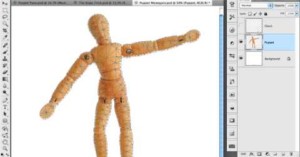
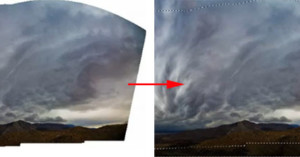
In this demo, it’s used on a layer containing a wooden mannequin, allowing the limbs to be manipulated as you would be able to do in real life prior to photographing it. The feature is then applied to rope, digitally tying it into a knot, and finally to fix distortion in a multi-photo panorama.

While this feature isn’t as mind-boggling as Content Aware Fill, it’s definitely something those of you excited about CS5 can look forward to.