Posts Tagged ‘photoshopcs5’

Photoshop’s Content Aware Fill is Only the Tip of the Iceberg

Demos at graphics conferences are often interesting to watch because they offer a sneak peek at technologies that may soon become available to the general public. The video above is a demo for “PatchMatch“, an algorithm developed by researchers at Princeton and Adobe. Although you might be unfamiliar with PatchMatch, you’ve probably heard of its most famous feature: Content Aware Fill. Only a small piece of this amazing technology was introduced in Photoshop CS5, so the amazing image manipulations seen in this demo are likely a sneak peek into what we’ll be seeing in Photoshop CS6.

PatchMatch (via DigitalPixels)

The New and Improved Sharpen Tool in Photoshop CS5

The Sharpen Tool in Photoshop has always been useful in that it allows you to quickly sharpen specific areas in a photograph, but a major problem was that it had the tendency to introduce nasty artifacts into the image. Alternative methods that avoid this issue (e.g. using a new sharpened layer) became popular, leaving the Sharpen Tool to gather dust on many users’ tool pallets.

Well, if you’ve recently upgraded to Photoshop CS5, you might want to take another look at the tool. They’ve quietly introduced a new feature (on by default) called “Protect Detail”, which allows for brush-based pressure-sensitive sharpening without the annoying artifact problem.

(via John Nack via Photography Bay)

Use Small Selections to Improve Results with Content Aware Fill

Photoshop product manager Bryan O’Neil Hughes offers this quick tip for getting better results with Content Aware Fill: use smaller selections for more accurate results.

(via John Nack)

Plugin for Saving Large Files 20x Faster in Photoshop CS5

Plugin for Saving Large Files 20x Faster in Photoshop CS5 3315178386 e119a5992d

If you’ve ever tried saving a layered file in Photoshop CS5 that’s more than a 1GB in size, you’ve probably experienced pretty sluggish performance. This is because the program always does image compression on the file that shrinks the file size at the expense of your workflow. If you’re rich in hard drive space but short on time, Adobe has released a plugin called that lets you disable image compression, speeding up the saving of large layered files by 20x!

Save PSD, PSB images without compression (via Mac Performance Guide via Rob Galbraith)


Image credit: Speedometer by RevTimMedia

Adobe Nav Lets You Control Photoshop from Your iPad

Adobe announced new tools today that lets developers create tablet apps — called Photoshop Touch Apps — that interact directly with Photoshop CS5. They also created a few apps to showcase some of the possibilities of using a tablet while working in Photoshop, including one called Adobe Nav. Basically it turns your iPad into a separate interface for controlling Photoshop, allowing you to select tools, customize the toolbar, or manage your open files by conveniently showing them as thumbnails. It’ll be available for $2 starting in early May, but we can’t wait to see what other apps developers will unveil before then!

Adobe Nav (via Photojojo)

Putting Faces to the Names Found on Photoshop’s Splash Screen

Every time you launch Photoshop, you’re greeted momentarily with a splash screen showing a cloud of names that give credit to the people who have worked on the program. This “Behind the Splash Screen” video introduces you to some of the people whose names are found there, and provides some background on how Photoshop CS5 was developed (as well as the huge challenges they faced).
Read more…

Webinpaint is a Poor Man’s Web-Based Content Aware Fill Tool

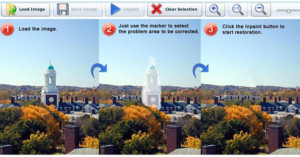
Webinpaint is a Poor Mans Web Based Content Aware Fill Tool webinpaint1

Photoshop CS5′s Content Aware Fill feature was quite a hit when it came out earlier this year, but what about free alternatives? Webinpaint is a web-based photo app that aims to do just that. You simply open up an image, paint over the area you’d like removed, and click the “Inpaint” button for the app to do its removal magic.

From tests I’ve done with the app, it’s pretty clear it doesn’t come close to the power of Content Aware Fill. However, for simple photographs without much texture or clutter, the app actually works quite well.
Read more…

Adobe Looking for the Next Photoshop Evangelist

Adobe Looking for the Next Photoshop Evangelist photoevan

Adobe is running a unique contest right now in search of the “next Photoshop evangelist”. Sadly, the winner isn’t given a special “evangelist” position in Adobe’s marketing department, but rather the prize package is pretty typical: a copy of CS5 Design Standard and a trip to Photoshop World in 2011 (which includes airfare, lodging, meals, and a chance to demo the winning tutorial).
Read more…

One Photoshop Fan’s Quest for CS5

It’s nice to see that Adobe’s corporate culture allows for some “self-deprecating fun“. Yesterday Photoshop product manager John Nack posted the above video, in which a “Photoshop fan” starts an Apple-esque waiting line outside what appears to be a Best Buy.

Guess who makes an appearance in the video? None other than Bryan O’Neil Hughes, the product manager whose voice narrates the now famous Content Aware Fill demo video.

“Unicorn into a meteor sho-weer!”

Sneak Peek at Photoshop CS5 Puppet Warp

In addition to Content Aware Fill, Puppet Warp is another powerful feature to be included in Adobe’s upcoming Photoshop CS5.

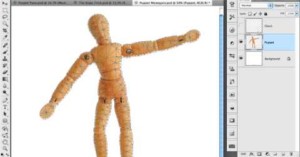
In this demo, it’s used on a layer containing a wooden mannequin, allowing the limbs to be manipulated as you would be able to do in real life prior to photographing it. The feature is then applied to rope, digitally tying it into a knot, and finally to fix distortion in a multi-photo panorama.

While this feature isn’t as mind-boggling as Content Aware Fill, it’s definitely something those of you excited about CS5 can look forward to.