Posts Tagged ‘windows8’

Adobe Says Photoshop and Lightroom Both Play Nice with Windows 8

Adobe Says Photoshop and Lightroom Both Play Nice with Windows 8 windows8

Just in case you’ve been wondering: yes, the latest versions of Adobe’s photo-editing programs are all compatible with the new Microsoft Windows 8. Adobe product manager Jeffrey Tranberry writes,

We’re happy to announce that Photoshop CS6, Lightroom 4 and Elements 11 are compatible with Microsoft Windows 8. The only issue customers might see is with document window transparency/flickering in Photoshop CS6 caused by video drivers. The drivers that ship with Windows 8 may not be the most recent available from the card vendors [...]

I recommend that customers make sure they have the lastest drivers from either AMD or nVidia. If you still have problems with the latest drivers, try setting the Advanced Settings for OpenGL Drawing/Graphic Card Processing in the Photoshop’s Preferences>Performance… dialog so that Drawing Mode is set to “Basic.”

Microsoft has already ensured that Windows 8 is fully backwards-compatible with Windows 7 software. Adobe is just confirming that photographers can upgrade with peace of mind knowing that their existing workflow can still be used on the other side.

Windows 8 and Photoshop [Photoshop Blog via John Nack]

Sneak Peek at the Windows 8 Photos App

Sneak Peek at the Windows 8 Photos App win8photoapp1 mini

Recently, Microsoft has been showing off many of the new features we’ll be seeing in the much-anticipated official release of Windows 8, and the most recent sneak peek Microsoft gave us was of the new Photos app. The app offers a native way for Windows users to organize, view and share all of their photos regardless of what they were taken with or where they’re stored. Read more…

Windows 8 to Offer Improvements in Photo and File Management

Windows 8 to Offer Improvements in Photo and File Management screen1 mini

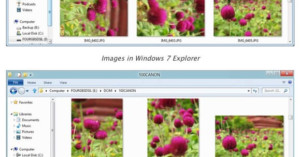
The Microsoft team tasked with building Windows 8 has published a blog post with various user suggestions they’ve decided to implement in the OS. A big thing they’re focusing on is file management — something that isn’t usually touted as a “feature” but is important in day-to-day computer usage. One useful improvement is having the OS read the EXIF data in JPEG photos to automatically present the correct orientation.
Read more…