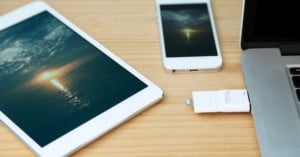
As a photographer, it would be nice if you could always have your portfolio in your pocket so that you can show prospective customers your work right away. And even though there are portfolio websites that will allow you to display your work on your phone, you’re not always around a solid data connection; and keeping your work on your phone isn’t a good idea either, since high-res photos fill up a 16GB iPhone hard drive before you know it.
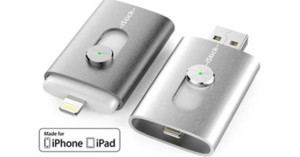
Thankfully, there’s another option. Keep them on the i-FlashDrive by PhotoFast. A thumb drive that plays nice with both computers and iOS devices, this little guy can store either 8GB or 16GB and will allow you to keep any photos or other data easily accessible and in your pocket without taking up space on your phone.
Read more…
-
Jason Land · Feb 27, 2013
-

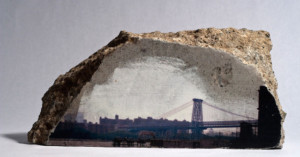
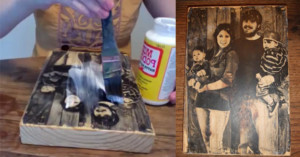
Photographs printed onto wood are hangable, durable, and sustainable. The technique I use at Wood Craft Photos involves printing the image onto a special film, preparing a wood panel with custom gel medium, and then combining, leaving the wood grain in the light colored areas of the image showing through.
Here’s a step-by-step tutorial on how you can use this process yourself for beautiful wood prints.
Read more…

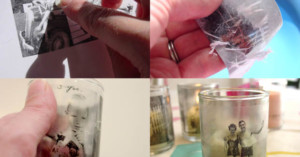
About a year ago, we shared a neat DIY method of transferring black-and-white photos onto blocks of wood. A very similar technique can be used for displaying your photos on glass. Inspired Ideas writes that all you need are a toner-based print of your photo (e.g. using a copier or laser printer) and some clear contact paper.
Sticking the contact paper to your print will transfer the toner from your ordinary paper to the sticky transparent film. The next step is to soak the two connected sheets in water, which softens up the white paper and allows it to be rubbed off. What you’re left with is a piece of wet transparent contact paper that features your photo. Let it dry to restore its stickiness, and then attach the resulting “sticker” to whatever you’d like to show off your photo on (e.g. glass jars, candle holders, windows etc.)
Making Memory Candles [Inspired Ideas via Photojojo]
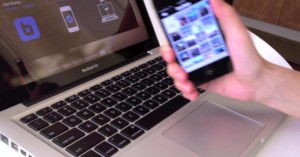
If you’ve been using smartphones for any length of time you’ve probably heard of Bump, the app that allows you to transfer photos and contact information between two phones with a simple… well… bump. And now they’ve expanded their functionality to include a website/webapp that makes transferring photos from your phone to your computer a breeze.
All you have to do if you already have the app is log on to bu.mp, select the photos you would like to transfer from your phone, and bump the phone against the space bar (although we’re pretty sure you could just hit the spacebar with any apendage…). After that you can download them straight to your computer to get them off Bump’s servers or share them with your friends via permalink. There’s not much “professional” application here, but it’s a great way to quickly transfer photos from your phone to your desktop when you’re in a bind.
Bump (via Lifehacker)

Photographer Rory White‘s Rorshak Tape Transfer Series might look like some kind of surreal digital art, but the images were actually created without Photoshop. White shot portraits of his subjects, printed them out, and invited the subjects to paint, tear, and alter the prints. He then covered the image with packing tape, dropped it in hot water, and peeled off the paper on the back (like a Polaroid emulsion transfer). The semi-transparent image would then be hung from a stand, and the subject rephotographed while standing behind it.
Read more…

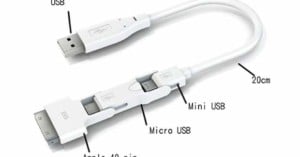
Tired of packing a huge mess of cables every time you go on a trip? The Magic Cable Trio is a 3-in-1 cable designed to cut down on your clutter. It lets you power and sync a wide range of devices ranging from phones, iOS systems (e.g. the iPad), music players, and compact cameras. Just make sure your device uses miniUSB, microUSB, or an iPhone dock connector. The three connections are daisy-chained, making it uber-compact and easy to manage. They cost $20 over at Innergie.
Magic Cable Trio (via Wired)

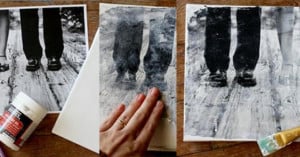
Earlier this month we shared a hugely popular post on transferring a photo onto a block of wood. Well, the same technique can also be used to create a canvas print. All you need, besides the stretched canvas, is some gel medium and a photo printed with toner (e.g. made with a laser printer or photocopier). The gel medium is used to “steal” the toner from the paper, and once the paper is rubbed away, the print remains. Check out the full tutorial over on A Beautiful Mess.
Make Your Own Canvas Portrait! [A Beautiful Mess]
P.S. Be sure to check out the wood transfer tutorial if you haven’t seen it already. It’d make for a neat gift for the holidays!

Here’s a quick and easy tutorial that’ll teach you a cool method of transferring a photo print (black and white or color) onto a block of wood.
Read more…

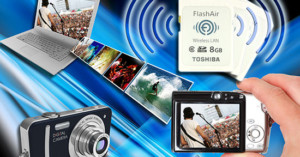
Here’s some good news for people who find memory card readers and data cables a hassle — Toshiba has unveiled a new “FlashAir” SDHC memory card with built-in wireless LAN functionality. It’s similar to Eye-Fi‘s offerings, but Toshiba’s cards will offer something that Eye-Fi’s don’t: two-way transfer. This means they can not only send photos wirelessly, but receive photos as well — perfect for quickly exchanging photos on the go with a friend’s camera! You’ll be able to purchase the cards starting in February 2012.
(via Toshiba via Help Net Security)

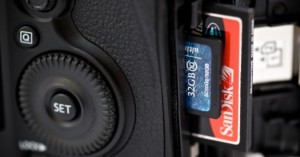
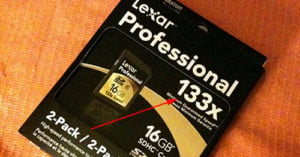
Instead of labeling their memory cards in MB/s, some manufacturers choose to use “Times” ratings (e.g. 8x, 12x, 20x, etc…). While it’s pretty clear that a higher number indicates faster speed, what exactly is the number a multiple of?
Read more…