Posts Tagged ‘quality’

Quantifying the Variation in Sharpness Between Copies of the Same Lens

Quantifying the Variation in Sharpness Between Copies of the Same Lens chartlens

As you might know, different copies of the same lens can vary in quality, and some people go as far as to purchase multiple copies to pick the sharpest one before returning the others. Roger Cicala over at LensRentals wanted to quantify exactly how much variation actually exists between copies of the same lens, so he subjected some to Imatest quality tests:

[...] while the Canon 100mm f/2.8 IS L lens is a bit sharper than the other two on average, not every copy is. If someone was doing a careful comparative review there’s a fair chance they could get a copy that wasn’t any sharper than the other two lenses. I think this explains why two careful reviewers may have slightly different opinions on a given lens.

That’s interesting to think about. Two highly objective reviews of the same lens could come to different conclusions about relative sharpness compared to other lenses, simply because there are differences among copies of that lens. Too bad reviews are usually based on a single copy of a lens, rather than the average performance of multiple copies.

Notes on Lens and Camera Variation [LensRentals]

Nikon 1 System Sensor Performs Very Well Given Its Small Size

Nikon 1 System Sensor Performs Very Well Given Its Small Size j1test mini

DxOMark has just published its findings on the quality of Nikon’s new mirrorless camera sensor, and the verdict is that Nikon did a pretty good job milking quality out of the small 1-inch sensor:

With regard to its size, this ranking is a big surprise, as the Nikon J1 sensor manages to score close to or even better than larger sensors (including 4/3 sensors).

[...] On the other hand, its low-light ISO score is a bit low: 372, which reflects the impact of the sensor size. Indeed, this score is naturally dependent on the sensor size: the bigger the sensor, the more light it captures. So even though the quality of the pixels provided by Nikon is very close to that of its main competitor, its sensor size physically limits the image quality.

If low-light shooting is your thing. then you might want to look into cameras with larger sensors. However, for everyday photography the new Nikon line perform surprisingly well given how much smaller its sensor is compared to its competitors.

Interchangeable Lens cameras by Nikon (via Nikon Rumors)

JPEG and RAW Samples Published for the Nikon J1

JPEG and RAW Samples Published for the Nikon J1 samples mini

The relatively small 1-inch CX-format sensor found in Nikon’s new mirrorless cameras caused quite a bit of discontent among serious shooters even before the cameras were announced, but now that it’s official we finally have the opportunity to see its image quality in real-world environments. dpreview has published a gallery of 23 JPGs shot with the Nikon J1, along with 5 RAW files shot between ISO 100 and ISO 3200. Take a look, and judge for yourself.

Nikon J1 real-world samples gallery [dpreview]

A Higher Quality Setting in Photoshop Sometimes Reduces JPEG Quality

A Higher Quality Setting in Photoshop Sometimes Reduces JPEG Quality photoshopsave mini

While looking into the new compression service JPEGmini yesterday, the following statement caught my eye in an interview they did with Megapixel:

[...] sometimes you increase the quality setting in Photoshop and the actual quality of the image is reduced…

I had never heard of that before, so I decided to dig a little deeper.
Read more…

How to Take Better Pictures with Your Point-and-Shoot Camera

How to Take Better Pictures with Your Point and Shoot Camera ps1

There are several things you can and should do to get the most out of the images from your point-and-shoot camera. If you use it correctly, people won’t know with what camera the shot was taken.Check out the photograph above and guess which camera it was taken with. I’ll reveal the answer at the end of the post.
Read more…

Fujifilm FinePix X100 Sensor Found to Outperform Micro Four Thirds

Fujifilm FinePix X100 Sensor Found to Outperform Micro Four Thirds finepixcompare

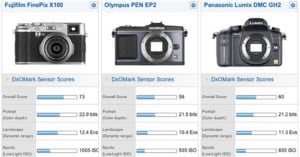
Turns out Fujifilm’s new FinePix X100 isn’t just nice to look at — DxOMark just published results from testing the camera’s APS-C sensor, finding that it delivered better results in all aspects compared to the best Micro Four Thirds camera sensors (namely the Olympus PEN EP2 and Panasonic Lumix DMC GH2) and rivals the quality of the best APS-C sensors found in DSLR and SLT cameras. Now if only the camera would start becoming available here in the US…

Fuji X100 sensor measured on DxOMark.com (via 43 Rumors)

Pentax K-5 Head and Shoulders Above Other APS-C Sensors

Pentax K 5 Head and Shoulders Above Other APS C Sensors dxo

DXOMark.com just published their review of the Pentax K-5 sensor, finding that it was superior to every other APS-C sensor they’ve tested:

No need for suspense: this new 16.3 MP sensor is simply the best APS-C we have tested so far, sometimes able to compete even with very high-end full-frame cameras.

The overall score of the K5 puts it in the lead with 82 points — more than 9 points better than the D90 or the Alpha 55, and 16 points ahead of the Canon 7D or 60D. The K5 is literally the best APS-C performer for each segment, even in low ISO.

(via The Online Photographer)

A Look at How Memory Cards Are Tested

Lexar recently put out this video showing what goes on inside their quality labs. It’s pretty much an advertisement for the brand, but it’s an interesting look at how the memory cards we use are tested for quality. It’s pretty crazy how each of the memory card lines are tested on the 800+ cameras and devices stored in the lab, and how there’re high-tech machines for testing everything from shocks to temperature in a controlled way.

(via Imaging Insider)

Nokia Exec Predicts Rise of Cameraphones and Demise of DSLRs

Nokia Exec Predicts Rise of Cameraphones and Demise of DSLRs l Vanjoki Anssi Nokia048Speaking on the explosive improvement of camerephone technology in Helsinki yesterday, Nokia Executive Vice President Anssi Vanjoki shared his vision of the future for cameraphones — a future without DSLRs.

Pointing at a professional photographer in the room, Vanjoki said, “There will be no need to carry around those heavy lenses.”

From a poll we ran on PetaPixel last week, we found that 59% of our readers didn’t believe cameraphones would replace even compact cameras. We didn’t even think to mention DSLRs, since there currently does not seem to be any answer as to how cameraphones will address their disadvantage of smaller sensors and poorer optics.

However, the idea of cameraphones replacing even the best digital cameras continues to find its way into news articles. Just last month Wired published a story titled, “Quantum Technology Promises Wedding Photos From Phone Cameras“.

Wedding photography with a cameraphone? Really?

Perhaps these quotes and articles aren’t intended to suggest that the DSLR market will be replaced by cell phones, but rather that the quality difference will be reduced to the point that those who simply bought DSLR cameras for casual photography might be satisfied with cameraphone quality.

If that’s the case, these claims might be true. Enough consumers may buy into the megapixel myth and eschew fancier cameras for the increased “megapixel power” of cameraphones. In the same speech, Vanjoki also predicted that cellphones will be capable of filming HD video within the next 12 months.

Once we see a “Last 3 Minutes” caliber film shot with a cameraphone, we’ll be believers. Until then, we’ll keep bringing our DSLR to weddings.

Why You Should Never Let Browsers Resize Your Photos

Everyone wants sharp images when they post their photographs online. After all, who wants to look at a blurry photograph? (Unless it’s intentional, of course). What many people don’t realize, however, is that displaying your images incorrectly in HTML can have a big negative impact on image quality.

Here is the main rule of thumb you should always remember: never, ever do image resizing using HTML.

For example, lets say I have the following 620px photograph:

Why You Should Never Let Browsers Resize Your Photos threecolors620

The image is pretty sharp right? Now, lets say I want to display the same image as a 500px wide photo. The wrong way to do this would be to change the width=”620″ attribute in HTML to width=”500″. Here’s what would result if I did the resizing this way through HTML:

Why You Should Never Let Browsers Resize Your Photos threecolors620

That’s the exact same image file. I simply copy-and-pasted the HTML, and changed the width from 620 to 500. This means the browser actually loaded the same 620px image, and then reprocessed it to display a 500px image to the viewer. Notice how the photograph instantly loses much of the sharpness it had when displayed in its actual dimensions.

To further illustrate my point, here is the same photo displayed at 500px. However, instead of telling HTML to shrink the large version, I used Photoshop to resize it down to 500px.

Why You Should Never Let Browsers Resize Your Photos threecolors2

You can hover your mouse over this last image to compare it to the browser-resized version. If you’re using a browser that renders it correctly, try hovering over this link to see how other less-capable browsers render the same image (you might have to wait a couple seconds for the image to load). That’s a pretty big difference, huh?

The lesson to be learned is that you should always display your images in their exact dimensions. Even a single pixel difference can cause the photograph to become noticeably more blurry in most browsers.

Finally, another reason why you shouldn’t leave resizing to your browser is that the original, full-sized image is loaded anyway, regardless of what size you’re displaying the image at. This means that if you have a large, 1 megabyte, 1024×682 photograph that you’re displaying at 500px in width, the whole 1 megabyte image is downloaded by the visitor before the browser resizes it down to 500px.

Some of you might have thought that using larger, higher-resolution photographs and having them resized in HTML produces higher quality images, since there’s more information or detail in the file. It doesn’t. For best image quality and fastest loading time for your visitors, always resize your images to the desired size prior to uploading!

Update: I’ve added a second link under the mouse-hover comparison for those who are using more capable browsers. If you don’t see any difference in hovering over the image, try hovering over the new link to see how other browsers render the image.

Update 2: Just for your info: This doesn’t apply to uploading full-sized images to photo sharing services like Flickr or SmugMug. These services take your large resolution photograph, and reprocess it into multiple images of various sizes. Thus, when you’re viewing the 500px image on Flickr, it’s actually a 500px image that Flickr resized and sharpened using your original large image.