Posts Tagged ‘painting’

Wave this Programmable “Light Saber” to Light Paint Words and Images

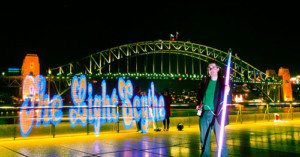
Wave this Programmable Light Saber to Light Paint Words and Images scythe1

Gavin of Sydney, Australia created an awesome 2-meter long programmable staff that makes painting giant words and images as easy as waving/walking the staff around during a long-exposure photograph. The staff, which he call the LightScythe (we would have called it the “Lightsaber”), was inspired by the Wi-Fi light painting project we shared here earlier this year.

The hardware is pretty simple. There’s a 2m programmable LED strip inside an acrylic tube, which is controlled from a small receiver and battery pack. A laptop PC with a wireless Xbee link sends the image data to the scythe at a specified time. [#]

Read more…

Nikon D7000 with Custom Paint Jobs

Nikon D7000 with Custom Paint Jobs painted1

Cars can have pretty creative paint jobs, but it seems like the best anyone can do with a DSLR is do a messy DIY repainting or buy a Pentax with ridiculous or nasty-looking designs. Sherwin Sibala came up with these unique design concepts showing what a DSLR (specifically a Nikon D7000) might look like if people chose to personalize the body.
Read more…

Self-Portraits Found on the Internet Recreated as Paintings

Self Portraits Found on the Internet Recreated as Paintings endaism1

Enda O’Donoghue finds photographs of people taking self-portraits through social networks and blogs, and recreates them as paintings after finding the owners and requesting permission.
Read more…

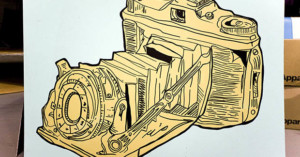
Camera Graffiti on Canvas by Joe Suta

Camera Graffiti on Canvas by Joe Suta cameragraffiti

Threadless’ in-house graffiti artist Joe Suta creates 3 giant (48” x 36”) paintings for their Chicago store window each week, which are then sold through the Threadless website for $250 a pop. Panel 347 from the week of September 21 is the awesome camera shown above. It’s also available as a tee or hoodie, titled “I Can’t Draw“.

Who wouldn’t want this painting hanging up in their room?

(via Photojojo)

Adobe Unleashes Photoshop CS5

Adobe Unleashes Photoshop CS5 photoshopcs5After building up anticipation by releasing sneak peeks at upcoming features such as Content-Aware Fill and Puppet Warp, Adobe has unveiled Photoshop CS5, the latest version of its popular image editing program.

Photoshop CS5 and Photoshop CS5 Extended are expected to start shipping next month at the price of $699 and $999, respectively. If you already own Photoshop and only need the upgrade, it’ll set you back $149 or $349.

Here’s a quick overview of some of the new features:

Better HDR

Companies like HDRSoft (makers of Photomatix) can’t be too pleased about this one. Adobe claims to have greatly improved the HDR capabilities in this new version. In addition to greater speed and accuracy, they now have ghost artifact removal (to combat camera shake) and the ability to emulate the look of HDR using single photographs.

New Painting Module

Adobe Unleashes Photoshop CS5 paintingcs5thomashawk
CS5 now features a painting module through which you can “paint” over a photograph. This feature flips photorealism around and allows you to turn your images into rather convincing paintings.
Instead of using an artistic filter, which can produce unreliable results, the painting tools allow for a more organic feel: the program shows a live view of the virtual brush tip as you paint.

Lens Correction Feature

Adobe Unleashes Photoshop CS5 distortioncorrection

Another major feature is almost a subtle addition compared to the other features, but it makes a huge difference in the way we can edit. Adobe is including a lens correction feature which corrects for distortion, chromatic aberration and vignetting based on what lens you used according to the EXIF data. The folks over at dpreview predict that CS5 will come with preset lens profiles – much like color profiles – for Nikon and Canon lenses. Photoshop also enables the ability to customize your own profiles with the possibility of sharing profiles with a larger community of users.

Adobe has also taken several pointers from community feedback with regards to the lens correction filter options.

Adobe Camera Raw 6: Non-Destructive Editing, Add and Remove Grain

Adobe Unleashes Photoshop CS5 adobecameraraw6
Adobe Camera Raw 6 alone is plenty to get excited about. It uses the same processing engine as the Lightroom 3 beta and supports more than 275 camera models. It also allows nondestructive editing not only for raw files, but also for JPEG and TIFF.
There’s a new Grain feature which mimics the look of film grain, which provides an alternative to the film grain artistic filter, but is also nondestructive and can add an evenly dispersed grain to the entire image.
On the opposite spectrum, ACR also has improved noise removal controls that can prove quite handy when shooting at a high ISO.

Improved Edge Detection

In each iteration of Photoshop, Adobe has constantly improved its ability to distinguish edges for making selections and masking. CS5 has new adaptive selection-edge modification controls, such as Smart Radius, which selects the best edging style when selecting different types of subjects. Adobe has also added extra view modes to preview selections. The other features include Refine Radius and Erase Refinements, which can be particularly helpful when trying to reduce and remove background colors that show up through a subject’s hair.

Content-Aware Fill

Adobe Unleashes Photoshop CS5 content awarefill

Content-Aware Fill has received the most attention in CS5 preview coverage, and it’s no wonder why. This feature provides the ability to remove parts of a photograph and replace the void with a practically seamless filled area. You can either make a selection using Content-Aware Fill, or use the spot healing brush on the Content-Aware Fill setting.

Puppet Wrap

Adobe Unleashes Photoshop CS5 elephant

Puppet Warp allows elements in a photograph to be convincingly repositioned using anchor points.  Anchor points act like joints, and when appropriately placed, can be used to manipulate arms, legs, and other elements of an image composition. Like most of these new features, it’s another impressively powerful tool for creative individuals.


Image Credits: Thomas Hawk and Adobe Systems

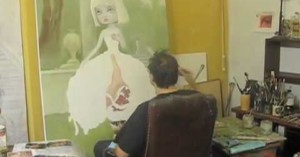
Time-Lapse Video of Mark Ryden Painting

This video isn’t related to photography per se (though it is a time-lapse), but occasionally we like to show other kinds of art in action to help get your creative juices flowing. It shows American painter Mark Ryden (the artist behind Michael Jackson’s Dangerous album cover) painting Incarnation.

(via Boing Boing)

Fake Painting Photographs by Alexa Meade

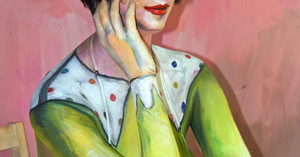
It might be hard to believe, but each of the following “paintings” is actually a photograph by artist Alexa Meade.

Fake Painting Photographs by Alexa Meade 4178980910 7c46273535

Fake Painting Photographs by Alexa Meade alexa1

Fake Painting Photographs by Alexa Meade 4423503104 cab1272e04

Fake Painting Photographs by Alexa Meade 4422746009 df415e24c8

Fake Painting Photographs by Alexa Meade 4423506088 964cf96b94

Here’s a quick look behind the scenes to show you what we mean:

Fake Painting Photographs by Alexa Meade alexabts

Were you fooled? We were.

To create the effect, Meade paints on three dimensional surfaces of objects, people, and spaces using acrylic paint.

Visit her website to see more of her work.


Image credits: Photographs by Alexa Meade and used with permission.

Notice Anything About This Painting?

Notice Anything About This Painting? notapainting

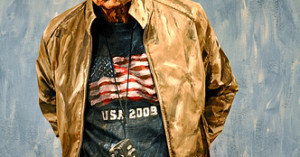
Despite what your eyes tell you, the above image is a photograph of a real person, not a painting. It was taken by Peter Kun Frary, a music professor at the University of Hawaii. He tells us,

Recently I walked by the Ala Moana Center Mac (cosmetic) store and noticed a crowd of Japanese tourists gawking and snapping pics. A model in full body paint was posing against a set on an open air stage in front of the store. I thought she was a darn good simulation of a late 19th or early 20th century French oil painting. Although there were no stage lights, natural sunlight light was diffused through white cloth canopy to reduce shadows and contrast.

We can imagine an artist doing a whole series of photographs that look exactly like paintings. Has this been done before? Link us if so!

(via Gizmodo)


Image credit: Photograph by Peter Kun Frary and used with permission.

Painting With Light and Long Exposures

I love experimenting with photography, and trying out interesting new techniques, angles, and styles. One of the things I’ve really enjoyed playing around with over the years is drawing pictures with light using long exposures.

These photographs definitely aren’t hard to do. All you need is a stationary camera (i.e. tripod?), and some mobile source of light, like an LED light or a flashlight. Simply set your camera to an extremely slow shutter speed (enough time for your to paint in), make sure the focus is set to where you will be standing, and paint away!

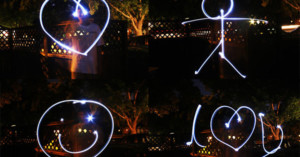
Here are some basic examples of simple shapes I painted:

Painting With Light and Long Exposures lpbasic

These four photographs were all taken at ISO 1600 at shutter speeds between 13 and 15 seconds. In retrospect, I probably should have used a wider aperture setting to blur the background. These were between f/6.3 and f/11.

Another thing I did was use the timer to give myself 10 seconds to get into position in front of the camera. For long exposures, you could actually omit this and still get pretty much identical results, since the second or two you’ll take to get into position won’t amount to much of the exposure.

Writing is interesting, but a little tricky:

Painting With Light and Long Exposures lpname

Since you can’t see what you’re doing, you’ll have to remember where in the air you drew each letter. It might take a little practice to get right. Also, keep in mind that whatever you draw will appear backwards in the photograph. In these photos, I decided to write backwards, but you can also write normally and then flip the photograph horizontally to correct it.

Once you get bored with simple shapes and writing messages, try experimenting further and coming up with stranger ways to use the combination of light and longer exposures.

Here are a couple shots I took where I made myself appear multiple times in the photo by turning the light on and off while moving to different areas of the frame.

Painting With Light and Long Exposures lpmultiple

I had to keep in mind where I was at each point to keep from overlapping with prior faces.

A couple more examples of weird experimentation:

Painting With Light and Long Exposures lpthrow

Hmmm… Not sure what to say about that one. How about an angel?

Painting With Light and Long Exposures lpangel

Get a little boy or girl to pose for that one and it might look pretty neat. With me it just looks creepy.

Now, onto some more complicated drawings. First, some scribbles and an example of drawing gone wrong:

Painting With Light and Long Exposures lpscrilbbles

These are a little better, but strange nonetheless:

Painting With Light and Long Exposures lpbetter

Notice how you can make certain lines or areas glow brighter by allowing your light to stay at that point for a little longer. Finally, a very generic drawing:

Painting With Light and Long Exposures lptree

Hopefully this brief walkthrough of light painting was interesting, informative, and inspiring. Though it’s not really useful for improving your general photography, I’ve found that experimenting and doing random things with my camera has helped me grow a lot more familiar with it and the technical side of photography in general.

If you have any interesting results or examples of light painting, feel free to link to them in a comment! If there’s good ones I might update this post with links.