There are many niches in photography, but one we don’t talk about often is taking product photos. Even though these types of shots don’t fall under the professional umbrella — we’re not talking professional product photography, just product shots for an online store — almost everyone at one time or another has had to sell something on eBay or (not for the faint of heart) Craigslist.
And so, we thought we’d share this short “how to” video that Jessica Marquez of Miniature Rhino put together for Etsy. It offers beginners a few basic tips that can help take your product shots (and hopefully sales) to the next level. Read more…

Here’s something you might want to read and bookmark for future reference. Photographer Robert Thomas has written up an in-depth article explaining what the different Photoshop blending modes are and how they actually work:
Working with blend modes is almost always an experimental process. Because it’s nearly impossible to predict the results, you always seem to end up experimenting with different modes and Fill Opacities until you get the results you’re looking for.
In this article I’m going to give you a high-level view of what the various blend modes do, and then I’ll dig deeper into the nuts and bolts of the blend modes by explaining some of the math involved, and their interrelationships with each other. I’m not going to “show” you how the blend modes work—I’m going to “explain” how they work. By the time you finish reading this article, you should have a better idea of how to use blend modes and where to begin your “experimentation,” which in turn should reduce the time it takes to achieve the results you’re looking for.
Photoshop Blend Modes Explained [PhotoBlogStop via swissmiss]

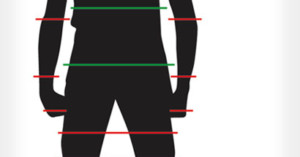
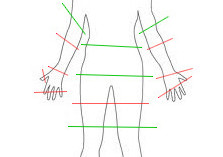
If you need to chop off portions of the human body while cropping a photograph, where should you draw the line? The folks over at Digital Camera World have released this helpful graphic with suggestions on appropriate and inappropriate areas to crop at:
Portrait photography is challenging for a whole host of reasons. Getting your portrait right in-camera is only half the battle. Knowing how to edit your portraits can be quite difficult when it comes to cropping a photo. Cropping in an awkward position on your subject can end up ruining a perfectly good shot. [...] we’ve put together this easy guide for understanding some of the best places to crop a subject in a portrait, and some of the places where you should not. ‘Yes’ areas are marked in green, while ‘bad’ locations are marked in red.
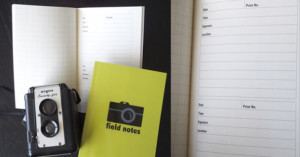
This new infographic is nearly identical to one we shared two years ago, except it’s larger and clearer, and therefore more print friendly. You can download the full-resolution version of the image here.
Free portrait photography cropping guide [Digital Camera World]
Thanks for sending in the tip, Sam!

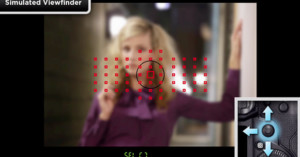
Want to learn more about your Canon DSLR without leaving the comfort of its LCD screen? Canon has a series of “on-camera tutorials” that you can load and watch on most of its latest DSLR models. The video tutorials, which cover everything from AF modes to multiple exposure shooting, are meant to be loaded onto memory cards and viewed on-the-go using your camera itself. To find your camera’s tutorials, find and click its model on this products page, and then select “On-Camera Tutorials” at the top. Be warned though: the downloads weigh in at over 150MB each.
Canon Photography Products (via United By Photography)

Posing App is a new app that offers a pocket reference for poses — helpful for both photographers and models. The 140 hand-drawn poses come in a variety of flavors — children, couples, weddings, and women, to name a few — and are accompanied by short descriptions that provide additional pointers. The is available from the iTunes App Store for $2, and will be released for Android soon.

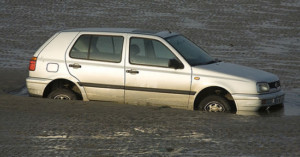
Want to get closer to animals when doing wildlife photography? If there’s access, your car can do the trick by serving as a photography blind. Scott Bourne of Photofocus writes,
For whatever reason, most wildlife (birds included) won’t spook or flush when they see a car. Open the car door, step out of the car, now that’s a totally different situation. But as long as you stay in the car, your chances of getting close enough to wildlife to get the shot are improved by 90%.
(via Photofocus)
Image credit: CAR STUCK IN SAND – BULL ISLAND by infomatique
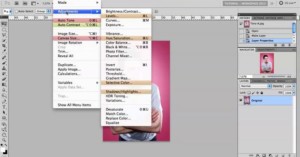
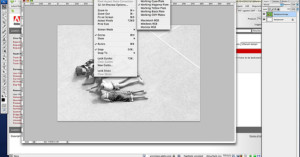
If you’re relatively new to Photoshop, you might not know that it’s possible to highlight and/or remove the various options in dropdown menus. All you need to do is play around with the Edit->Menus screen to make your commonly used options more visible and to reduce clutter by hiding options that you’ve never touched in your life.
(via Orms Connect)

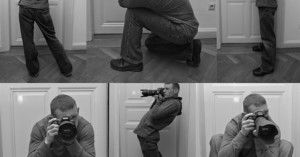
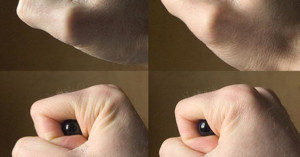
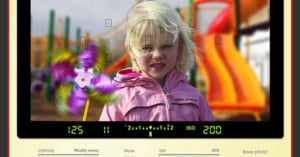
If you’ve ever tried shooting in a dark location without using flash or a tripod, you probably know how difficult it can be to remove camera shake from your photos. Alex Jansen — a photography enthusiast who’s an officer in the US Army — has written up an awesome tutorial on how you can apply some of the tricks used by rifle shooters to shooting with a camera:
I am by no measures a “pro,” but I understand my fundamentals very well, and this specific set has been drilled into my head so many times that it is now second-nature. I am going to teach you how to “shoot” your camera like a high end rifle because at the end of the day, the fundamentals stay the same in every aspect.
The guide focuses on the US Army’s four fundamentals of marksmanship: steady position, aiming, breath control, and trigger control.
Making the Most of Long Exposure Handhelds [Pentax Forums]
Image credits: Photographs by Alex Jansen/Pentax Forums
-
Nick Solarz · Feb 20, 2012
-

So I’ve been shooting some shows for some of the choral groups on campus at my school, and I’ve started to notice a trend: people make some stupid faces when they are singing. They can range from an approaching sneeze to a full-on O-face.
Read more…