
Time-Lapse Journey into an Abandoned Asylum Created with 35,000 Photos
Washington Times video producer Drew Geraci created this amazing time-lapse video of an asylum that was abandoned decades ago.
Washington Times video producer Drew Geraci created this amazing time-lapse video of an asylum that was abandoned decades ago.

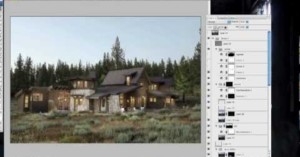
Here's a tutorial on how to do non-automated HDR for real estate photography using Photoshop CS5. The first thing you'll need is a sturdy tripod with a level. The closer you are to a leveled image, the less correction you'll have to do later.

The Washington Post raised some eyebrows last Friday after running an uber-saturated front …
Here’s an educational time-lapse tutorial by Los Angeles-based architectural photographer Mike Kelley in …
Late last year we showed you an interesting demonstration of HDR video filmed using two Canon 5D Mark IIs. The cameras captured the exact same scene at different exposure values using a beam-splitter. Now, a new camera called AMP has been developed that captures real-time HDR video using a single lens. The trick is that there are two beam-splitters in the camera that take the light and direct it onto three different sensors, giving the system a dynamic range of 17 stops. Check out some sample clips in the video above -- they might be pretty ugly, but the technology here is pretty interesting.

Here's a good example of when HDR photography is useful: NASA created this image of the Space Shuttle Endeavour lifting off for the final time by combining six separate photographs.
Each image was taken at a different exposure setting, then composited to balance the brightness of the rocket engine output with the regular daylight levels at which the orbiter can be seen. The processing software digitally removes pure black or pure white pixels from one image and replaces them with the most detailed pixel option from the five other images. This technique can help visualize debris falling during a launch or support research involving intense light sources like rocket engines, plasma experiments and hypersonic vehicle engines. [#]

In mid-2010, Time Magazine showed off a demonstration of a slick tablet app they were making in collaboration with The Wonderfactory. As it became widely shared across the web, HDR photographer Trey Ratcliff of Stuck in Customs started receiving messages from fans who spotted his work in the video demo. Problem was, he had never given the magazine or the agency permission to use his work.
Here’s a beautiful tone mapped HDR time-lapse video of Las Vegas shot by …

Flickr user Paul Little creates surreal images he calls "HDR Mixes" by combining different photographs with the help of HDR software. While you're normally supposed to feed the program multiple versions of the same photo (which are bracketed), with HDR Mixes you use two photos of the same scene and a third that's completely unrelated.

Here’s a cool and creative video that will only take 6 seconds of your time. Photographs from 3 different …

Patryk Kizny created this short HDR time-lapse film titled "The Chapel" that explores the inside of a Protestant chapel located in Zeliszów, Poland built in 1797. The HDR imagery gives the video a eerily beautiful surreal look that makes the video look like it came from a video game.
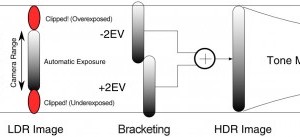
Reddit user MacTuitui created this simple diagram (click to enlarge) explaining …
Update: This giveaway is now over. The winners were randomly selected and announced below. HDRSoft recently released version 4.0 …
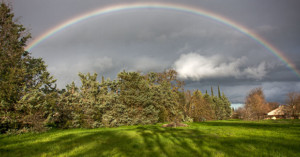
The Internet viral sensation "Double Rainbow" video was captured on January 8th, 2010. About two weeks later on the 23rd (and long before that video went viral), I saw a double rainbow myself when looking out my window. I quickly grabbed my camera (a Canon 40D at the time) with my 16-35mm lens (I wanted the widest shot possible) and ran out to shoot the rainbow.

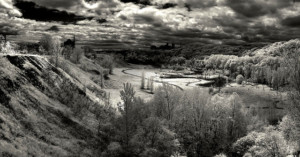
Andrew Rees shot this beautiful black and white time lapse in Cardiff, Wales using a Sony A700 DSLR. He shot 700 pairs of photos (a total of 1400 shots) with 2.5 seconds in between pairs, and combined the resulting HDR photographs into a 12fps time lapse video.

Future generations of photographers may one day look back and wonder why we often blinded each other with painfully bright flashes of light for the sake of proper exposure.
NYU researchers Dilip Krishnan and Rob Fergus are working on a dark flash that eliminates the "dazzle" effect of regular flashes in a low-light room. They've created this camera rig that combines common infrared photography techniques with an ultraviolet flash that produces a dim purple glow instead.
The team placed an infrared filter on the lens of the Fujifilm S5 Pro, which is has a modified CCD sensor that specializes in IR and UV photography. To supplement existing UV light, the team created a modified filter on an external flash to emit only UV and IR wavelengths.

You've most likely seen HDR photographs before, but how about HDR video? The above is a demonstration of HDR video by Soviet Montage, created using two Canon 5D Mark II DSLR cameras. Both cameras recorded identical scenes using a beam splitter, and captured the footage at different exposure values (over and under exposed).

Apple had a special event this morning where they announced a few new products. In addition to the introduction …

French company Oloneo has just released a free beta for their product, PhotoEngine. The software is a straightforward HDR creator and non-destructive editor that allows you to quickly merge HDR photos. Additionally, it has features that can adjust specific light sources in the photo, to change the white balance or the exposure. This could come in handy when shooting HDR frames that have a variety of different light sources with different temperatures.
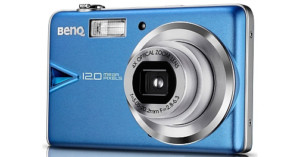
Taiwanese electronics company BenQ isn’t a very big name in the digicam world, …

After building up anticipation by releasing sneak peeks at upcoming features such as Content-Aware Fill and …

Constant Motion is a breathtaking time-lapse video by Redding, California-based freelance photographer Aaron Patterson that takes HDR to a whole new level. On his blog, Patterson writes,

Update: This giveaway has now ended. The winners have been randomly selected and are posted here. Thanks to …